Skip to content

This is the multi-page printable view of this section. .

Return to the regular view of this page.

Key Features

Key features and highlights
Item
      href="/docs/intro/distro">
    Just use PostgreSQL for Everything! \
    Build data infra with assembled superpowers!
RDS Solution for Operators
    Self-hosting PostgreSQL like a Pro! \
    Operate production grade Service without expertise

Postgres Extensions
    Get the superpower of **437** PG extensions out of the box
High-Availability
    Self-healing architecture and hassle-free service access
Kernel Replacement
    Simulating MySQL, Mongo, Oracle, SQL Server upon PGSQL
Disaster Recovery
    Auto configured backups and PITR made simple
Infra as Code
    Describe and materialize everything with Code / Data
Built-in Monitoring
    Pre-configured Dashboards with Grafana & Prometheus stack
Self-Hosting Supabase
    Turn Postgres into a full-featured backend as a service
Application Templates
    Harden software with HA PG: Gitlab, Odoo, Dify, and more

1 - PG Extensions

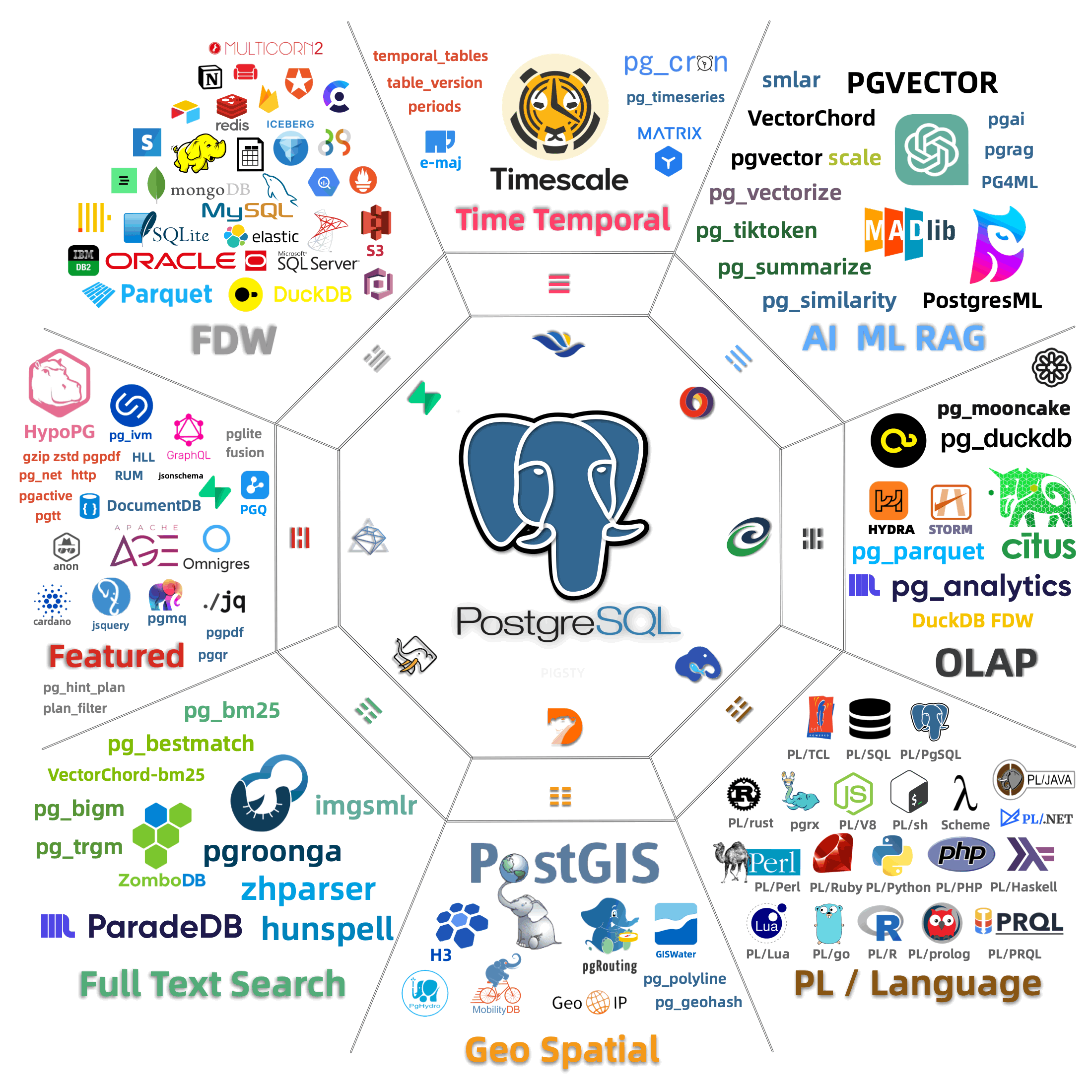
Get 437 extensions out-of-the-box

Pigsty allows you to harness the synergistic superpower of the PostgreSQL extensions ecosystem with three things:

  • Catalog : Find the extension you need, with unparalleled 437 extensions included
  • Repository : Get pre-made RPM/DEB packages for 10 mainstream Linux OS
  • Package Manager : Install everything with a single command - pig

Also check our blog post: PostgreSQL is eating the Database World

ecosystem


Extensions

TIME GIS RAG FTS OLAP FEAT LANG TYPE
UTIL FUNC ADMIN STAT SEC FDW SIM ETL

Category Count Description
TIME 11 TimescaleDB, Versioning & Temporal Table, Crontab, Async & Background Job Scheduler
GIS 20 GeoSpatial Data Types, Operators, and Indexes, Hexagonal Indexing, OGR Data FDW, GeoIP & MobilityDB
RAG 10 Vector Database with IVFFLAT, HNSW, DiskANN Indexes, AI & ML in SQL interface, Similarity Funcs
FTS 20 ElasticSearch Alternative with BM25, 2-gram/3-gram Fuzzy Search, Zhparser & Hunspell Segregation Dicts
OLAP 13 DuckDB Integration with FDW & PG Lakehouse, Access Parquet from File/S3, Sharding with Citus/Partman/PlProxy
FEAT 56 OpenCypher with AGE, GraphQL, JsonSchema, Hints & Hypo Index, HLL, Rum, IVM, ChemRDKit, and Message Queues
LANG 31 Develop, Test, Package, and Deliver Stored Procedures written in various PL/Languages: Java, Js, Lua, R, Sh, PRQL
TYPE 37 Dedicate New Data Types Like: prefix, sember, uint, SIUnit, RoaringBitmap, Rational, Sphere, Hash, RRule
UTIL 31 Utilities such as send http request, perform gzip/zstd compress, send mails, Regex, ICU, encoding, docs, Encryption
FUNC 43 Function such as id generator, aggregations, sketches, vector functions, mathematical functions and digest functions
ADMIN 36 Utilities for Bloat Control, DirtyRead, BufferInspect, DDL Generate, ChecksumVerify, Permission, Priority, Catalog
STAT 34 Observability Catalogs, Monitoring Metrics & Views, Statistics, Query Plans, WaitSampling, SlowLogs
SEC 26 Auditing Logs, Enforce Passwords, Keep Secrets, TDE, SM Algorithm, Login Hooks, Log Erros, Extension White List
FDW 22 Wrappers & Multicorn for FDW Development, Access other DBMS: MySQL, Mongo, SQLite, MSSQL, Oracle, HDFS, DB2
SIM 16 Protocol Simulation & heterogeneous DBMS Compatibility: Oracle, MSSQL, DB2, MySQL, Memcached, and Babelfish
ETL 17 Logical Replication, Decoding, CDC in protobuf/JSON/Mongo format, Copy & Load & Compare Postgres Databases

Repository

Pigsty has a repository that provides 200+ extra PostgreSQL extensions on 10 mainstream Linux Distros. It is designed to work together with the official PostgreSQL Global Development Group (PGDG) repo.

You can enable the pigsty infra & pgsql repo with the pig CLI tool, or add them manually to your system:

curl https://repo.pigsty.io/pig | bash      # download and install the pig CLI tool
pig repo add all -u                         # add linux, pgdg, pigsty repo and update cache
# Add Pigsty's GPG public key to your system keychain to verify package signatures
curl -fsSL https://repo.pigsty.io/key | sudo gpg --dearmor -o /etc/apt/keyrings/pigsty.gpg

# Get Debian distribution codename (distro_codename=jammy, focal, bullseye, bookworm), and write the corresponding upstream repository address to the APT List file
distro_codename=$(lsb_release -cs)
sudo tee /etc/apt/sources.list.d/pigsty-io.list > /dev/null <<EOF
deb [signed-by=/etc/apt/keyrings/pigsty.gpg] https://repo.pigsty.io/apt/infra generic main
deb [signed-by=/etc/apt/keyrings/pigsty.gpg] https://repo.pigsty.io/apt/pgsql/${distro_codename} ${distro_codename} main
EOF

# Refresh APT repository cache
sudo apt update
# Add Pigsty's GPG public key to your system keychain to verify package signatures
curl -fsSL https://repo.pigsty.io/key | sudo tee /etc/pki/rpm-gpg/RPM-GPG-KEY-pigsty >/dev/null

# Add Pigsty Repo definition files to /etc/yum.repos.d/ directory, including two repositories
sudo tee /etc/yum.repos.d/pigsty-io.repo > /dev/null <<-'EOF'
[pigsty-infra]
name=Pigsty Infra for $basearch
baseurl=https://repo.pigsty.io/yum/infra/$basearch
skip_if_unavailable = 1
enabled = 1
priority = 1
gpgcheck = 1
gpgkey=file:///etc/pki/rpm-gpg/RPM-GPG-KEY-pigsty
module_hotfixes=1

[pigsty-pgsql]
name=Pigsty PGSQL For el$releasever.$basearch
baseurl=https://repo.pigsty.io/yum/pgsql/el$releasever.$basearch
skip_if_unavailable = 1
enabled = 1
priority = 1
gpgcheck = 1
gpgkey=file:///etc/pki/rpm-gpg/RPM-GPG-KEY-pigsty
module_hotfixes=1
EOF

# Refresh YUM/DNF repository cache
sudo yum makecache;

All the RPM / DEB packages are signed with GPG Key fingerprint (B9BD8B20) in Pigsty repository.


Package Manager

“Postgres Install Genius, the missing extension package manager for PostgreSQL ecosystem”

Get started with PIG in seconds:

curl -fsSL https://repo.pigsty.io/pig | bash
curl -fsSL https://repo.pigsty.cc/pig | bash

Then it’s ready to use, assume you want to install the pg_duckdb extension:

$ pig repo add pigsty pgdg -u  # add pgdg & pigsty repo, then update repo cache
$ pig ext install pg18         # install PostgreSQL 18 kernels with native PGDG packages
$ pig ext install pg_duckdb    # install the pg_duckdb extension (for current pg18)

2 - PG Kernel Forks

Simulate other DBMS, and replace vanilla PostgreSQL with exotic forks

Pigsty supports various PostgreSQL kernels and compatible forks, enabling you to simulate different database systems while leveraging PostgreSQL’s ecosystem. Each kernel provides unique capabilities and compatibility layers.

Database Kernels

PostgreSQL

Vanilla Postgres with 437 Extensions

Citus

Native Distributive Extension

Babelfish

SQL Server wire-compatible

IvorySQL

Oracle grammar & PL/SQL compatible

OpenHalo

MySQL wire-compatibility

Percona

Transparent Data Encryption

OrioleDB

OLTP-optimized cloud-native storage engine

PolarDB PG

Aurora-like RAC with china domestic compliance

Supabase

Backend as a Service, self-hosting Firebase

FerretDB

Mongo Wire-Compatibility over PostgreSQL


Choose the Right Kernel

Note

Flexible Kernel: Choose the right kernel for your specific use case - whether you need MSSQL compatibility, Oracle features, or horizontal scaling capabilities.

Kernel Key Feature Description
PostgreSQL Original Flavor Vanilla PostgreSQL with 437 extensions
Citus Horizontal Scaling Distributive PostgreSQL via native extension
WiltonDB SQL Server Migration SQL Server wire-compatibility
IvorySQL Oracle Migration Oracle Grammar and PL/SQL compatible
OpenHalo MySQL Migration MySQL wire-protocol compatibility
Percona Transparent Data Encryption Percona Distribution with pg_tde
FerretDB MongoDB Migration MongoDB wire-protocol compatibility
OrioleDB OLTP Optimization Zheap, No bloat, S3 Storage
PolarDB Aurora flavor RAC RAC, China domestic compliance
Supabase Backend as Service BaaS based on PostgreSQL, Firebase alternative
Cloudberry (WIP) MPP DW & Analytics Massively parallel processing database warehouse

Citus (Distributive)

Citus Native Distributive

Citus transforms PostgreSQL into a distributed database system, enabling horizontal scaling across multiple nodes. Deploy native HA Citus clusters with Pigsty for better throughput and performance.

Key Features

  • Distributed Tables: Automatically shard tables across worker nodes
  • Distributed Queries: Execute queries across the entire cluster
  • High Availability: Built-in replication and failover capabilities
  • Real-time Analytics: Handle both transactional and analytical workloads
  • Postgres Compatibility: Maintain full PostgreSQL feature compatibility

Use Cases

  • Multi-tenant SaaS applications requiring horizontal scaling
  • Real-time analytics on large datasets
  • High-throughput OLTP workloads
  • Applications need to scale beyond single-node limitations
Note

Planning Required: Proper shard key selection is crucial for optimal performance and avoiding cross-shard queries.


Babelfish (MSSQL)

Babelfish SQL Server Wire Compatible

Note

SQL Server Compatible

Note

Beta

Create SQL Server-compatible PostgreSQL clusters with WiltonDB and Babelfish, providing wire protocol-level compatibility with Microsoft SQL Server.

Key Features

  • T-SQL Support: Execute T-SQL queries natively
  • Wire Protocol Compatibility: Connect using SQL Server drivers and tools
  • Stored Procedures: Support for T-SQL stored procedures and functions
  • Data Types: Compatible with SQL Server data types and behaviors
  • Migration Tools: Simplified migration from SQL Server environments

Use Cases

  • Migrating legacy SQL Server applications to PostgreSQL
  • Multi-database environments requiring SQL Server compatibility
  • Cost reduction while maintaining application compatibility
  • Cloud migration from SQL Server to open-source alternatives
Note

Migration Path: Ideal for organizations looking to reduce licensing costs while maintaining existing SQL Server application compatibility.


IvorySQL (Oracle)

Babelfish Oracle Grammar Compatible

Run Oracle-compatible PostgreSQL clusters with the IvorySQL kernel, open-sourced by HighGo, providing Oracle syntax and feature compatibility.

Key Features

  • PL/SQL Support: Execute PL/SQL code with minimal modifications
  • Oracle Syntax: Support for Oracle-specific SQL syntax and functions
  • Package Support: Oracle-style package and procedure definitions
  • Data Types: Oracle-compatible data types and behaviors
  • Migration Tools: Utilities for Oracle to PostgreSQL migration

Use Cases

  • Oracle database migration projects
  • Organizations seeking Oracle feature compatibility
  • Cost optimization while preserving Oracle functionality
  • Development environments requiring Oracle compatibility
Note

Enterprise Focus: Particularly valuable for enterprises with significant Oracle investments looking for migration paths.


OpenHalo (MySQL)

OpenHalo MySQL Wire-Compatible

The OpenHalo kernel provides MySQL-compatible PostgreSQL functionality, accessible using standard MySQL clients and protocols.

Key Features

  • MySQL Protocol: Wire-level compatibility with MySQL protocol
  • Client Compatibility: Use existing MySQL drivers and tools
  • SQL Dialect: Support for MySQL-specific SQL syntax
  • Migration Support: Simplified migration from MySQL environments
  • Ecosystem Integration: Leverage PostgreSQL’s advanced features with MySQL compatibility

Use Cases

  • MySQL application migration to PostgreSQL
  • Multi-database environments requiring MySQL compatibility
  • Leveraging PostgreSQL features while maintaining MySQL interface
  • Gradual migration strategies from MySQL to PostgreSQL
Note

Early Stage: Currently experimental - evaluate thoroughly before production use.


OrioleDB (OLTP)

OrioleDB OLTP Optimized Cloud Native

A PostgreSQL storage engine optimized for OLTP workloads, eliminating transaction ID wraparound issues and table bloat while supporting cloud storage.

Compatible with PostgreSQL 17, Available on all support platforms.

Key Features

  • No XID Wraparound: Eliminates transaction ID wraparound maintenance
  • No Table Bloat: Advanced storage management prevents table bloat
  • Cloud Storage: Native support for S3-compatible object storage
  • OLTP Optimization: Specifically designed for transactional workloads
  • Improved Performance: Better space utilization and query performance

Use Cases

  • High-frequency transactional applications
  • Cloud-native deployments requiring object storage
  • Applications suffering from PostgreSQL maintenance overhead
  • Systems requiring consistent performance without vacuum cycles
Note

Early Stage: Currently in Beta - evaluate thoroughly before production use.


PolarDB PG (RAC)

PolarDB Aurora Flavor RAC

Replace vanilla PostgreSQL with PolarDB PG, an open-source Aurora-like solution similar to Oracle RAC with shared storage architecture.

Key Features

  • Shared Storage: Multiple compute nodes sharing the same storage layer
  • Read Scaling: Add read replicas without storage duplication
  • Fast Recovery: Rapid recovery through shared storage architecture
  • Cost Efficiency: Reduced storage costs through sharing
  • High Availability: Built-in failover and disaster recovery

Use Cases

  • Applications requiring extreme read scalability
  • Cost-sensitive deployments need high availability
  • Cloud environments with shared storage infrastructure
  • Workloads with variable read/write patterns
Note

Cloud Architecture: Designed for cloud environments with disaggregated compute and storage.


Supabase (Firebase)

Supabase Backend as a Service

Self-host Supabase with existing managed HA PostgreSQL clusters, launching the stateless components with docker-compose for a complete Firebase alternative.

Key Features

  • Real-time APIs: Auto-generated REST and GraphQL APIs
  • Real-time Subscriptions: WebSocket-based real-time data sync
  • Authentication: Built-in user authentication and authorization
  • Storage: File storage with CDN capabilities
  • Edge Functions: Serverless functions for custom logic

Use Cases

  • Rapid application development with backend-as-a-service
  • Real-time applications requiring instant data sync
  • JAMstack applications needing serverless backend
  • Mobile and web apps require authentication and storage
Note

Full Stack: Provides a complete backend solution with PostgreSQL as the foundation.


Cloudberry (MPP)

Cloudberry MPP Data Warehouse

Install and monitor Greenplum / Cloudberry / YMatrix MPP clusters with Pigsty for large-scale analytical processing and data warehousing.

Key Features

  • Massively Parallel Processing: Distribute queries across multiple nodes
  • Columnar Storage: Optimized storage for analytical workloads
  • Advanced Analytics: Built-in machine learning and statistical functions
  • Petabyte Scale: Handle massive datasets with linear scalability
  • Standard SQL: Full SQL compliance with PostgreSQL compatibility

Use Cases

  • Data warehousing and business intelligence
  • Large-scale analytics and reporting
  • Machine learning on big datasets
  • ETL processing for enterprise data platforms
Note

Enterprise Analytics: Designed for enterprise-scale analytical workloads requiring massive parallel processing capabilities.

3 - Observability Infra

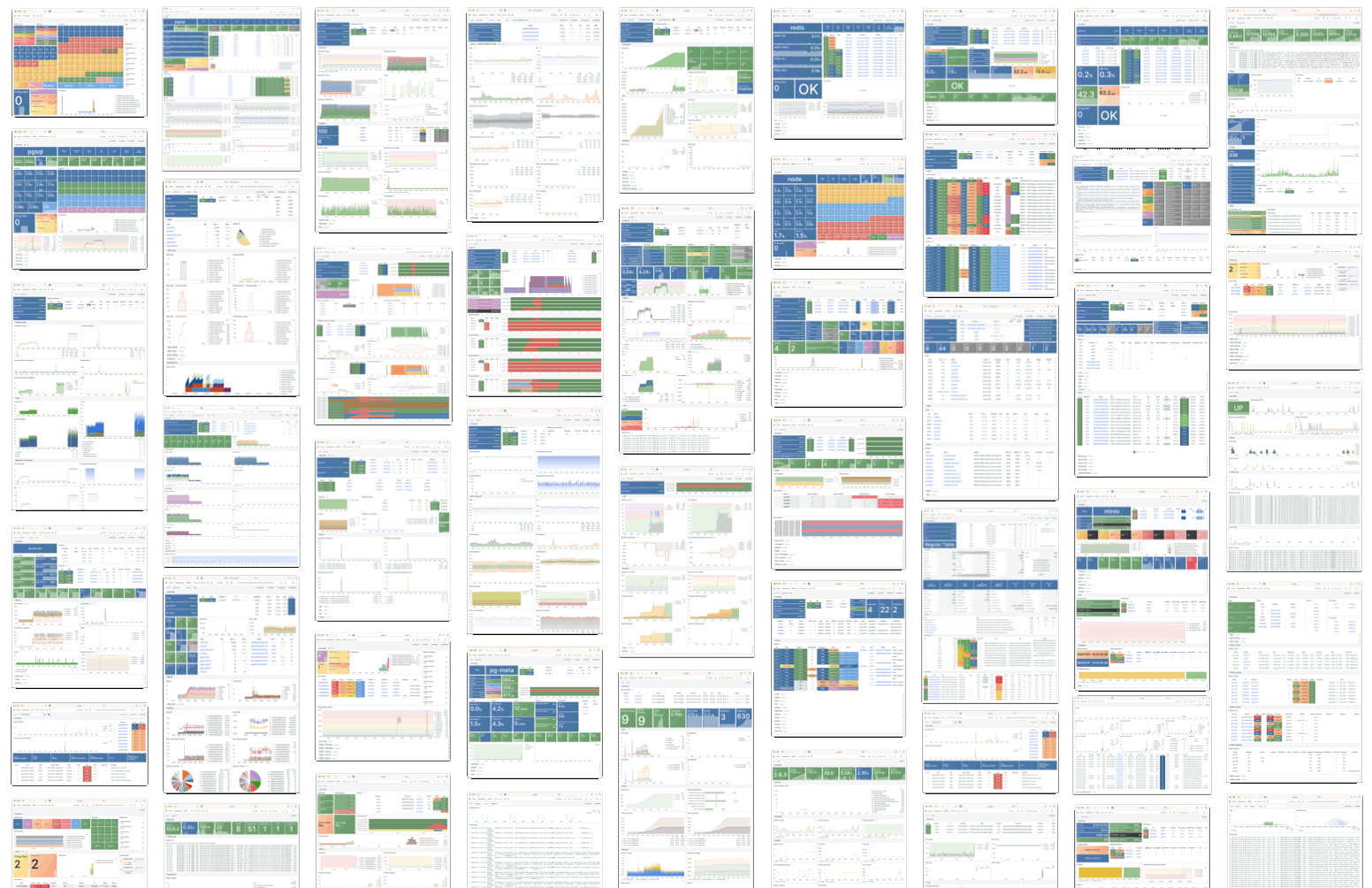
Modern observability stack with 3000+ metrics, 30+ dashboards, and enterprise-grade monitoring

Pigsty delivers unparalleled observability with a modern monitoring stack built on industry best practices. Automatically monitor every component with 3000+ metrics, 30+ dashboards.

Note

Complete Insight: Monitor everything from high-level cluster health to individual table statistics. Get complete insight into the past, present, and future of your infrastructure.

Architecture Overview

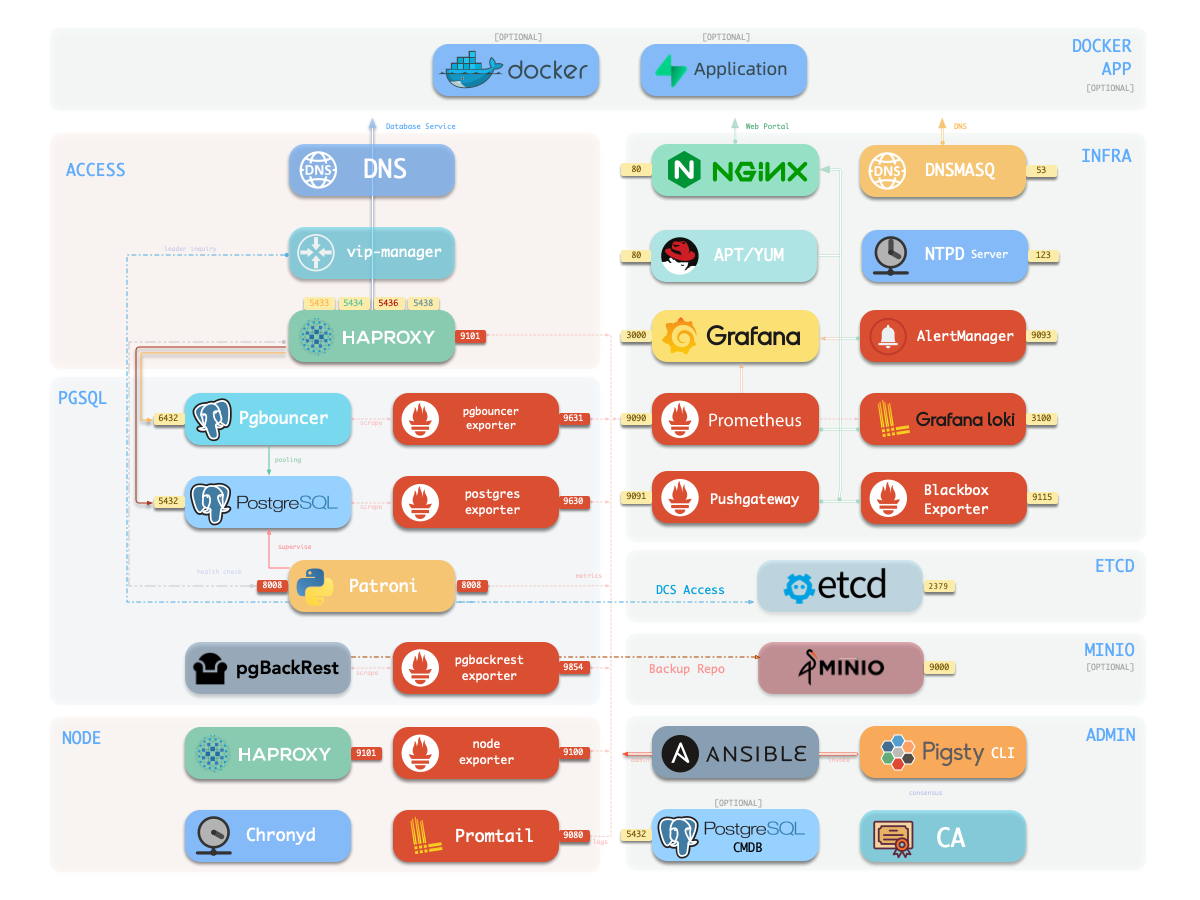
Pigsty’s observability infrastructure leverages battle-tested open-source components in a cohesive, production-ready stack:

Grafana Visualization Engine

Dashboards with advanced interactive visualizations

Prometheus Metrics Database

Time-series storage with powerful query language

Loki Logging Platform

Centralized logging with label-based indexing

AlertManager

Alert aggregate, management and escalation

Service Architecture

graph TB
    subgraph "Observability Stack"
        Grafana[Grafana :3000]
        Prometheus[Prometheus :9058]
        Loki[Loki :3100]
        AlertManager[AlertManager :9059]
        Pushgateway[Pushgateway :9091]
        Blackbox[Blackbox :9115]
    end

    subgraph "Data Sources"
        PG[(PostgreSQL)]
        Node[Node Metrics]
        Redis[(Redis)]
        MinIO[(MinIO)]
    end

    subgraph "Exporters"
        PGExp[pg_exporter]
        NodeExp[node_exporter]
        RedisExp[redis_exporter]
        MinIOExp[minio_exporter]
    end

    PG --> PGExp
    Node --> NodeExp
    Redis --> RedisExp
    MinIO --> MinIOExp

    PGExp --> Prometheus
    NodeExp --> Prometheus
    RedisExp --> Prometheus
    MinIOExp --> Prometheus

    Prometheus --> Grafana
    Prometheus --> AlertManager
    Loki --> Grafana

Monitoring Dashboards

Multi-Level Dashboard Hierarchy

Pigsty provides 26+ PostgreSQL dashboards organized in a logical drill-down hierarchy:

# Global overview dashboards
dashboards:
  - Home: Global cluster overview and key metrics
  - INFRA: Infrastructure services status
  - NODES: Node-level resource utilization
  - Alert: Active alerts and notification status

Purpose: High-level operational visibility across entire environment Audience: Operations teams, management dashboards

# Cluster-focused dashboards
dashboards:
  - PGSQL Cluster: Cluster health and replication status
  - PGSQL Service: Service endpoints and load balancing
  - PGSQL Activity: Connection pools and query activity
  - PGSQL Replication: Streaming replication metrics

Purpose: Cluster-wide PostgreSQL performance and health Audience: Database administrators, SRE teams

# Instance-specific dashboards
dashboards:
  - PGSQL Instance: Detailed PostgreSQL server metrics
  - PGSQL Persist: WAL, checkpoints, and persistence
  - PGSQL Proxy: Pgbouncer connection pooling metrics
  - PGSQL Session: Active sessions and lock analysis

Purpose: Deep-dive into individual PostgreSQL instances Audience: Database developers, performance engineers

# Database and object-level dashboards
dashboards:
  - PGSQL Database: Database-specific performance metrics
  - PGSQL Table: Table statistics and access patterns
  - PGSQL Query: Query performance and optimization
  - PGSQL Slow: Slow query analysis and tuning

Purpose: Application-level database performance analysis Audience: Application developers, database analysts

Dashboard Features

Drill-Down Navigation

Seamless exploration from overview to granular details with contextual linking

Time Range Controls

Flexible time windows from real-time to historical analysis over months

Multi-Dimensional Filtering

Dynamic filtering by cluster, instance, database, or custom labels

Alert Integration

Visual alert correlation with metrics and direct links to alert details


Grafana Deployment

Enhanced Grafana Stack

Pigsty extends Grafana with powerful plugins and data sources for advanced analytics:

# Essential Grafana plugins
grafana_plugins:
  - grafana-piechart-panel        # Pie chart visualizations
  - grafana-polystat-panel        # Multi-value status panels
  - grafana-worldmap-panel        # Geographic visualizations
  - grafana-clock-panel           # Time display widgets

Purpose: Essential visualization capabilities for monitoring dashboards

# Advanced visualization plugins
grafana_plugins:
  - echarts-panel                 # Apache ECharts integration
  - volkovlabs-echarts-panel      # Enhanced ECharts support
  - volkovlabs-form-panel         # Interactive forms
  - volkovlabs-variable-panel     # Dynamic variables

Purpose: Rich, interactive visualizations for complex data analysis

# Extended data source support
grafana_datasources:
  - infinity-datasource           # REST API and file data sources
  - redis-datasource              # Redis data source
  - clickhouse-datasource         # ClickHouse integration
  - postgres-datasource           # Enhanced PostgreSQL support

Purpose: Connect to diverse data sources beyond traditional metrics

# Pigsty-specific customizations
custom_features:
  - pigsty-theme                  # Custom branding and colors
  - dashboard-provisioning       # Automated dashboard deployment
  - alert-templates               # Pre-configured alert rules
  - data-link-automation          # Context-aware navigation

Purpose: Tailored user experience optimized for PostgreSQL environments

Configuration & Customization

# Advanced Grafana configuration
grafana_config:
  # Authentication
  auth.anonymous.enabled: true
  auth.anonymous.org_role: Viewer
  auth.disable_login_form: false

  # Security
  security.allow_embedding: true
  security.cookie_secure: true
  security.cookie_samesite: strict

  # Performance
  database.max_open_conn: 300
  database.max_idle_conn: 300
  database.conn_max_lifetime: 14400

  # Alerting
  alerting.enabled: true
  alerting.execute_alerts: true
  unified_alerting.enabled: true

  # Custom panels
  panels.enable_alpha: true
  feature_toggles.enable: ngalert,live,publicDashboards

Prometheus Stack

Complete Monitoring Ecosystem

Pigsty deploys the full Prometheus ecosystem for comprehensive observability:

Step 1

Prometheus Server

Core metrics database with advanced querying and storage capabilities

# Prometheus configuration highlights
prometheus_config:
  global:
    scrape_interval: 15s          # Default scrape frequency
    evaluation_interval: 15s      # Rule evaluation frequency
    external_labels:
      cluster: '{{ pg_cluster }}'

  rule_files:
    - "/etc/prometheus/rules/*.yml"

  scrape_configs:
    - job_name: 'node'            # Node-level metrics
    - job_name: 'postgres'        # PostgreSQL metrics
    - job_name: 'redis'           # Redis metrics
    - job_name: 'pushgateway'     # Batch job metrics

Step 2

AlertManager

Intelligent alert routing with suppression, grouping, and escalation

# AlertManager routing configuration
alertmanager_routes:
  - match:
      severity: critical
    receiver: pagerduty-critical
    group_wait: 30s
    group_interval: 5m
    repeat_interval: 4h

  - match:
      severity: warning
    receiver: slack-warnings
    group_wait: 1m
    group_interval: 10m
    repeat_interval: 24h

Step 3

Pushgateway

Batch job metrics collection for ephemeral workloads and cron jobs

# Example: Backup job metrics
echo "backup_duration_seconds $(date +%s)" | curl --data-binary @- \
  http://pushgateway:9091/metrics/job/pg-backup/instance/pg-test

Step 4

Blackbox Exporter

Network connectivity monitoring with HTTP, TCP, and ICMP probes

# Blackbox probe configuration
blackbox_probes:
  http_2xx:
    prober: http
    timeout: 5s
    http:
      valid_status_codes: [200]

  tcp_connect:
    prober: tcp
    timeout: 5s

Pre-configured Alert Rules

# Sample PostgreSQL alert rules
alert_rules:
  - alert: PostgreSQLDown
    expr: pg_up == 0
    for: 5m
    labels:
      severity: critical
    annotations:
      summary: "PostgreSQL instance {{ $labels.instance }} is down"

  - alert: PostgreSQLHighConnections
    expr: pg_stat_database_numbackends / pg_settings_max_connections > 0.8
    for: 10m
    labels:
      severity: warning
    annotations:
      summary: "High connection usage on {{ $labels.instance }}"

  - alert: PostgreSQLReplicationLag
    expr: pg_replication_lag_seconds > 300
    for: 5m
    labels:
      severity: warning
    annotations:
      summary: "Replication lag > 5 minutes on {{ $labels.instance }}"

pg_exporter: Advanced PostgreSQL Monitoring

Custom Metrics Engine

Pigsty’s pg_exporter is a highly customizable PostgreSQL metrics collector supporting all PostgreSQL versions with fine-grained metric control:

# pg_exporter key capabilities
features:
  - auto_discovery: true          # Automatic database discovery
  - custom_queries: true          # User-defined metric queries
  - version_aware: true           # PostgreSQL version detection
  - rds_compatible: true          # Cloud database support
  - label_customization: true     # Flexible metric labeling
  - connection_pooling: true      # Efficient connection reuse

Advantages: Flexible, lightweight, and highly configurable

# PostgreSQL version support matrix
supported_versions:
  - postgresql_9_6: legacy_metrics_set
  - postgresql_10: enhanced_metrics_set
  - postgresql_11: advanced_metrics_set
  - postgresql_12: modern_metrics_set
  - postgresql_13: extended_metrics_set
  - postgresql_14: latest_metrics_set
  - postgresql_15: cutting_edge_metrics_set
  - postgresql_16: next_gen_metrics_set

Benefit: Single exporter for heterogeneous PostgreSQL environments

# Custom metric definition example
custom_queries:
  pg_custom_business_metrics:
    query: |
      SELECT
        schemaname,
        tablename,
        n_tup_ins as inserts_total,
        n_tup_upd as updates_total,
        n_tup_del as deletes_total
      FROM pg_stat_user_tables
    metrics:
      - inserts_total:
          usage: COUNTER
          description: "Total number of inserts"
      - updates_total:
          usage: COUNTER
          description: "Total number of updates"
# RDS monitoring configuration
rds_monitoring:
  connection_string: "postgres://monitor:[email protected]:5432/postgres"
  metrics_subset: rds_safe        # RDS-compatible metrics only
  auto_discovery: false           # Manual database specification
  query_timeout: 30s              # Conservative timeout

  # RDS-specific metrics
  included_databases: [production, staging]
  excluded_schemas: [information_schema, pg_catalog]

Metrics Configuration

# Comprehensive pg_exporter configuration
pg_exporter_config:
  # Connection settings
  data_source_name: "postgres://dbuser_monitor:password@localhost:5432/postgres"

  # Metric collection
  auto_discover_databases: true
  exclude_databases: [template0, template1]
  include_databases: [postgres, business_db]

  # Query customization
  query_path: "/etc/pg_exporter/queries"
  metric_prefix: "pg"

  # Performance tuning
  parallel_scrape: true
  scrape_timeout: 30s
  max_connections: 3

  # Security
  ssl_mode: require
  ssl_cert: "/etc/ssl/pg-client.crt"
  ssl_key: "/etc/ssl/pg-client.key"

Host & Infrastructure Monitoring

Pigsty v3.7 installs node_exporter on managed nodes and registers Node, HAProxy, Keepalived, Nginx, Etcd, MinIO, Redis, PostgreSQL, PgBouncer, and pgBackRest targets with Prometheus when the corresponding modules are enabled. Component ports and switches are defined by the tagged role defaults and documented on each module’s parameter page.

External Database Monitoring

Existing PostgreSQL instances and cloud RDS can be registered with pgsql-monitor.yml. Supply a monitor connection URL with only the required pg_monitor privileges; Pigsty registers pg_exporter and the Grafana datasource without provisioning or changing that database.

./pgsql-monitor.yml -e pg_exporters='{"rds":{"pg_exporter_url":"postgres://dbuser_monitor:[email protected]:5432/postgres"}}'

Data Analytics & Visualization Platform

Grafana can query both Prometheus metrics and PostgreSQL data. The bundled dashboards use variables and URL links for drill-down navigation; ECharts and other packaged plugins can visualize application or business data.

Low-Code Application Development

Grafana panels may be combined with PostgreSQL queries to build internal operational views. This is a visualization capability, not a separate Pigsty deployment module or application API.

Reusable Infrastructure

infra.yml can deploy INFRA independently from PGSQL. Nginx, DNSMasq, Prometheus, AlertManager, Grafana, and Loki are controlled by their documented *_enabled parameters, allowing Pigsty to reuse or coexist with existing infrastructure.

Best Practices

  • Control metric cardinality and set retention according to available disk.
  • Back up Grafana configuration and keep alert notification channels tested.
  • Protect monitoring endpoints with access controls and HTTPS when exposed outside the trusted network.
  • Monitor the monitoring stack itself and review storage growth regularly.

Limitations & Considerations

Prometheus and Loki in v3.7 are single-node services by default. Very large metric cardinality, long retention, or complex dashboards require capacity planning. External long-term storage and HA monitoring architectures are manual integrations rather than built-in v3.7 modules.

4 - High Availability

Enterprise-grade high availability with automatic failover and self-healing capabilities

Pigsty uses Patroni to achieve high availability for PostgreSQL, ensuring automatic failover.

pigsty-ha
Note

Primary Failure RTO ≈ 30s, RPO < 1MB, Replica Failure RTO≈0 (reset current conn)


Overview

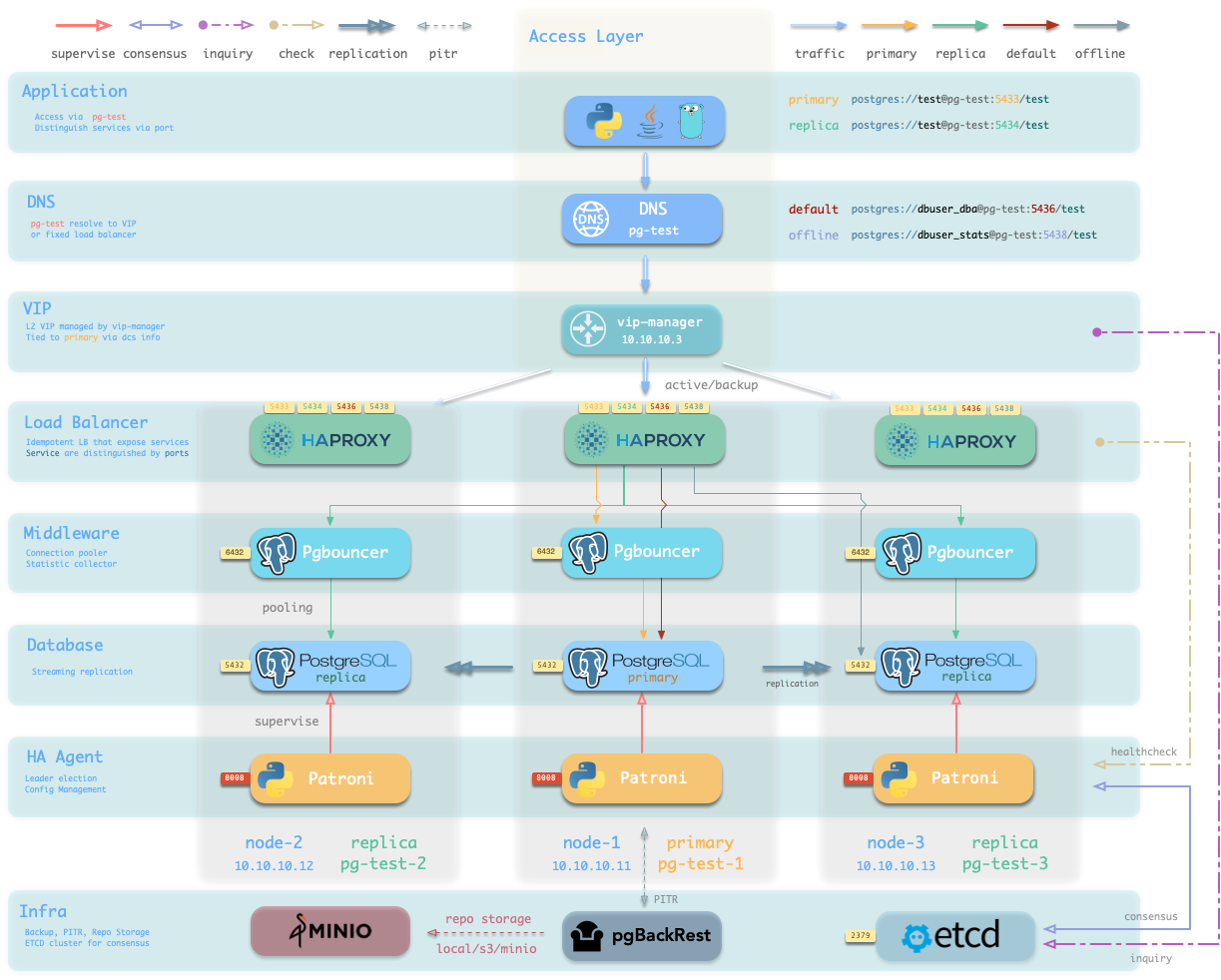
Pigsty’s PostgreSQL cluster has battery-included high-availability powered by Patroni, Etcd, and HAProxy.

When you have two or more instances in the PostgreSQL cluster, you have the ability to self-heal from hardware failures without any further configuration — as long as any instance within the cluster survives, the cluster can serve its services. Clients simply need to connect to any node in the cluster to obtain full services without worrying about replication topology changes.

By default, the recovery time objective (RTO) for primary failure is approximately 30s ~ 60s, and the data recovery point objective (RPO) is < 1MB; for standby failure, RPO = 0, RTO ≈ 0 (instantaneous). In consistency-first mode, zero data loss during failover is guaranteed: RPO = 0. These metrics can be configured as needed based on your actual hardware conditions and reliability requirements.

Pigsty incorporates an HAProxy load balancer for automatic traffic switching, offering multiple access methods for clients such as DNS/VIP/LVS. Failovers and switchover are almost imperceptible to the business side except for sporadic interruptions, meaning applications do not need connection string modifications or restarts.

Key Metrics

RTO ~ 30s
Primary Failure
RPO < 1MB
Async Mode RPO
RTO ~ 0s
Replica Failure
RPO = 0
Sync Mode

What High Availability Solves

High availability addresses critical operational challenges:

Data Safety

Elevates availability: RPO ≈ 0, RTO < 30s for enhanced data protection

Rolling Maintenance

Seamless maintenance: Minimize maintenance windows for operational convenience

Hardware Failures

Self-healing: Automatic recovery from hardware failures without human intervention

Load Distribution

Read scaling: Distribute read-only queries across standby instances

Specific Benefits

  • Enhanced data safety: Improves the availability aspect of data safety CIA to a new height
  • Rolling maintenance capabilities: Enables seamless maintenance with minimal downtime
  • Hardware failure recovery: Self-healing from hardware failures without human intervention
  • Load sharing: Read-only requests can be distributed across standby instances

Costs of High Availability

Implementing HA introduces certain trade-offs and requirements:

Note

Infrastructure Requirements: HA requires at least 3 nodes and additional infrastructure dependencies.

Resource Requirements

  • Minimum cluster size: At least 3 nodes for proper consensus
  • Additional infrastructure: Requires consensus store (Etcd) and load balancer
  • Resource overhead: Additional CPU, memory, and network resources
  • Operational complexity: Increased monitoring and management requirements

Limitations

Note

High availability cannot prevent:

  • Human errors and operational mistakes
  • Software defects causing data corruption
  • Logical data deletion or corruption

For these scenarios, additional recovery strategies are needed:

  • Delayed clusters for protection against logical corruption
  • Point-in-time recovery for fine-grained data restoration
  • Regular backups for disaster recovery scenarios

Architecture

Pigsty’s HA architecture leverages a multi-component design that eliminates single points of failure:

Patroni

Cluster Management: Orchestrates PostgreSQL processes and handles automatic failover

Etcd

Consensus Store: Provides distributed configuration and leader election

HAProxy

Load Balancer: Routes traffic and provides service discovery

VIP Manager

Virtual IP: Optional Layer 2 VIP binding for seamless connectivity

Component Roles

Cluster Orchestrator

  • Manages PostgreSQL server processes
  • Handles automatic failover and switchover
  • Monitors cluster health and topology
  • Configures streaming replication
  • Provides REST API for cluster management
# Patroni configuration example
patron:
  name: pg-test-1
  scope: pg-test
  bootstrap:
    dcs:
      ttl: 30
      loop_wait: 10
      retry_timeout: 30

Distributed Configuration Store

  • Stores cluster configuration and state
  • Provides leader election mechanism
  • Ensures consistent view across all nodes
  • Handles network partitions gracefully
  • Maintains cluster membership information
# Etcd cluster configuration
etcd_cluster: etcd
etcd_safeguard: false

Traffic Router and Load Balancer

  • Routes read/write traffic to appropriate nodes
  • Provides health checking for database instances
  • Offers multiple service endpoints
  • Handles connection pooling and load distribution
  • Supports SSL termination and connection limits
# HAProxy service endpoints
primary:5433    # Read-write traffic to primary
replica:5434    # Read-only traffic to replicas
default:5436    # Failover-aware connection
offline:5438    # Dedicated offline queries

Virtual IP Management

  • Manages Layer 2 Virtual IP addresses
  • Provides seamless client connectivity
  • Handles VIP migration during failover
  • Supports multiple VIP interfaces
  • Optional component for simplified client access
# VIP configuration
vip_enabled: true
vip_address: 10.10.10.99/24
vip_interface: eth0

Implementation

Pigsty’s HA implementation follows proven patterns for PostgreSQL clustering:

Replication Architecture

Step 1

Streaming Replication

PostgreSQL uses built-in streaming replication for data synchronization between primary and standby nodes.

Step 2

Consensus-Based Leadership

Patroni uses Etcd for distributed consensus to elect cluster leader and manage topology changes.

Step 3

Automatic Failover

When primary fails, Patroni automatically promotes the most up-to-date standby to become the new primary.

Step 4

Traffic Rerouting

HAProxy detects topology changes and automatically routes traffic to the new primary instance.

Failure Scenarios

Primary Node Failure Process

  1. Detection: Patroni detects primary node failure (15-30 seconds)
  2. Leader Election: Etcd coordinates new leader selection
  3. Promotion: Most up-to-date standby is promoted to primary
  4. Reconfiguration: Remaining standbys reconfigure to new primary
  5. Traffic Switch: HAProxy redirects traffic to new primary
Note

Write Service Interruption: 15-30 seconds during failover process

Standby Node Failure Process

  1. Detection: Immediate detection of standby failure
  2. Traffic Rerouting: HAProxy removes failed node from pool
  3. Service Continuity: Read queries continue on remaining standbys
  4. Automatic Recovery: Node rejoins cluster when restored
Note

Minimal Impact: Read-only queries experience brief interruption only

Network Partition Handling

  1. Split-Brain Prevention: Etcd consensus prevents multiple primaries
  2. Quorum Requirements: Majority of nodes required for operations
  3. Graceful Degradation: Read-only mode in minority partitions
  4. Automatic Recovery: Normal operations resume when partition heals
Note

Quorum Dependency: Requires majority of consensus nodes to remain operational


Trade-Offs

Pigsty provides configurable parameters to balance between recovery speed and data consistency:

Recovery Time Objective (RTO)

The pg_rto parameter controls failover timing and sensitivity:

# RTO Configuration
pg_rto: 30  # Default: 30 seconds

Lower RTO values:

  • ✅ Faster failover response
  • ✅ Reduced service interruption
  • ❌ Higher risk of false positives
  • ❌ May cause unnecessary failovers

Higher RTO values:

  • ✅ More stable, fewer false alarms
  • ✅ Better tolerance for network hiccups
  • ❌ Longer service interruption
  • ❌ Delayed response to real failures

Recovery Point Objective (RPO)

The pg_rpo parameter limits potential data loss during failover:

# RPO Configuration
pg_rpo: 1048576  # Default: 1MB

Lower RPO values:

  • ✅ Better data consistency
  • ✅ Minimal data loss risk
  • ❌ May delay failover
  • ❌ Could impact availability

Higher RPO values:

  • ✅ Faster failover process
  • ✅ Better availability
  • ❌ Potential for more data loss
  • ❌ Consistency trade-offs

Configuration Examples

# Zero data loss configuration
synchronous_mode: true
synchronous_mode_strict: true
pg_rpo: 0
pg_rto: 60
synchronous_standby_names: 'ANY 1 (*)'

Use Case: Financial systems, critical transactional data

# Fast failover configuration
synchronous_mode: false
pg_rpo: 16777216  # 16MB
pg_rto: 15
max_replication_slots: 16

Use Case: High-traffic applications, read-heavy workloads

# Default balanced configuration
synchronous_mode: false
pg_rpo: 1048576   # 1MB
pg_rto: 30
max_replication_slots: 8

Use Case: Most production environments

Network Quality Impact

Network conditions significantly affect HA behavior:

  • High-quality networks: Can use lower RTO values safely
  • Unstable networks: Require higher RTO to prevent false positives
  • WAN deployments: Need careful tuning of timeout parameters
  • Local networks: Can optimize for faster failover

Monitoring and Observability

Pigsty provides comprehensive monitoring for HA cluster health:

Key Metrics

Cluster State

Monitor cluster topology, leader status, and member health

Replication Lag

Track replication lag and sync status across all replicas

Failover Events

Log and analyze failover events and their impact

Performance

Monitor query performance and connection health

Dashboard Integration

Pigsty includes pre-built Grafana dashboards for HA monitoring:

  • Cluster Overview: Real-time cluster topology and health
  • Replication Monitoring: Lag metrics and sync status
  • Failover Analysis: Historical failover events and timing
  • Performance Metrics: Query performance during normal and failover scenarios

Best Practices

Deployment Recommendations

Note

Anti-Affinity: Deploy cluster nodes across different physical hosts, racks, or availability zones.

  • Hardware diversity: Use different hardware configurations to avoid common failure modes
  • Network redundancy: Ensure multiple network paths between cluster nodes
  • Storage considerations: Use local storage for best performance, shared storage for specific use cases
  • Monitoring setup: Implement comprehensive monitoring before going to production

Operational Guidelines

  • Regular testing: Perform controlled failover tests in non-production environments
  • Capacity planning: Size cluster nodes appropriately for failover scenarios
  • Backup strategy: Maintain regular backups independent of HA setup
  • Documentation: Keep runbooks updated for emergency procedures

Common Pitfalls

Note

Avoid These Common Mistakes:

  • Insufficient network bandwidth between nodes
  • Inadequate monitoring of replication lag
  • Not testing failover procedures regularly
  • Incorrect firewall configurations

Summary

Pigsty’s high availability solution provides:

  • Automatic failover with sub-minute RTO
  • Configurable consistency with RPO control
  • Self-healing capabilities for hardware failures
  • Load balancing for read scaling
  • Minimal operational overhead with automated management

The combination of Patroni, Etcd, and HAProxy creates a robust, production-ready HA solution that handles the majority of failure scenarios automatically while providing the flexibility to tune behavior based on specific requirements.


High availability is not just about technology—it’s about building resilient systems that your business can depend on.

5 - Disaster Recovery

Battle-tested backup strategies and auto-configured Point-in-Time Recovery

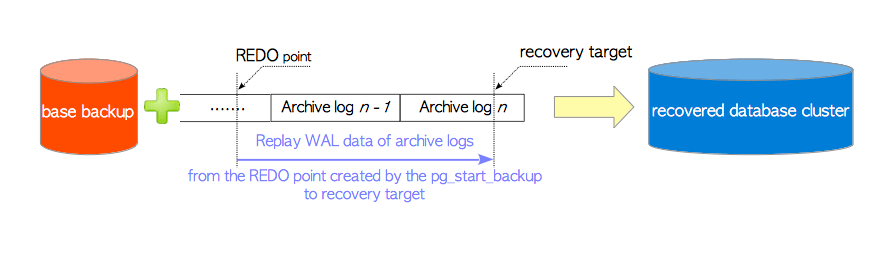
Point-in-Time Recovery (PITR) allows rolling back a PostgreSQL cluster to any specific moment in the past, preventing data loss from software defects or human errors. Pigsty uses pgBackRest for PITR, with configurable backup strategies using local filesystems or object storage like MinIO.

PITR Architecture
Note

Time Travel for Databases: Roll back your cluster to any point in time, protecting against software defects, human errors, and data corruption scenarios that high availability cannot address.

Overview

Pigsty provides enterprise-grade Point-in-Time Recovery with zero-configuration setup, automated backups, and flexible restore options. Built on pgBackRest with MinIO/S3 support, it protects against data corruption, human errors, and logical disasters.

Reduced RPO
Minimize Recovery Point Objective with continuous WAL archiving
Data Integrity
Enhanced data integrity protection against corruption
Disaster Recovery
Improved disaster recovery capabilities with flexible restore options

How PITR Works

PITR requires two key components working together to enable point-in-time recovery:

Base Backups

Uses pgBackRest to create database cluster snapshots with multiple backup types:

- **Full backups**: Complete database cluster snapshots
- **Incremental backups**: Only changes since the last backup
- **Differential backups**: Changes since the last full backup
- **Scheduled backups**: Periodic backups configured via Crontab

WAL Archiving

Continuously archives Write-Ahead Log (WAL) segment files:

- **Continuous archiving**: Real-time WAL file preservation
- **Automatic management**: WAL files and cleanup handled automatically
- **Optional feature**: Can be disabled if PITR is not needed

Implementation

Pigsty provides two default backup strategies with flexible configuration options:

Local Filesystem Strategy

- **Frequency**: Daily full backups
- **Storage**: Local filesystem storage
- **Use case**: Single-node or local development environments

MinIO/S3 Strategy

- **Frequency**: Weekly full backup with daily incremental backups
- **Storage**: Object storage (MinIO, S3)
- **Use case**: Production environments with distributed storage

Configuration Options

Backup configuration is highly flexible with options to specify:

  • Repository type: Local, S3, or other supported backends
  • Retention policies: How long to keep backups
  • Encryption: Secure backup storage
  • Storage locations: Multiple backup destinations

Recovery Options

Note

Recovery operations should be performed carefully as they will replace the current database state.

Recovery commands allow restoring to various points in time:

Step 1

### Latest WAL Archive
Restore to the most recent point available in WAL archives:
```bash
pg-pitr
```

Step 2

### Specific Timestamp
Restore to an exact moment in time:
```bash
pg-pitr --time="2022-12-30 14:44:44+08"
```

Step 3

### Named Restore Point
Restore to a previously created named point:
```bash
pg-pitr --name="my-restore-point"
```

Step 4

### Specific LSN or Transaction ID
Restore to a particular Log Sequence Number or transaction:
```bash
pg-pitr --lsn="0/1234567"
pg-pitr --xid="12345"
```
Note

While PITR is powerful for data recovery, it should ideally be combined with High Availability solutions for comprehensive data protection against both logical and physical failures.

6 - Infra as Code

Declarative infrastructure and database management with YAML-driven configuration

Pigsty provides a declarative interface: Describe everything in a config file, and Pigsty operates it to the desired state with idempotent playbooks. It works like Kubernetes CRDs & Operators but for databases and infrastructures on any nodes: bare metal or virtual machines.

Note

Infra as Code, Database as Code: Declarative API & Idempotent Playbooks, GitOPS works like a charm.


Declare Module

You can declare modules on a single node:

# infra cluster for proxy, monitor, alert, etc...
infra: { hosts: { 10.10.10.10: { infra_seq: 1 } } }

# minio cluster, s3 compatible object storage
minio: { hosts: { 10.10.10.10: { minio_seq: 1 } }, vars: { minio_cluster: minio } }

# etcd cluster for ha postgres DCS
etcd: { hosts: { 10.10.10.10: { etcd_seq: 1 } }, vars: { etcd_cluster: etcd } }

# postgres example cluster: pg-meta
pg-meta: { hosts: { 10.10.10.10: { pg_seq: 1, pg_role: primary } }, vars: { pg_cluster: pg-meta } }

And apply with playbooks:

./infra.yml -l infra    # init infra module on node 10.10.10.10
./etcd.yml  -l etcd     # init etcd  module on node 10.10.10.10
./minio.yml -l minio    # init minio module on node 10.10.10.10
./pgsql.yml -l pg-meta  # init pgsql module on node 10.10.10.10

Declare Cluster

To create a three-node HA postgres cluster with streaming replication:

pg-test:
  hosts:
    10.10.10.11: { pg_seq: 1, pg_role: primary }
    10.10.10.12: { pg_seq: 2, pg_role: replica }
    10.10.10.13: { pg_seq: 3, pg_role: replica }
  vars:
    pg_cluster: pg-test

And apply with:

./pgsql.yml -l pg-test  # init pg-test cluster

Declare Cluster Internal

You can deep customize a database cluster:

pg-meta:
  hosts:
    10.10.10.10: { pg_seq: 1, pg_role: primary }
  vars:
    pg_cluster: pg-meta
    pg_databases:
      - name: meta
        baseline: cmdb.sql
        comment: pigsty meta database
        schemas: [pigsty]
        extensions:
          - { name: adminpack, schema: pg_catalog }
          - { name: postgis, schema: public }
          - { name: timescaledb, schema: public }
    pg_users:
      - { name: dbuser_meta, password: DBUser.Meta, pgbouncer: true, roles: [dbrole_admin], comment: pigsty admin user }
      - { name: dbuser_view, password: DBUser.Viewer, pgbouncer: true, roles: [dbrole_readonly], comment: pigsty read-only user }
    pg_services:
      - { name: primary, port: 5433, dest: default }
      - { name: replica, port: 5434, dest: default, selector: "[]" }
      - { name: default, port: 5436, dest: postgres }
      - { name: offline, port: 5438, dest: postgres, selector: "[]" }
    pg_hba_rules:
      - { user: dbuser_view, db: all, addr: infra, auth: pwd, title: 'allow view user from infra nodes' }
    pgb_hba_rules:
      - { user: dbuser_view, db: all, addr: infra, auth: pwd, title: 'allow view user from infra nodes' }

Declare Access Control

Define advanced access control rules:

pg_hba_rules:
  - { user: '${dbsu}', db: all, addr: local, auth: ident, title: 'dbsu access via local os user ident' }
  - { user: '${dbsu}', db: replication, addr: local, auth: ident, title: 'dbsu replication from local os ident' }
  - { user: '${repl}', db: replication, addr: '${ip}/32', auth: pwd, title: 'replicator replication from ${ip}' }
  - { user: '${repl}', db: postgres, addr: '${ip}/32', auth: pwd, title: 'replicator postgres db from ${ip}' }
  - { user: '${monitor}', db: all, addr: '${ip}/32', auth: pwd, title: 'monitor from ${ip}' }
  - { user: '${monitor}', db: all, addr: infra, auth: pwd, title: 'monitor from infra nodes' }
  - { user: '${admin}', db: all, addr: infra, auth: ssl, title: 'admin @ infra nodes with pwd & ssl' }
  - { user: '+dbrole_readonly', db: all, addr: '${vip}/32', auth: ssl, title: 'allow readonly role from ${vip} with ssl' }
  - { user: '+dbrole_offline', db: all, addr: '${vip}/32', auth: ssl, title: 'allow offline role from ${vip} with ssl' }
  - { user: dbuser_meta, db: meta, addr: '10.0.0.0/8', auth: ssl, title: 'allow meta user from 10.0.0.0/8 with ssl' }

Citus Distributive Cluster

Declare a horizontally distributed Citus cluster:

pg-citus0: # coordinator
  hosts: { 10.10.10.10: { pg_seq: 1, pg_role: primary } }
  vars:
    pg_cluster: pg-citus0
    pg_mode: citus
    pg_shard: pg-citus
    pg_primary_db: meta
    pg_users: [ { name: dbuser_meta, password: DBUser.Meta, pgbouncer: true, roles: [ dbrole_admin ] } ]
    pg_databases: [ { name: meta, extensions: [ { name: citus }, { name: postgis }, { name: timescaledb } ] } ]
    pg_hba_rules:
      - { user: 'all', db: all, addr: '10.10.10.0/24', auth: trust }
pg-citus1: # worker1
  hosts: { 10.10.10.11: { pg_seq: 1, pg_role: primary } }
  vars: { pg_cluster: pg-citus1, pg_mode: citus, pg_shard: pg-citus }
pg-citus2: # worker2
  hosts: { 10.10.10.12: { pg_seq: 1, pg_role: primary } }
  vars: { pg_cluster: pg-citus2, pg_mode: citus, pg_shard: pg-citus }
pg-citus3: # worker3
  hosts: { 10.10.10.13: { pg_seq: 1, pg_role: primary } }
  vars: { pg_cluster: pg-citus3, pg_mode: citus, pg_shard: pg-citus }

Redis Clusters

Declare different types of Redis clusters:

redis-ms: # redis classic primary-replica
  hosts: { 10.10.10.10: { redis_node: 1 , redis_instances: { 6379: { }, 6380: { replica_of: '10.10.10.10 6379' } } } }
  vars: { redis_cluster: redis-ms ,redis_password: 'redis.ms' }
redis-sentinel: # redis sentinel x3
  hosts:
    10.10.10.10: { redis_node: 1, redis_instances: { 26379: { sentinel_monitor: redis-src } } }
    10.10.10.11: { redis_node: 2, redis_instances: { 26379: { sentinel_monitor: redis-src } } }
    10.10.10.12: { redis_node: 3, redis_instances: { 26379: { sentinel_monitor: redis-src } } }
  vars: { redis_cluster: redis-sentinel, redis_password: 'redis.sentinel' }
redis-cluster: # native redis cluster: 3m x 3s
  hosts:
    10.10.10.10: { redis_node: 1 ,redis_instances: { 6379: { }, 6380: { } } }
    10.10.10.11: { redis_node: 2 ,redis_instances: { 6379: { }, 6380: { } } }
    10.10.10.12: { redis_node: 3 ,redis_instances: { 6379: { }, 6380: { } } }
  vars: { redis_cluster: redis-cluster, redis_password: 'redis.cluster', redis_mode: cluster, redis_max_memory: 64MB }

Etcd Cluster

Declare a 3-node etcd consensus cluster:

etcd:
  hosts:
    10.10.10.10: { etcd_seq: 1 }
    10.10.10.11: { etcd_seq: 2 }
    10.10.10.12: { etcd_seq: 3 }
  vars:
    etcd_cluster: etcd
    etcd_safeguard: false

MinIO Cluster

Declare a 3-node MinIO object storage cluster:

minio:
  hosts:
    10.10.10.10: { minio_seq: 1 }
    10.10.10.11: { minio_seq: 2 }
    10.10.10.12: { minio_seq: 3 }
  vars:
    minio_cluster: minio
    minio_data: '/data/minio'
    minio_domain: sss.pigsty
    minio_buckets: [ { name: pgsql }, { name: infra }, { name: redis } ]
    minio_users:
      - { access_key: dba, secret_key: S3User.DBA, policy: consoleAdmin }
      - { access_key: pgbackrest, secret_key: S3User.Backup, policy: readwrite }

Pigsty enables you to describe your entire infrastructure declaratively and manage it through code, providing consistency, repeatability, and scalability for your database and infrastructure operations.

7 - No Containers

Pigsty runs on raw Linux without containers and kubernetes

Pigsty runs on bare Linux, We support mainstream Linux distributions like EL / Debian / Ubuntu, and compatible Linux distributions like Rocky Linux, AlmaLinux, etc…

We do this on purpose. It is hard to compile and package all the postgres related packages and hundreds of extensions into RPM/DEB for each Major version x PG version x OS Arch…

But I believe this is the right thing to do. So we don’t take shortcuts like Docker, Podman, or Kubernetes.

8 - App Templates

Setup enterprise software with templates, supabase, odoo, dify, gitlab,…
Supabase
    Self-Hosting Supabase
Odoo
    Run Odoo the OSS ERP
Dify
    Run Dify the AI workflow
pgAdmin
    Run official Admin GUI Tool

9 - Local First

Install without Internet, All dependencies included

10 - Supabase

Turn Postgres into a full-featured backend as a service
Self-Hosting Supabase