Architecture
Architecture, core concepts, identity management
This is the multi-page printable view of this section. .
Architecture, core concepts, identity management
Configure infra module, and use multiple infra nodes.
Customize infra components with 57+ parameters
Manage local repo, nginx portal, domain, certs, and more
Ansible playbooks that can be used in this module
Dashboards, metrics, record & alerting rules.
Frequently Asked Questions about infra module
A standard Pigsty deployment comes with an INFRA module that provides the following services:
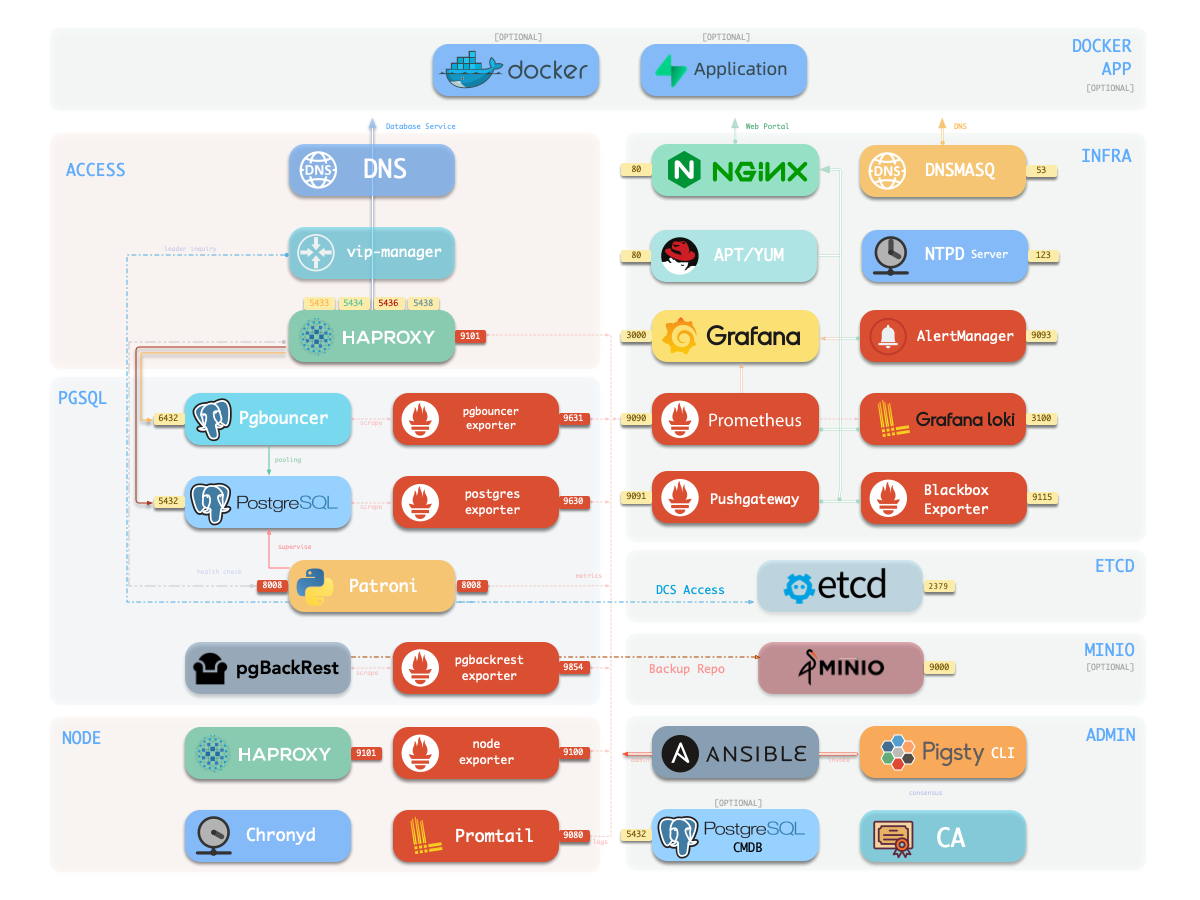
These are essential for a production-grade PostgreSQL service, and will be installed by default.
| Component | Port | Domain | Description |
|---|---|---|---|
nginx |
80 |
h.pigsty |
Web Service Portal (YUM/APT Repo) |
alertmanager |
9059 |
a.pigsty |
Alert Aggregation and delivery |
prometheus |
9058 |
p.pigsty |
Monitoring Time Series Database |
grafana |
3000 |
g.pigsty |
Visualization Platform |
loki |
3100 |
- | Logging Collection Server |
pushgateway |
9091 |
- | Collect One-Time Job Metrics |
blackbox_exporter |
9115 |
- | ICMP, TCP, HTTP Probing |
dnsmasq |
53 |
- | DNS Server, optional |
chronyd |
123 |
- | NTP Time Server, optional |
If you don’t want these, the Minimal Install mode deploy HA Postgres without the Infra module.
The INFRA module isn’t mandatory for HA PostgreSQL - for instance, it’s omitted in Slim Install mode.
However, since INFRA provides essential supporting services for production-grade HA PostgreSQL clusters, it’s strongly recommended for most deployments.
If you already have your own infrastructure (Nginx, local repos, monitoring, DNS, NTP), you can disable INFRA and configure Pigsty to use your existing stack instead.
Nginx is the gateway for all WebUI services in Pigsty, serving on HTTP (80) / HTTPS (443) by default.
It exposes web UIs like Grafana, Prometheus, AlertManager, and HAProxy console, while also serving static resources like local yum/apt repos.
Nginx configuration follows infra_portal definitions, for example:
These endpoint definitions are referenced by other services - logs go to loki endpoint, Grafana datasources register to grafana endpoint, alerts route to alertmanager endpoint.
Pigsty allows rich Nginx customization as a local file server or reverse proxy, with self-signed or real HTTPS certs.
For more details, check these tutorials:
During installation, Pigsty creates a local software repository on the INFRA node to speed up subsequent software installations.
Located at /www/pigsty and served by Nginx, it’s accessible via http://h.pigsty/pigsty.
Pigsty’s offline package is a tarball of a pre-built repo directory. If /www/pigsty exists with a /www/pigsty/repo_complete marker, Pigsty skips downloading from upstream - perfect for air-gapped environments!
Repo definition lives in /www/pigsty.repo, fetchable via http://${admin_ip}/pigsty.repo:
You can also use the file repository directly without Nginx:
Local repo configs are in: Config: INFRA - REPO
Prometheus, our TSDB for monitoring, listens on port 9058 (access via IP:9058 or http://p.pigsty).
Key features:
AlertManager handles alerts on port 9059 (IP:9059 or http://a.pigsty). While it receives Prometheus alerts, you’ll need extra config (e.g., SMTP) for notifications.
Configs for Prometheus, AlertManager, PushGateway, and BlackboxExporter are in: Config: INFRA - PROMETHEUS
Grafana, our visualization powerhouse, runs on port 3000 (IP:3000 or http://g.pigsty).
Pigsty’s monitoring is dashboard-based with URL-driven navigation. Drill down or up quickly to pinpoint issues.
Fun fact: We’ve supercharged Grafana with extra viz plugins like ECharts - it’s not just monitoring, it’s a low-code data app platform!
Loki handles logs on port 3100, with Promtail shipping logs from nodes to the mothership.
Configs live in: Config: INFRA - GRAFANA and Config: INFRA - Loki
Ansible is already installed on the Admin Node during bootstrap.
So the ansible on infra nodes are not actually used.
But it gives you a viable backup option in case your admin node is compromised.
DNSMASQ handles DNS resolution, with other modules registering their domains to INFRA’s DNSMASQ service.
DNS records live in /etc/hosts.d/ on all INFRA nodes.
Configs: Config: INFRA - DNS
Pigsty sets it up just for your convenience, and Pigsty actually does NOT use it internally (static DNS records in /etc/hosts are used instead).
Chronyd helps keep all nodes in sync!
NTP configs: Config: NODES - NTP
This is purely optional, if you already have your own NTP servers configured, just leave it alone.
The INFRA module primarily provides monitoring infrastructure and is optional for PostgreSQL service.
Unless you have manually configured dependencies on DNS/NTP services from INFRA nodes elsewhere, failures in the INFRA module typically won’t affect the normal operation of PostgreSQL database clusters.
In most cases, a single INFRA node is sufficient for typical scenarios. For production environments with higher requirements, we recommend using 2-3 INFRA nodes for high availability.
To improve resource utilization, PostgreSQL high availability typically relies on the ETCD module, which can share nodes with the INFRA module.
Using more than 3 INFRA nodes provides limited benefits, but you can use more ETCD nodes (e.g., 5) to enhance the availability and reliability of DCS services.
To install the INFRA module on nodes, first add node IPs to the infra group in the inventory and assign them an Infra instance number infra_seq.
By default, a single INFRA node configuration meets most requirements. All configuration templates include a default infra group definition:
The 10.10.10.10 IP placeholder in the infra group will be replaced with the current node’s primary IP address during configuration, meaning the INFRA module will be installed on the current node.
Then use the infra.yml playbook to initialize the INFRA module on the node.
To configure two INFRA nodes, add new IPs to infra.hosts:
To configure three INFRA nodes with custom cluster/node parameters:
Most components in the Infra module are “stateless/shared-state”. For these components, high availability primarily requires addressing load balancing.
Infra component load balancing can be achieved through two methods: Keepalived L2 VIP or HAProxy Layer 4 Load Balancing.
If your network environment supports Layer 2 connectivity, you can use Keepalived L2 VIP for high availability:
In addition to configuring VIP-related parameters like vip_address, you need to modify endpoints for Infra services in infra_portal.
Parameters for Pigsty infrastructure components: local YUM repository, Nginx, DNSMasq, Prometheus, Grafana, Loki, AlertManager, PushGateway, Blackbox Exporter, etc.
There are 9 sections in total, and 57 parameters in this module.
META: infra meta dataCA: self-signed CAINFRA_ID: Portals and identityREPO: local YUM/APT repositoryINFRA_PACKAGE: packages to be installedNGINX: Nginx web serverDNS: DNSMasq nameserverPROMETHEUS: Prometheus, AlertManager, PushGateway & Blackbox ExporterGRAFANA: Grafana, the visualization platformLOKI: Loki, the logging server| Name | Section | Type | Level | Comment |
|---|---|---|---|---|
version |
META |
string |
G | pigsty version string |
admin_ip |
META |
ip |
G | admin node ip address |
region |
META |
enum |
G | upstream mirror region: default, china, europe |
proxy_env |
META |
dict |
G | global proxy env when downloading packages |
ca_create |
CA |
bool |
G | create the CA when missing; true by default |
ca_cn |
CA |
string |
G | CA common name, fixed as pigsty-ca |
cert_validity |
CA |
interval |
G | cert validity, 20 years by default |
infra_seq |
INFRA_ID |
int |
I | infra node identity, REQUIRED |
infra_portal |
INFRA_ID |
dict |
G | infra services exposed via portal |
repo_enabled |
REPO |
bool |
G/I | create a yum repo on this infra node? |
repo_home |
REPO |
path |
G | repo home dir, /www by default |
repo_name |
REPO |
string |
G | repo name, pigsty by default |
repo_endpoint |
REPO |
url |
G | access point to this repo by domain or ip:port |
repo_remove |
REPO |
bool |
G/A | remove existing upstream repo |
repo_modules |
REPO |
string |
G/A | which repo modules are installed in repo_upstream |
repo_upstream |
REPO |
upstream[] |
G | where to download upstream packages |
repo_packages |
REPO |
string[] |
G | which packages to be included |
repo_extra_packages |
REPO |
string[] |
G/C/I | extra packages to be included |
repo_url_packages |
REPO |
string[] |
G | extra packages from url |
infra_packages |
INFRA_PACKAGE |
string[] |
G | packages to be installed on infra nodes |
infra_packages_pip |
INFRA_PACKAGE |
string |
G | pip installed packages for infra nodes |
nginx_enabled |
NGINX |
bool |
G/I | enable nginx on this infra node? |
nginx_exporter_enabled |
NGINX |
bool |
G/I | enable nginx_exporter on this infra node? |
nginx_sslmode |
NGINX |
enum |
G | nginx ssl mode? disable, enable, enforce |
nginx_cert_validity |
NGINX |
duration |
G | nginx self-signed cert validity, 397d by default |
nginx_home |
NGINX |
path |
G | nginx content dir, /www by default |
nginx_port |
NGINX |
port |
G | nginx listen port, 80 by default |
nginx_ssl_port |
NGINX |
port |
G | nginx ssl listen port, 443 by default |
nginx_navbar |
NGINX |
index[] |
G | nginx index page navigation links |
certbot_sign |
NGINX |
bool |
G/A | sign nginx cert with certbot during setup? |
certbot_email |
NGINX |
string |
G/A | certbot email address, used for free ssl |
certbot_options |
NGINX |
string |
G/A | certbot extra options |
dns_enabled |
DNS |
bool |
G/I | setup dnsmasq on this infra node? |
dns_port |
DNS |
port |
G | dns server listen port, 53 by default |
dns_records |
DNS |
string[] |
G | dynamic dns records resolved by dnsmasq |
prometheus_enabled |
PROMETHEUS |
bool |
G/I | enable prometheus on this infra node? |
prometheus_port |
PROMETHEUS |
port |
G | prometheus listen port, 9058 by default |
prometheus_clean |
PROMETHEUS |
bool |
G/A | clean prometheus data during init? |
prometheus_data |
PROMETHEUS |
path |
G | prometheus data dir, /data/prometheus by default |
prometheus_sd_dir |
PROMETHEUS |
path |
G | prometheus file service discovery directory |
prometheus_sd_interval |
PROMETHEUS |
interval |
G | prometheus target refresh interval, 5s by default |
prometheus_scrape_interval |
PROMETHEUS |
interval |
G | prometheus scrape & eval interval, 10s by default |
prometheus_scrape_timeout |
PROMETHEUS |
interval |
G | prometheus global scrape timeout, 8s by default |
prometheus_options |
PROMETHEUS |
arg |
G | prometheus extra server options |
pushgateway_enabled |
PROMETHEUS |
bool |
G/I | setup pushgateway on this infra node? |
pushgateway_options |
PROMETHEUS |
arg |
G | pushgateway extra server options |
blackbox_enabled |
PROMETHEUS |
bool |
G/I | setup blackbox_exporter on this infra node? |
blackbox_options |
PROMETHEUS |
arg |
G | blackbox_exporter extra server options |
alertmanager_enabled |
PROMETHEUS |
bool |
G/I | setup alertmanager on this infra node? |
alertmanager_port |
PROMETHEUS |
port |
G | alertmanager listen port, 9059 by default |
alertmanager_options |
PROMETHEUS |
arg |
G | alertmanager extra server options |
exporter_metrics_path |
PROMETHEUS |
path |
G | exporter metric path, /metrics by default |
exporter_install |
PROMETHEUS |
enum |
G | how to install exporter? none, yum, binary |
exporter_repo_url |
PROMETHEUS |
url |
G | exporter repo file url if install exporter via yum |
grafana_enabled |
GRAFANA |
bool |
G/I | enable grafana on this infra node? |
grafana_clean |
GRAFANA |
bool |
G/A | clean grafana data during init? |
grafana_admin_username |
GRAFANA |
username |
G | grafana admin username, admin by default |
grafana_admin_password |
GRAFANA |
password |
G | grafana admin password, pigsty by default |
loki_enabled |
LOKI |
bool |
G/I | enable loki on this infra node? |
loki_clean |
LOKI |
bool |
G/A | whether remove existing loki data? |
loki_data |
LOKI |
path |
G | loki data dir, /data/loki by default |
loki_retention |
LOKI |
interval |
G | loki log retention period, 15d by default |
META
This section contains metadata for current Pigsty deployments, such as version string, admin node IP address, repository mirror region and HTTP(S) proxy when downloading packages.
version
type: string, level: G
pigsty version string
default value:v3.7.0
It will be used for pigsty introspection & content rendering.
admin_ip
type: ip, level: G
admin node ip address
default value:10.10.10.10
Node with this ip address will be treated as admin node, usually point to the first node that install Pigsty.
The default value 10.10.10.10 is a placeholder that will be replaced during configure
This parameter is referenced by many other parameters, such as:
The exact string ${admin_ip} will be replaced with the actual admin_ip for above parameters.
region
type: enum, level: G
upstream mirror region: default,china,europe
default value: default
If a region other than default is set, and there’s a corresponding entry in repo_upstream.[repo].baseurl, it will be used instead of default.
For example, if china is used, pigsty will use China mirrors designated in repo_upstream if applicable.
proxy_env
type: dict, level: G
global proxy env when downloading packages
default value:
It’s quite important to use an HTTP proxy in restricted production environments, or when your Internet access is blocked (e.g., Mainland China).
Please note that if the Docker module is used, the proxy server configuration will also be written to the Docker Daemon configuration file.
Please note that if the -x parameter is specified during ./configure, the proxy configuration information in the current environment will be automatically filled into the generated pigsty.yaml file.
CA
Self-Signed CA used by Pigsty. It is required to support advanced security features.
ca_create
type: bool, level: G
Default value: true. The ca role creates files/pki/ca/ca.key and
files/pki/ca/ca.crt only when they are missing. Existing CA material is
always reused. Set this to false when supplying an existing key and
certificate; the role aborts if the key is then missing.
ca_cn
type: string, level: G
CA common name, not recommended to change it.
default value: pigsty-ca
You can check that with openssl x509 -text -in /etc/pki/ca.crt.
cert_validity
type: interval, level: G
certificate validity, 20 years by default, which is sufficient for most scenarios
default value: 7300d
INFRA_ID
Infrastructure identity and portal definition.
infra_seq
type: int, level: I
infra node identity, REQUIRED, no default value, you have to assign it explicitly.
infra_portal
type: dict, level: G
infra services exposed via portal.
default value will expose home, grafana, prometheus, alertmanager via nginx with corresponding domain names.
Each record consists of a Key and a Value dictionary, where name is the key, representing the component name, and the value is an object that can configure the following parameters:
Each record consists of a Key and a Value dictionary, where name is the key, representing the component name, and the value is an object that can configure the following parameters:
Each record consists of a Key and a Value dictionary, where name is the key, representing the component name, and the value is an object that can configure the following parameters:
name: REQUIRED, specify the name of the Nginx server
/etc/nginx/conf.d/<name>.confdomain: OPTIONAL, when the service needs to be exposed to the outside world via Nginx, it is a REQUIRED field, specifying the domain name used
endpoint: Usually used as an alternative to path, specifies the upstream server address. Setting endpoint indicates this is a reverse proxy server
${admin_ip} can be used as a placeholder, and will be dynamically replaced with admin_ip during deploymentpath: Usually used as an alternative to endpoint, specifies the local file server path. Setting path means this is a local web server
certbot: Certbot certificate name, if configured, will use Certbot to apply for a certificate
cert: Cert file path, if configured, will override the default certificate pathkey: Cert key file path, if configured, will override the default certificate key pathwebsocket: Whether to enable WebSocket support
schema: Protocol used by the upstream server, if configured, will override the default protocol
index: Whether to enable file index page
log: Nginx log file path
/var/log/nginx/<name>.log as the default log file pathconf: Nginx configuration file path
config: Nginx configuration code block
enforce_https: Redirect HTTP to HTTPS
REPO
This section is about the local software repository. Pigsty will create a local software repository (APT/YUM) when initializing an infra node.
During the initialization process, Pigsty will download all packages and their dependencies (specified by repo_packages) from the Internet upstream repository (specified by repo_upstream) to {{ nginx_home }} / {{ repo_name }} (default is /www/pigsty), and the total size of all dependent software is approximately 1GB.
When creating a local repository, Pigsty will skip the software download phase if the directory already exists and there is a marker file named repo_complete in the directory.
If the download speed of some packages is too slow, you can set the download proxy to complete the initial download by using the proxy_env configuration entry or directly download the pre-packaged offline package, which is essentially a local software source built on the same operating system.
repo_enabled
type: bool, level: G/I
create a YUM repository on this infra node? default value: true
If you have multiple infra nodes, you can disable the YUM repository on other standby nodes to reduce Internet traffic.
repo_home
type: path, level: G
repository home directory, /www by default
repo_name
type: string, level: G
repository name, pigsty by default, it is not recommended to change this value
repo_endpoint
type: url, level: G
access point to this repository by domain or IP:port, default value: http://${admin_ip}:80
If you have changed the nginx_port or nginx_ssl_port, or use a different infra node from admin node, please adjust this parameter accordingly.
The ${admin_ip} will be replaced with actual admin_ip during runtime.
repo_remove
type: bool, level: G/A
remove existing upstream repository, default value: true
If you want to keep existing upstream repository, set this value to false.
repo_modules
type: string, level: G/A
which repository modules are installed in repo_upstream, default value: infra,node,pgsql
This is a comma separated value string, it is used to filter entries in repo_upstream with corresponding module field.
For Ubuntu / Debian users, you can add redis to the list: infra,node,pgsql,redis
repo_upstream
type: upstream[], level: G
This parameter defines the upstream software repository for Pigsty. It DOES NOT have default values; you can specify it explicitly, or leave it empty if you want to use the default values.
When leaving it empty, Pigsty will use the default values from the repo_upstream_default defined in roles/node_id/vars according to your OS.
For EL (8, 9, 10) system, the default values are:
For Debian (11,12,13) or Ubuntu (22.04, 24.04) systems, the default values are:
repo_packages
type: string[], level: G
This parameter is an array of strings, with each string being a list of software packages separated by spaces, specifying which packages to be included and downloaded.
This param DOES NOT have a default value, you can specify it explicitly, or leaving it empty if you want to use the default values.
When leaving it empty, Pigsty will use the default values from the repo_packages_default defined in roles/node_id/vars according to your OS.
Each element in repo_packages will be translated into a list of package names according to the package_map defined in the above file, for specific OS distro version.
For example, on EL systems, it will be translated into:
And on Debian/Ubuntu systems, it will be translated into:
As a convention, repo_packages usually includes software packages that are not related to the major version of PostgreSQL (such as Infra, Node, and PGDG Common), while software packages related to the major version of PostgreSQL (kernel, extensions) are usually specified in repo_extra_packages to facilitate switching between PG major versions.
repo_extra_packages
type: string[], level: G/C/I
This parameter is the same as repo_packages, but it is used for additional software packages that need to be downloaded (usually PostgreSQL version-specific packages).
The default value is an empty list. You can override it at the cluster & instance level to specify additional software packages that need to be downloaded.
If this parameter is not explicitly defined, Pigsty will load the default value from the repo_extra_packages_default defined in roles/node_id/vars, which is:
Each element in repo_packages will be translated into a list of package names according to the package_map defined in the above file, for specific OS distro version.
For example, on EL systems, it will be translated into:
And on Debian/Ubuntu systems, it will be translated into:
Here $v will be replaced with the actual PostgreSQL major version number pg_version, So you can add any PG version related packages here, and Pigsty will download them for you.
repo_url_packages
type: object[] | string[], level: G
extra packages from URL, default values: []
You can use object list or string list in this parameter, in the latter case, Pigsty will use the url basename as the filename.
Note that if the region is set to china, pigsty.io will be replaced with pigsty.cc automatically.
INFRA_PACKAGE
These packages are installed on infra nodes only, including common rpm/deb/pip packages.
infra_packages
type: string[], level: G
This parameter is an array of strings, with each string being a list of common software packages separated by spaces, specifying which packages to be installed on INFRA nodes.
This parameter DOES NOT have a default value; you can specify it explicitly, or leave it empty if you want to use the default values.
When leaving it empty, Pigsty will use the default values from the repo_packages_default defined in roles/node_id/vars according to your OS.
For EL (7/8/9) system, the default values are:
For Debian (11,12) or Ubuntu (22.04, 22.04) systems, the default values are:
infra_packages_pip
type: string, level: G
pip installed packages for infra nodes, default value is empty string
NGINX
Pigsty exposes all web services through Nginx: Home Page, Grafana, Prometheus, AlertManager, etc., and other optional tools such as PGWeb, Jupyter Lab, pgAdmin, Bytebase, and other static resources & reports such as pev, schemaspy & pgbadger.
This Nginx also serves as a local YUM/APT repository.
nginx_enabled
type: bool, level: G/I
enable nginx on this infra node? default value: true
nginx_exporter_enabled
type: bool, level: G/I
enable nginx_exporter on this infra node? default value: true.
Setting this to false will also disable the /nginx health check stub: If your Nginx does not support the /nginx stub, you can set this value to false to disable it.
nginx_sslmode
type: enum, level: G
nginx ssl mode? which could be: disable, enable, enforce, the default value: enable
disable: listen on nginx_port and serve plain HTTP onlyenable: also listen on nginx_ssl_port and serve HTTPSenforce: all links will be rendered as https:// by default
infra_portalnginx_cert_validity
type: duration, level: G
nginx self-signed cert validity, 397d by default
Use longer validity is not recommended, as the latest browsers require the website certificate to be valid for at most 397 days, so this is the default value.
nginx_home
type: path, level: G
nginx web server static content dir, /www by default
Nginx root directory which contains static resource and repo resource. It’s wise to set this value same as repo_home so that local repo content is automatically served.
nginx_port
type: port, level: G
Nginx listening port which serves the HTTP requests, 80 by default.
If your default 80 port is occupied or unavailable, you can consider using another port, and change repo_endpoint and repo_upstream (the local entry) accordingly.
nginx_ssl_port
type: port, level: G
nginx ssl listen port, 443 by default
nginx_navbar
type: index[], level: G
nginx index page navigation links
default value:
Each record is rendered as a navigation link to the Pigsty home page App drop-down menu, and the apps are all optional, mounted by default on the Pigsty default server under http://h.pigsty/.
The url parameter specifies the URL PATH for the app, with the exception that if the ${grafana} string is present in the URL, it will be automatically replaced with the Grafana domain name defined in infra_portal.
certbot_sign
type: bool, level: G/A
sign nginx cert with certbot during setup? default value: false
When set to true, Pigsty will use certbot to automatically apply for free SSL certificates from Let’s Encrypt during the execution of infra.yml and install.yml playbooks (the nginx role).
In the infra_portal defined domain, if the certbot parameter is defined, Pigsty will use certbot to apply for the domain domain certificate, and the certificate name will be the value of the certbot parameter. If multiple servers/domains specify the same certbot parameter, Pigsty will merge and apply for a certificate for these domains, and use the value of the certbot parameter as the certificate name.
Enabling this option requires:
This option is disabled by default, you can manually execute the make cert command after installation to manually execute it, it actually calls the rendered /etc/nginx/sign-cert script, using certbot to update or apply certificates.
certbot_email
type: string, level: G/A
The email address used to receive certificate expiration reminder emails, default value: [email protected]
When certbot_sign is set to true, it is recommended to provide this parameter. Let’s Encrypt will send reminder emails to this email when the certificate is about to expire.
certbot_options
type: string, level: G/A
Additional configuration parameters passed to certbot, default value: empty string.
You can pass additional command line options to certbot through this parameter, for example --dry-run, then certbot will not actually apply for a certificate, but will preview and test it.
DNS
Pigsty will launch a default DNSMASQ server on infra nodes to serve DNS inquiry. such as h.pigsty a.pigsty p.pigsty g.pigsty and sss.pigsty for optional MinIO service.
All records will be added to infra node’s /etc/hosts.d/*.
You have to add nameserver {{ admin_ip }} to your /etc/resolv to use this dns server, and node_dns_servers will do the trick.
dns_enabled
type: bool, level: G/I
setup dnsmasq on this infra node? default value: true
If you don’t want to use the default DNS server, you can set this value to false to disable it. And use node_default_etc_hosts and node_etc_hosts instead.
dns_port
type: port, level: G
dns server listen port, 53 by default
dns_records
type: string[], level: G
dynamic dns records resolved by dnsmasq, Some auxiliary domain names will be written to /etc/hosts.d/default on infra nodes by default
PROMETHEUS
Prometheus is used as the time-series database for metrics scrape, storage & analysis.
prometheus_enabled
type: bool, level: G/I
enable prometheus on this infra node?
default value: true
prometheus_port
type: port, level: G
The listening port for Prometheus, default value is 9058.
Newly added since 3.7, with previous default value changing from 9090 to 9058.
Because the EL10 distro has a new default web service cockpit-ws which also uses port 9090.
prometheus_clean
type: bool, level: G/A
clean prometheus data during init? default value: true
prometheus_data
type: path, level: G
prometheus data dir, /data/prometheus by default
prometheus_sd_dir
type: path, level: G, default value: /etc/prometheus/targets
prometheus static file service discovery target dir, prometheus will find dynamic monitoring targets from this directory.
prometheus_sd_interval
type: interval, level: G, default value: 5s
Prometheus will check prometheus_sd_interval dir per 5s by default to find out new monitoring targets.
prometheus_scrape_interval
type: interval, level: G
prometheus scrape & eval interval, 10s by default
prometheus_scrape_timeout
type: interval, level: G
prometheus global scrape timeout, 8s by default
DO NOT set this larger than prometheus_scrape_interval
prometheus_options
type: arg, level: G
prometheus extra server options
default value: --storage.tsdb.retention.time=15d
Extra cli args for prometheus server, the default value will set up a 15-day data retention to limit disk usage.
pushgateway_enabled
type: bool, level: G/I
setup pushgateway on this infra node? default value: true
pushgateway_options
type: arg, level: G
pushgateway extra server options, default value: --persistence.interval=1m
blackbox_enabled
type: bool, level: G/I
setup blackbox_exporter on this infra node? default value: true
blackbox_options
type: arg, level: G
blackbox_exporter extra server options, default value is empty string
alertmanager_enabled
type: bool, level: G/I
setup alertmanager on this infra node? default value: true
alertmanager_port
type: port, level: G
The listening port for AlertManager, default value is 9059.
The default value change from 9093 since v3.7.
Because the kafka’s default peer port is also 9093
alertmanager_options
type: arg, level: G
alertmanager extra server options, default value is empty string
exporter_metrics_path
type: path, level: G
exporter metric path, /metrics by default
exporter_install
type: enum, level: G
(OBSOLETE) how to install exporter? none,yum,binary
default value: none
Specify how to install Exporter:
none: No installation, (by default, the Exporter has been previously installed by the node_pkg task)yum: Install using yum (if yum installation is enabled, run yum to install node_exporter and pg_exporter before deploying Exporter)binary: Install using a copy binary (copy node_exporter and pg_exporter binary directly from local file dir, not recommended)When installing with yum, if exporter_repo_url is specified (not empty), the installation will first install the REPO file under that URL into /etc/yum.repos.d. This feature allows you to install Exporter directly without initializing the node infrastructure. It is not recommended for regular users to use binary installation. This mode is usually used for emergency troubleshooting and temporary problem fixes.
exporter_repo_url
type: url, level: G
(OBSOLETE) exporter repo file url if install exporter via yum
default value is empty string
Default is empty; when exporter_install is yum, the repo specified by this parameter will be added to the node source list.
GRAFANA
Grafana is the visualization platform for Pigsty’s monitoring system.
It can also be used as a low code data visualization environment
grafana_enabled
type: bool, level: G/I
enable grafana on this infra node? default value: true
grafana_clean
type: bool, level: G/A
clean grafana data during init? default value: true
grafana_admin_username
type: username, level: G
grafana admin username, admin by default
grafana_admin_password
type: password, level: G
grafana admin password, pigsty by default
default value: pigsty
WARNING: Change this to a strong password before deploying to production environment
LOKI
loki_enabled
type: bool, level: G/I
enable loki on this infra node? default value: true
loki_clean
type: bool, level: G/A
whether remove existing loki data? default value: false
loki_data
type: path, level: G
loki data dir, default value: /data/loki
loki_retention
type: interval, level: G
loki log retention period, 15d by default
Here are some admin tasks related to the INFRA module
Nginx Portal for WebUI services
Manage local APT / YUM repository
Use local / public domain names
Use self-signed or real HTTPS certificates
Use the infra.yml playbook to install the INFRA module on Infra nodes:
Use the infra-rm.yml playbook to uninstall the INFRA module from Infra nodes:
To scale out an existing INFRA deployment, first modify the infra group by adding new node IPs and assigning unique infra_seq numbers:
Then use the infra.yml playbook to install INFRA on the new node:
Use these playbook tasks to manage local package repositories (YUM/APT) on Infra nodes :
Commonly used commands:
If users specify a cert name in the certbot field of infra_portal, you can get free HTTPS certs with certbot:
Use these playbook tasks to manage infrastructure components on Infra nodes
Other useful tasks
There are three playbooks related to the INFRA module:
infra.yml: Initialize Pigsty infrastructure on infra nodesinfra-rm.yml: Remove infrastructure components from infra nodesinstall.yml: Perform a complete one-time installation of Pigsty on the current nodeinfra.yml
The INFRA module playbook infra.yml initializes the infrastructure module on Infra nodes defined in the infra group of your config file.
This playbook performs the following tasks:
This playbook executes on the infra group by default:
INFRA module on the group named infra in the config file10.10.10.10 in the config template with the current node’s primary IP addressPlaybook notes:
This is an idempotent playbook - repeated execution will overwrite infra components on Infra nodes
prometheus_clean is set to false, Prometheus time series metrics will be lostloki_clean is set to false, Loki log data will be lostgrafana_clean is set to false, Grafana dashboards and configuration changes will be lostWhen the local software repo /www/pigsty/repo_complete exists, this playbook skips downloading software from the internet
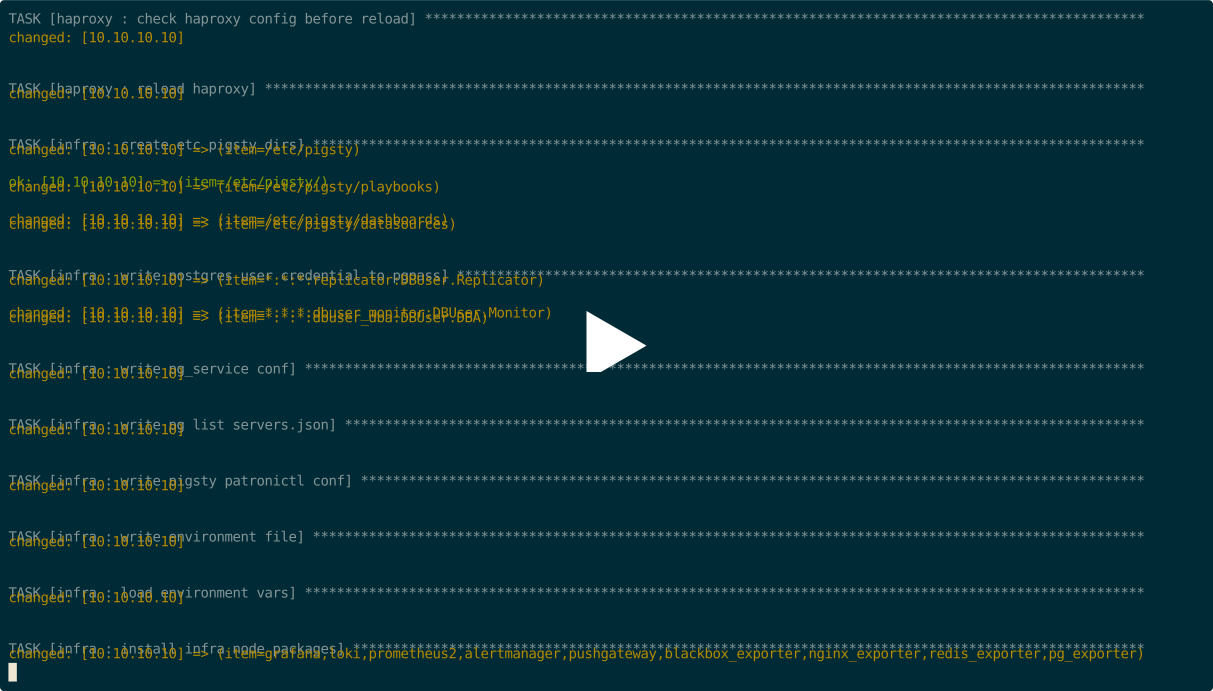
Here’s the list of available tasks in the infra.yml playbook:
infra-rm.yml
The INFRA module playbook infra-rm.yml removes Pigsty infrastructure from Infra nodes defined in the infra group of your config file.
Common subtasks include:
install.yml
The INFRA module playbook install.yml performs a complete one-time installation of Pigsty on all nodes.
This playbook is described in more detail in Playbook: One-Pass Deployment.
Pigsty provides the following two alert rules for the INFRA module:
InfraDown : Infrastructure components are downAgentDown : Monitoring agent is downYou can modify or add new infrastructure alert rules in files/prometheus/rules/infra.yml.
If you accidentally deleted the Prometheus targets dir, you can register monitoring targets to Prometheus again with the:
PGSQL Databases in pg_databases are registered as Grafana datasource by default.
If you accidentally deleted the registered postgres datasource in Grafana, you can register them again with
The haproxy admin page is proxied by Nginx under the default server.
If you accidentally deleted the registered haproxy proxy settings in /etc/nginx/conf.d/haproxy, you can restore them again with
PGSQL cluster/instance domain names are registered to /etc/hosts.d/<name> on infra nodes by default.
You can restore them with the following command:
If you wish to expose a new WebUI service via the Nginx portal, you can add the service definition to the infra_portal parameter.
And re-run ./infra.yml -t nginx_config,nginx_launch to update & apply the Nginx configuration.
If you wish to access with HTTPS, you must remove files/pki/csr/pigsty.csr, files/pki/nginx/pigsty.{key,crt} to force re-generating the Nginx SSL/TLS certificate to include the new upstream’s domain name.
While you can directly access services via IP:Port, we still recommend consolidating access points by using domain names and uniformly accessing various web-based services through the Nginx portal. This approach helps centralize access, reduce the number of exposed ports, and facilitates access control and auditing.
If you wish to expose a new WebUI service through the Nginx portal, you can add the service definition to the infra_portal parameter. For example, here is the config used by the public demo site, which exposes several additional web services:
After completing the Nginx upstream service definition, use the following commands to register the new service with Nginx.
If you wish to access via HTTPS, you must delete files/pki/csr/pigsty.csr and files/pki/nginx/pigsty.{key,crt} to force the regeneration of the Nginx SSL/TLS certificate to include the new upstream domain names. If you prefer to use an SSL certificate issued by an authoritative organization instead of a certificate issued by Pigsty’s self-signed CA, you can place it in the /etc/nginx/conf.d/cert/ directory and modify the corresponding configuration: /etc/nginx/conf.d/<name>.conf.
Pigsty has a built-in wrapper script bin/repo-add, which will invoke Ansible playbook node.yml to add repository files to corresponding nodes.