Extension Catalog
The complete list of <span class="text-lg font-black text-emerald-500">437</span> available PostgreSQL extensions
This is the multi-page printable view of this section. .
Pigsty allows you to harness the synergistic superpower of the Postgres extensions ecosystem with 3 things: Catalog, Repo, and pig.
The complete list of <span class="text-lg font-black text-emerald-500">437</span> available PostgreSQL extensions
The APT/YUM repo that deliver PostgreSQL extensions
The missing package manager for PostgreSQL & Extensions
How to get, install, config, manage these extensions?
There are 437 PostgreSQL extensions in the v3.7.0 catalog. PostgreSQL 18 is the default in v3.7.0.
The per-major figures below are the archive’s PG13–17 compatibility snapshot; the final PG18 breakdown was not recorded in this table. Use the v3.7.0 package aliases and release note for PG18.
| Distro | All | PGDG | PIGSTY | CONTRIB | OTHER | MISS | PG17 | PG16 | PG15 | PG14 | PG13 |
|---|---|---|---|---|---|---|---|---|---|---|---|
| EL | 417 | 119 | 227 | 71 | 0 | 6 | 399 | 407 | 410 | 394 | 368 |
| Debian | 410 | 103 | 236 | 71 | 0 | 13 | 397 | 400 | 403 | 391 | 363 |
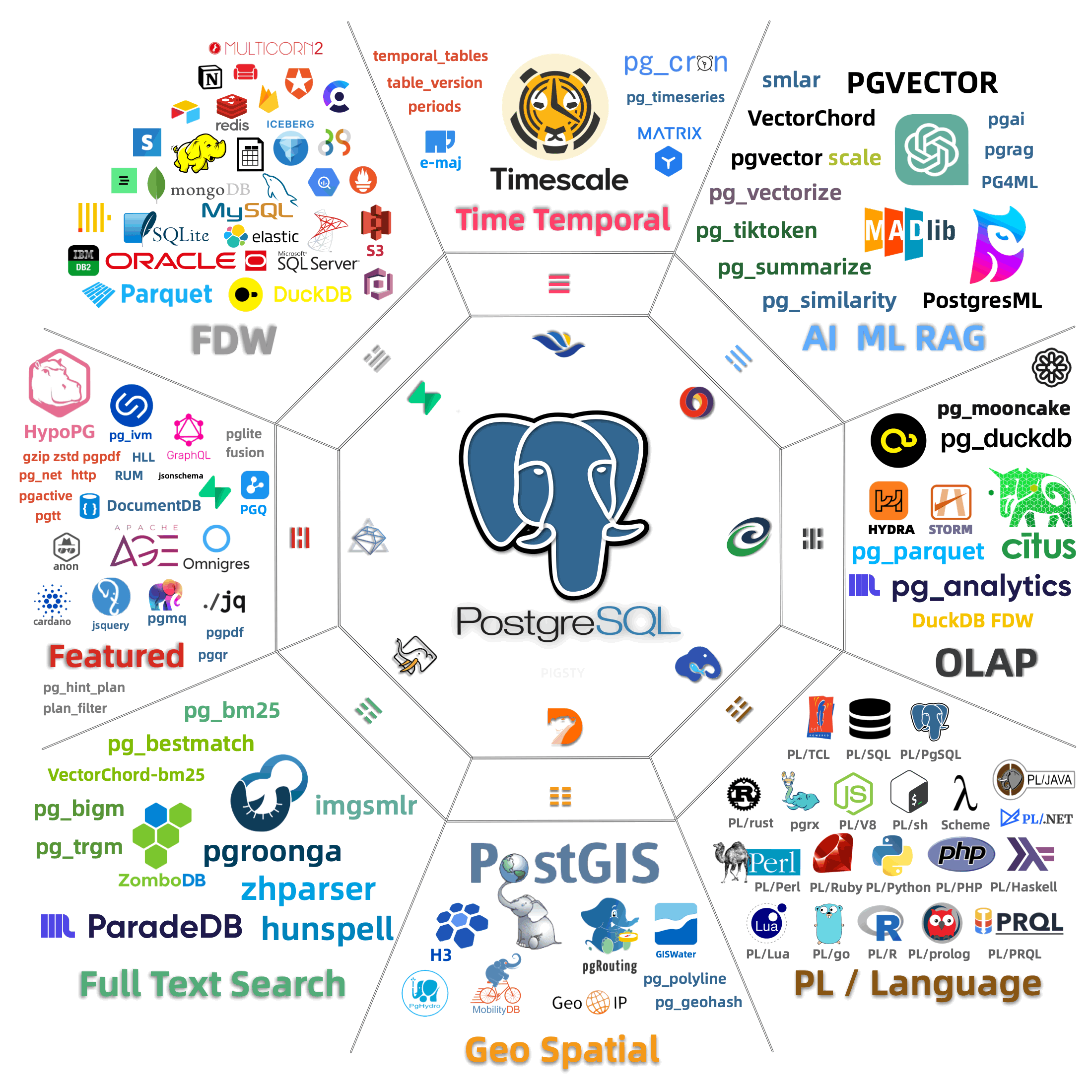
TIME GIS RAG FTS OLAP FEAT LANG TYPE UTIL FUNC ADMIN STAT SEC FDW SIM ETL
MIT ISC PostgreSQL BSD-0 BSD-2 BSD-3 Artistic Apache-2.0 MPL-2.0 GPL-2.0 GPL-3.0 LGPL-2.1 LGPL-3.0 AGPL-3.0 Timescale
Download and install extensions with package alias
Download Extensions from PGDG / Pigsty Repo
Install Postgres Extension Packages
Configure extensions and setup pre-loading
Download Extensions from PGDG / Pigsty Repo
Install Postgres Extension Packages
Configure extensions and setup pre-loading
CREATE Postgres Extension in Database
Upgrade Postgres Extension
Uninstall Postgres Extension
There are unparalleled 437 extensions available in Pigsty for 14 mainstream Linux distros.
It takes 4 steps to deliver an extension: downloads, installs, config, and create:
    [**Download**](#download-extension) : Which extension packages to download

    ```yaml tab="config" title="define which extensions to be downloaded"
    repo_extra_packages: [ postgis, timescaledb, vector ]
    ```
    ```bash tab="apply" title="download package"
    make repo
    ```
    [Install](#install-extension) : Which extensions to be installed

    ```yaml tab="config"
    pg_extensions: [ postgis, pgvector, timescaledb ]
    ```
    ```bash tab="apply"
    ./pgsql.yml -t pg_ext     # install extensions
    ```
    [**Load**](#load-extension) : Which extensions to be pre-loaded

    ```yaml tab="config"
    pg_libs: 'timescaledb, pg_stat_statements, auto_explain'  # add extension to preload libraries (not all extensions need this)
    ```
    ```bash tab="apply" title="edit existing cluster config and reload"
    pg edit-config --force -p shared_preload_libraries='timescaledb, pg_stat_statements, auto_explain'
    ```
    [**Create**](#create-extension) : Create extension in the [database](/docs/pgsql/db)

    ```yaml tab="config"
    pg_databases:
    - { name: meta ,extensions: [ postgis, timescaledb, vector ] }
    ```
    ```sql tab="apply" title="create extension in existing database"
    CREATE EXTENSION postgis CASCADE;
    ```
You can describe extensions in the config inventory, and pigsty will
download, install, configure, and enable extensions for you.
This example makes postgis, pgvector, timescaledb out-of-the-box:
When you init this PG cluster, these extensions will be made available for you in the pg-meta cluster.
Here’s a more complicated example: launch Postgres with required extensions for self-hosting supabase:
All available extensions for PG 17 are downloaded and installed, and required ones are loaded & enabled.
Mange extensions and packages are not that simple, here are two common extension examples:
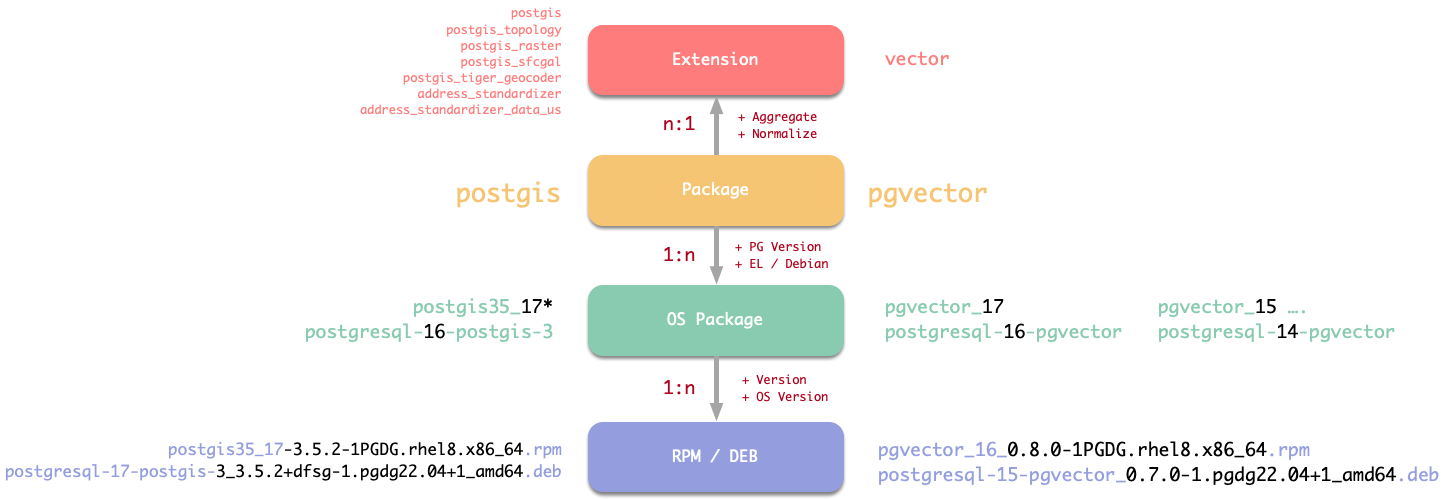
| Entity | Example pgvector |
Example postgis… |
|---|---|---|
| Extension | vector |
postgis, postgis_topology, postgis_raster,… |
| Package | pgvector |
postgis |
| OS PKG | pgvector_18 | postgresql-16-postgis-3 |
| RPM/DEB | pgvector_18_0.8.1-1PGDG.rhel8.x86_64.rpm | postgresql-17-postgis-3_3.5.2+dfsg-1.pgdg22.04+1_amd64.deb |
To install the right RPM / DEB with minimal effort, we need to use the abstract layer: package alias.
So you can install these extensions by specifying the “Normalized” names, like pgvector or postgis.
Without knowing any details about PG & OS version, Arch, Extension versions, and any other details.
Package alias pkg are used for extension download & install, but you’ll have to use the extension name ext when CREATE EXTENSION in the database (like the vector in meta database).
And beware some extensions require explicit preloading, like the timescaledb in the above example.
Besides, all the extensions are categorized into 16 major categories, we also have alias for the entire extension category so that you can download and install them in batch, such as:
All extensions CAN be installed simultaneously, except the olap category, where citus conflict with hydra, and pg_duckdb conflict with pg_mooncake.
So you can download them all, but install one at a time.
In Pigsty, downloading and installing extensions are separate steps. During INFRA module installation, Pigsty downloads all required software to the local machine and creates a local YUM/APT repo for the entire deployment.
This approach accelerates installation, eliminates redundant downloads, removes the need for database nodes to access the internet, reduces network traffic, improves delivery reliability, and ensures consistent versions across your environment - all best practices for production deployments.
For development environments, installing extensions directly from internet repo is also acceptable
Packages defined in repo_packages and repo_extra_packages are automatically downloaded to your local repo during Pigsty installation.
For PostgreSQL-related packages (core and extensions), typically put them in repo_extra_packages while leaving repo_packages with its os-specific global defaults.
The default value for repo_extra_packages is [pgsql-main], an alias representing core PostgreSQL and critical extensions for the current active major version.
To add specific extensions, simply add Pigsty extension package name (pkg) to this parameter. Pigsty automatically downloads the appropriate packages for your active PG version and current OS distro.
To download all available extensions for the current PG version, add all 16 extension category aliases (as in the rich config template):
Alternatively, use version-specific aliases to download extensions for multiple PostgreSQL versions:
To add new extensions to your local repo, modify the parameters above and run:
To refresh the repo metadata on all other nodes in your environment, run:
PostgreSQL has a rich open-source ecosystem with numerous packages across different systems and architectures.
Pigsty provides an abstraction layer that categorizes PostgreSQL packages into “aliases,” hiding differences between systems, architectures, and PG versions.
In the Quick Start section, we used aliases like pgsql-main and pgsql-core. These aliases are translated into specific package names based on your system and architecture. For EL systems, pgsql-main expands to postgresql$v* kernel packages with pgvector_$v*, pg_repack_$v*, and wal2json_$v* extension packages.
The $v placeholder is replaced by the pg_version value (default: 18) to target the correct version. The * wildcard expands to include all package variants (e.g., server, libs, contrib, devel). Pigsty handles these details automatically.
The complete list of available packages and aliases is in roles/node_id/vars/<os_package>.yml. Here are commonly used aliases available across all supported systems:
When using these aliases, the $v placeholder is replaced with the PostgreSQL major version number from pg_version (default: 18).
To download packages for different PostgreSQL versions, either:
pg_version parameter, orpgsql- prefix with pg18-, pg17-, pg16-, etc.Not all extensions are available on all systems. Some extensions are commented out in the aliases because they:
pl/R)oracle_fdw)You can still manually add these extensions if needed.
Pigsty piggyback on standard OS package managers (yum/apt) to install PostgreSQL extensions.
When installing extensions, Pigsty uses the same alias mapping in the download section.
Install all extensions explicitly specified in the pg_extensions parameter, for the cluster pg-meta:
Or install all extensions by category aliases globally:
You can also specify the PG major version explicitly in these alias:
Install all extensions simultaneously is applicable (except two conflicts in the olap category) but not recommended. Just install the extensions you need by explicitly specifying them in the pg_extensions parameter.
During PGSQL cluster init, Pigsty will automatically install packages (& alias) specified in pg_packages and pg_extensions.
Both parameters can be used to install PostgreSQL-related packages. Typically, pg_packages is used to globally specify packages that should be installed across all PostgreSQL clusters in your environment: such as the PostgreSQL kernel, high-availability agent like Patroni, connection pooling with pgBouncer, monitoring with pgExporter, etc.
By default, Pigsty also specifies 3 important extensions here: pgvector, pg_repack, and wal2json for vector search, bloat management, and CDC change extraction.
Meanwhile, pg_extensions is usually used to specify extension for a specific cluster. The default is an empty list, indicating no other extensions will be installed by default.
An important distinction: packages installed via pg_packages are merely ensured to be present, whereas those installed via pg_extensions are automatically upgraded to the latest available version.
When using a local software repo, this distinction isn’t an issue. However, when using upstream internet repo, consider this carefully and move extensions you don’t want automatically upgraded to pg_packages.
Extensions pre-defined in the pg_extensions (and pg_packages) will be installed during cluster provisioning.
To install new extensions on a provisioned PostgreSQL cluster:
First, add extensions to pg_extensions, then execute the playbook subtask:
Note that extension plugins specified in the pg_extension task will be upgraded to the latest available version in your current environment by default.
To install extension, you need to ensure one of the following conditions is met:
For production environments, we recommend using Pigsty’s local software repo to manage and install extensions uniformly: First download extensions to the local repo, then install them from there. This ensures consistent extension versions across your environment and prevents database nodes from directly accessing the internet. You have to do nothing when installed from local repo, just make sure they are downloaded to the local repo.
For development environments, you may choose to directly use upstream internet repo for convenience. Use the following commands to add Internet repo and install extensions on the target cluster directly:
When installing extensions, users can use extension aliases to specify extension.
The aliases will be translated to the current active PG major version and OS environment.
and translated to the corresponding RPM/DEB package names by alias translation mechanism.
citus and hydra are mutually exclusive, since hydra is a fork of citus columnar without renamingpg_duckdb, pg_mooncake, duckdb_fdw, they all use their own libduckdbpgaudit got a different naming pattern on el for pg 15-: pg16+ = pgaudit, pg15=pgaudit17, pg14=pgaudit16 pg13=pgaudit15 pg12=pgaudit14postgis got its own version in el package name: postgis35 by default, and postgis33 for legacy el7While most PostgreSQL extensions written in SQL can be directly enabled with CREATE EXTENSION, some extensions that use special postgres hook will require an extra step to preload them before using.
Most extensions have one or more corresponding dynamic library (.so, .dylib, .dll), some of them require preloading before using.
Attempting to CREATE these extensions without proper preloading will result in an error.
And a wrongly configured preload library may lead to a failure on database restart/start.
Some extensions can partially work without preloading, which means part of the extension features are available directly, and the rest of the features are available after preloading.
To preload an extension, add it to the shared_preload_libraries and restart the database server.
The Extension Catalog gives the complete list of extensions that require dynamic preloading.
To configure a preload on new postgres cluster, the pg_libs parameter can be used.
It will be populated to the shared_preload_libraries parameter during postgres cluster bootstrap.
This example show how to specify pre-loaded extensions with pg_libs parameter.
shared_preload_libraries is a comma-separated list of extensions.
Beware that only works before cluster creation. After that,
you’ll have to config cluster to change the shared_preload_libraries parameter on existing cluster. (with patronictl, ALTER SYSTEM, etc…)
If you want to configure preloading manually, you can just change the postgresql.conf by yourself
The default value of pg_libs is pg_stat_statements, auto_explain,
which preload these two Contrib extensions by default, these two extensions provide essential observability:
auto_explain: Automatic logging of slow query execution planspg_stat_statements: Tracks planning and execution statistics for grouped SQL statementsPreload libraries are loaded one by one, so the order of extensions in shared_preload_libraries matters,
Here are some known rules to follow:
pg_stat_statements to ensure using the same query_id.timescaledb and citus should be placed at the BEGINNING of shared_preload_librariescitus and timescaledb together, place citus before timescaledb.pg_documentdb and pg_documentdb_core as library name for documentdb.pg_search does not require preloading in PostgreSQL 17 and later, but earlier versions do.Some extensions have configurable parameters, you can manage them in different places.
pg_parameters: write to /pg/data/postgresql.auto.confConsult the official docs of each extension for details.
You can enable (create) extension using the CREATE EXTENSION statement:
Extensions need to be installed first, some extension also requires preloading before using.
Some extensions have dependencies on other extensions.
In such cases, you can either install the dependencies first
or use the CASCADE clause to install all dependencies at once.
You can also provision extension with Pigsty, which will automatically create the extensions for you.
Extensions (database logical objects) are logically part of PostgreSQL databases.
In Pigsty, you can specify which extensions to be created in a database with pg_databases parameter.
But you can explicitly specify extension details with the object format, like create them in a specific schema.
Or install a specific version. Here’s a complete example (self-hosting supabase):
The extensions field is a list of extension (name or object) to be created in the database.
It will be created under the first schema in dbsu’s search_path, (usually the public schema).
Here, the extensions in the database object is a list where each element can be:
vectorname: Extension name, REQUIRED, beware it may differ from the extension package name.schema: Schema for installing the extension, OPTIONAL, defaults to the first schema in the current dbsu search path, usually the default public.version: Specifies the extension version, OPTIONAL, defaults to the latest version, rarely used.If the database doesn’t exist yet, the extensions defined here will be automatically created when creating a cluster or creating a database through Pigsty.
Re-creating database with non-trivial baseline schema may be dangerous (if you put some DROP there)
So for existing clusters / databases, it’s advised to use your own schema migration tool to manage extensions. (pgadmin, psql, bytebase, flyway, sqlitch,…)
But it’s helpful to enlist them in the config inventory for bookkeeping purposes. (So if you want to fork this cluster, it includes these extensions)
Some built-in extensions and one special pg_repack are created by default in Pigsty.
These extensions are defined by pg_default_extensions, created in the template1 database and the postgres database by default.
Newly created databases will inherit these extensions from template1, so you don’t need to create them again.
One extra default schema monitor is defined by pg_default_schemas is also created by default.
Which is used to contain monitoring related extensions, tables, functions and views.
There are three 3rd-party extensions that are available by default in Pigsty:
| Extension | What | Where |
|---|---|---|
pg_repack |
Online Bloat Control Tools | in the pg_default_extensions |
wal2json |
Changing data capture in JSON | extension without DDL, install means available |
vector |
vector data type & indexes | in pg_databases as an example |
The pg_repack extension is an important utility for maintaining bloat tables online.
vector is a very popular extension for RAG,
It is installed by default (in the pgsql-main alias) and created in the placeholder meta database in most config template.
The wal2json is another important extension for Changing Data Capture (CDC). It is installed by default, but it is an extension without DDL,
So you don’t need to CREATE it explicitly.
Extension without DDL does not require the CREATE EXTENSION command to work
PostgreSQL extensions typically consist of three parts: a required control file, optional SQL files, and optional libraries.
If an extension does not have SQL file, CREATE EXTENSION command is not needed.
| Component | Description | Required |
|---|---|---|
| Control file | Key metadata, name, dependencies, schema, version,… | REQUIRED |
| SQL file | SQL DDL statements, Types, Functions, etc… | OPTIONAL |
| Library file | binary shared libraries (.so, .dylib, .dll) |
OPTIONAL |
Since SQL / LIB files are optional, there are four possible combinations of extension types:
| LOAD / DDL | Requires CREATE EXTENSION |
Doesn’t require CREATE EXTENSION |
|---|---|---|
Requires LOAD |
Extensions using hooks | Headless extensions |
Doesn’t Require LOAD |
Extensions not using hooks | Logical decoding output plugins |
To update an existing extension, you need to first update the RPM/DEB package with your OS’s package manager,
then alter the extension to the new version in PostgreSQL with ALTER EXTENSION ... UPDATE.
You can upgrade extension packages with the following commands
All extensions listed in pg_extensions will be upgraded using during the pgsql.yml playbook execution.
Extensions (Package Alias) listed in pg_extensions will be upgraded with pgsql.yml’s pg_ext subtask:
This playbook will automatically install the latest available version of extension RPM/DEB packages in your current environment.
(from built local repo or via Internet directly).
You can also upgrade extensions with linux system’s yum/apt upgrade command directly, but you need to specify the full package names:
Pigsty’s pig cli can also help you with that, without the burden of specifying full package names:
Execute the ALTER EXTENSION ... UPDATE SQL command to update the extension to the new version:
If the TO new_version clause is omitted, the extension will be updated to the latest version available.
To uninstall an extension, you typically need to run the DROP EXTENSION SQL statement:
If other extensions or database objects depend on this extension, you’ll need to remove those dependencies first before uninstalling the extension.
Or remove all of them with CASCADE option:
The CASCADE option will delete all objects that depend on this extension,
including database objects, functions, views, etc. Use with caution!
Some extensions don’t have DDL, these extensions do not require the DROP EXTENSION statement to uninstall.
Instead, you can simply remove the extension from the shared_preload_libraries (if configured) and uninstall the package.
Refer to the Extensions Without DDL section for more details.
If you’re using an extension that requires dynamic loading (which modifies the shared_preload_libraries parameter), you need to first re-confnigure the shared_preload_libraries parameter.
Remove the extension name from shared_preload_libraries and restart the database cluster for the changes to take effect.
For extensions that need dynamic loading, refer to the Extensions that Need Loading list.
After removing the extension (logical object) from all databases in the cluster, you can safely uninstall the extension’s software package. Ansible commands can help you do this conveniently:
You can also use pig, or apt/yum commands directly to uninstall.
If you don’t know the extension package name, you can refer to the Extension List or check the extension package name mapping defined in roles/node_id/vars.