# PG 扩展
> 获得 437 个开箱即用的扩展
---
Pigsty 允许您通过三个组件来利用 PostgreSQL 扩展生态系统的协同超能力:
- [**目录**](https://pgext.cloud/list):查找您需要的扩展,包含无与伦比的 437 个扩展
- [**仓库**](https://pgext.cloud/repo):为 10 个主流 Linux 操作系统获取预制的 RPM/DEB 包
- [**包管理器**](https://pgext.cloud/pig):使用单个命令安装一切 - `pig`
另外查看我们的博客文章:[PostgreSQL is eating the Database World](https://medium.com/@fengruohang/postgres-is-eating-the-database-world-157c204dcfc4)
[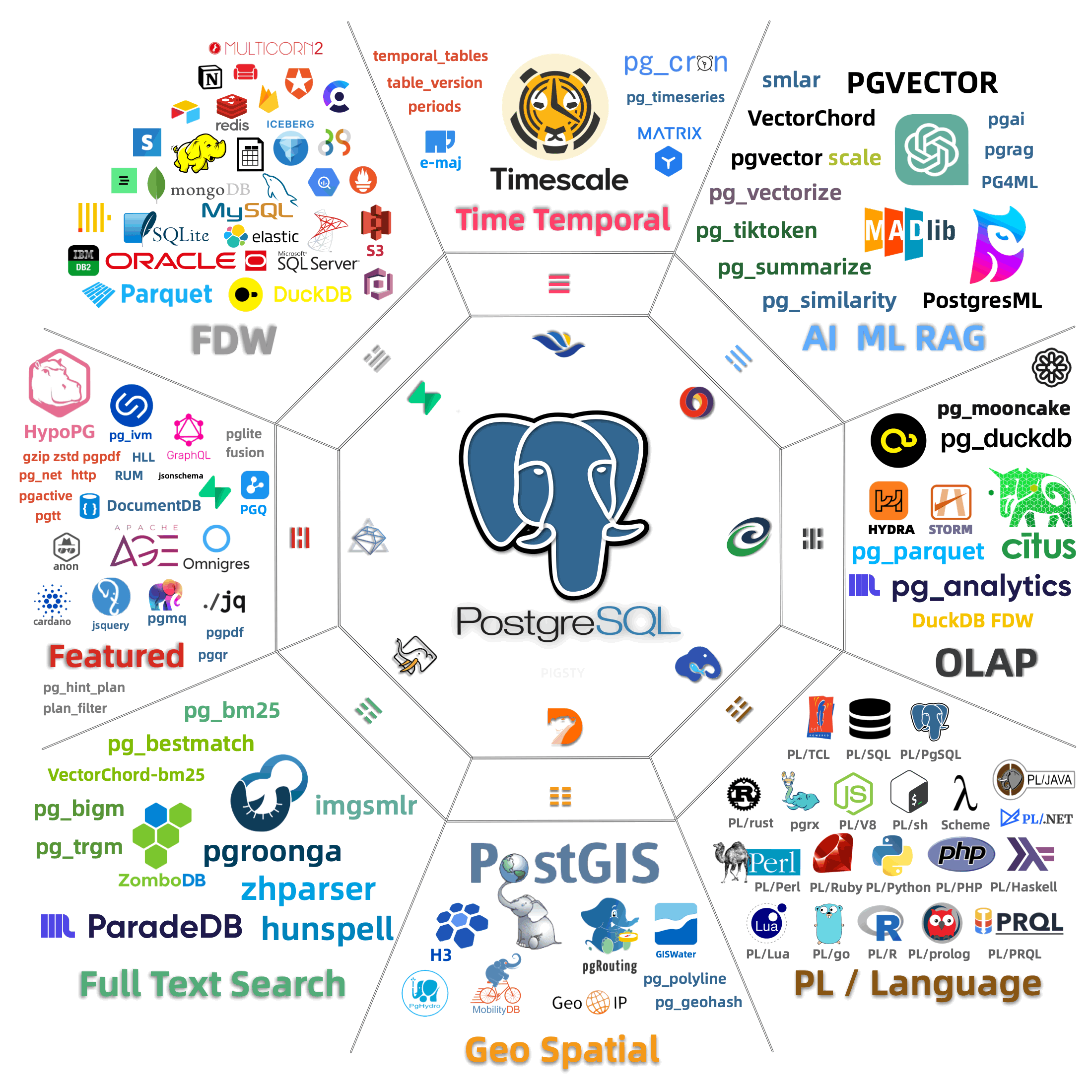](https://medium.com/@fengruohang/postgres-is-eating-the-database-world-157c204dcfc4)
--------
## 扩展 {#extensions}
TIME
GIS
RAG
FTS
OLAP
FEAT
LANG
TYPE
UTIL
FUNC
ADMIN
STAT
SEC
FDW
SIM
ETL
| 类别 | 数量 | 描述 |
|:---------|:-----:|:------------|
| TIME | 11 | TimescaleDB、版本控制与时态表、Crontab、异步与后台作业调度器 |
| GIS | 20 | 地理空间数据类型、操作符和索引、六边形索引、OGR 数据 FDW、GeoIP 与 MobilityDB |
| RAG | 10 | 具有 IVFFLAT、HNSW、DiskANN 索引的向量数据库、SQL 接口中的 AI 和 ML、相似性函数 |
| FTS | 20 | ElasticSearch 替代品,具有 BM25、2-gram/3-gram 模糊搜索、Zhparser 与 Hunspell 分词词典 |
| OLAP | 13 | DuckDB 与 FDW 和 PG Lakehouse 集成、从文件/S3 访问 Parquet、使用 Citus/Partman/PlProxy 分片 |
| FEAT | 56 | AGE 的 OpenCypher、GraphQL、JsonSchema、Hints 与 Hypo Index、HLL、Rum、IVM、ChemRDKit 和消息队列 |
| LANG | 31 | 开发、测试、打包和交付用各种 PL/语言编写的存储过程:Java、Js、Lua、R、Sh、PRQL |
| TYPE | 37 | 专用新数据类型如:prefix、sember、uint、SIUnit、RoaringBitmap、Rational、Sphere、Hash、RRule |
| UTIL | 31 | 实用工具如发送 HTTP 请求、执行 gzip/zstd 压缩、发送邮件、正则表达式、ICU、编码、文档、加密 |
| FUNC | 43 | 函数如 ID 生成器、聚合、草图、向量函数、数学函数和摘要函数 |
| ADMIN | 36 | 膨胀控制、脏读、缓冲区检查、DDL 生成、校验和验证、权限、优先级、目录的实用工具 |
| STAT | 34 | 可观测性目录、监控指标和视图、统计、查询计划、等待采样、慢日志 |
| SEC | 26 | 审计日志、强制密码、保持机密、TDE、SM 算法、登录钩子、日志错误、扩展白名单 |
| FDW | 22 | FDW 开发的包装器和 Multicorn、访问其他 DBMS:MySQL、Mongo、SQLite、MSSQL、Oracle、HDFS、DB2 |
| SIM | 16 | 协议模拟和异构 DBMS 兼容性:Oracle、MSSQL、DB2、MySQL、Memcached 和 Babelfish |
| ETL | 17 | 逻辑复制、解码、protobuf/JSON/Mongo 格式的 CDC、复制和加载及比较 Postgres 数据库 |
--------
## 仓库 {#repository}
Pigsty 有一个仓库,在 10 个主流 [Linux 发行版](/zh/docs/prepare/linux/) 上提供 200+ 个额外的 PostgreSQL 扩展。
它被设计为与官方 PostgreSQL 全球开发组([PGDG](https://www.postgresql.org/download/linux/))仓库一起工作。
您可以使用 [pig](https://pgext.cloud/pig) CLI 工具启用 pigsty infra 和 pgsql 仓库,或手动将它们添加到您的系统:
```bash tab="pig"
curl https://repo.pigsty.io/pig | bash # 下载并安装 pig CLI 工具
pig repo add all -u # 添加 linux、pgdg、pigsty 仓库并更新缓存
```
```bash tab="apt"
# 将 Pigsty 的 GPG 公钥添加到您的系统密钥链以验证包签名
curl -fsSL https://repo.pigsty.io/key | sudo gpg --dearmor -o /etc/apt/keyrings/pigsty.gpg
# 获取 Debian 发行版代号(distro_codename=jammy、focal、bullseye、bookworm),并将相应的上游仓库地址写入 APT List 文件
distro_codename=$(lsb_release -cs)
sudo tee /etc/apt/sources.list.d/pigsty-io.list > /dev/null </dev/null
# 将 Pigsty 仓库定义文件添加到 /etc/yum.repos.d/ 目录,包括两个仓库
sudo tee /etc/yum.repos.d/pigsty-io.repo > /dev/null <<-'EOF'
[pigsty-infra]
name=Pigsty Infra for $basearch
baseurl=https://repo.pigsty.io/yum/infra/$basearch
skip_if_unavailable = 1
enabled = 1
priority = 1
gpgcheck = 1
gpgkey=file:///etc/pki/rpm-gpg/RPM-GPG-KEY-pigsty
module_hotfixes=1
[pigsty-pgsql]
name=Pigsty PGSQL For el$releasever.$basearch
baseurl=https://repo.pigsty.io/yum/pgsql/el$releasever.$basearch
skip_if_unavailable = 1
enabled = 1
priority = 1
gpgcheck = 1
gpgkey=file:///etc/pki/rpm-gpg/RPM-GPG-KEY-pigsty
module_hotfixes=1
EOF
# 刷新 YUM/DNF 仓库缓存
sudo yum makecache;
```
所有 RPM / DEB 包都使用 Pigsty 仓库中的 [GPG 密钥](https://pgext.cloud/repo/gpg) 指纹(`B9BD8B20`)签名。
--------
## 包管理器 {#package-manager}
"Postgres 安装天才,PostgreSQL 生态系统缺失的扩展包管理器"
在几秒钟内 [开始使用](https://pgext.cloud/pig/start) PIG:
```bash tab="default"
curl -fsSL https://repo.pigsty.io/pig | bash
```
```bash tab="mirror"
curl -fsSL https://repo.pigsty.cc/pig | bash
```
然后就可以使用了,假设您想安装 [**`pg_duckdb`**](https://pgext.cloud/e/pg_duckdb/) 扩展:
```bash
$ pig repo add pigsty pgdg -u # 添加 pgdg 和 pigsty 仓库,然后更新仓库缓存
$ pig ext install pg18 # 使用原生 PGDG 包安装 PostgreSQL 18 内核
$ pig ext install pg_duckdb # 安装 pg_duckdb 扩展(用于当前的 pg18)
```