PostgreSQL Enterprise
Create self-healing High-Available PG clusters without hassle, with pre-configured Point-In-Time-Recovery, ACL, CA, SSL...
This is the multi-page printable view of this section. .
Pigsty (/ˈpɪɡ staɪ/) is a Battery-Included, FOSS PostgreSQL Distribution as a Local-First RDS Alternative.
Create self-healing High-Available PG clusters without hassle, with pre-configured Point-In-Time-Recovery, ACL, CA, SSL...
Declare your entire infra with code, and setup everything PG needs from Bare OS: LB, Nginx, NTP, DNS, Local Repo, etc...
Unparalleled monitoring best practices built upon modern Prometheus & Grafana observability stacks out-of-the-box
<span class="text-red-800 font-bold">437</span> PGSQL Extensions battery-included! Alone with forks: Babelfish, Oriole, IvorySQL, OpenHalo, PolarDB, Supabase,...
Pigsty provides everything you’ll need for self-hosting an enterprise-grade PostgreSQL Service even without expertise.
Just use PostgreSQL for EVERYTHING, and Self-Hosting PostgreSQL Like a Pro!
Read our in-depth What is Pigsty introduction.
PostgreSQL is eating the database world, and it is becoming the Linux kernel of the database world.
But where are the distributions?
Nowadays, people use OS distributions like Ubuntu, Debian, and RHEL, rather than the raw Linux kernel directly. You’ll need a lot of components to build a practical operating system, such as systemd, cron, NTP, DNS, logging, …, to make the raw Linux kernel usable.
The linux kernel is several MB in size, but a full OS DVD can easily take up 10+GB, including all the necessary parts and software packages. That’s what a PostgreSQL Distribution is all about —— Gives you everything to build a production-grade Database Service.
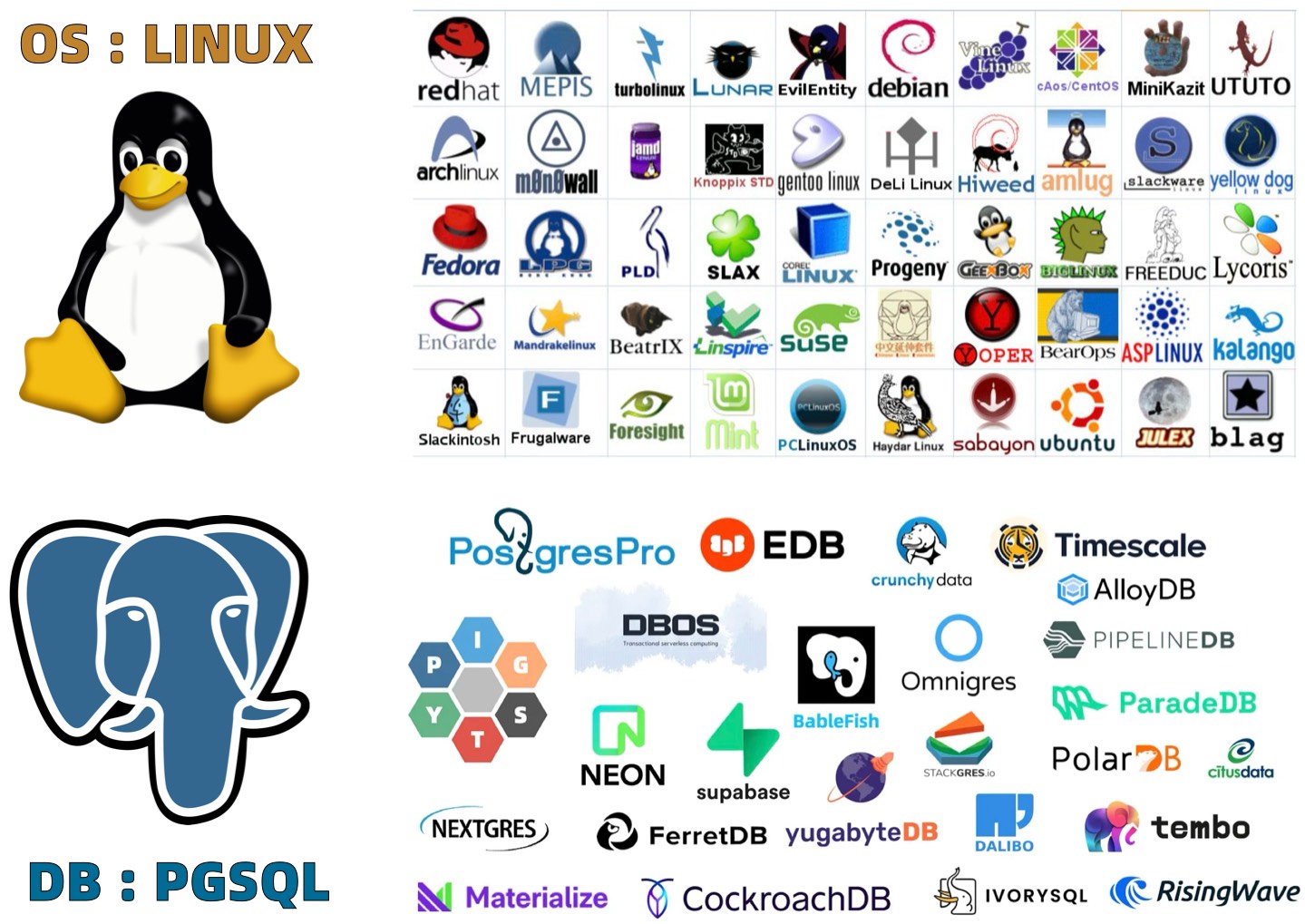
We have two things to forge a powerful PostgreSQL distribution: Extensions and Services.
There are 1000+ extensions in the PostgreSQL ecosystem. But only 100 of them are accessible via the “Official” PGDG Repositories.
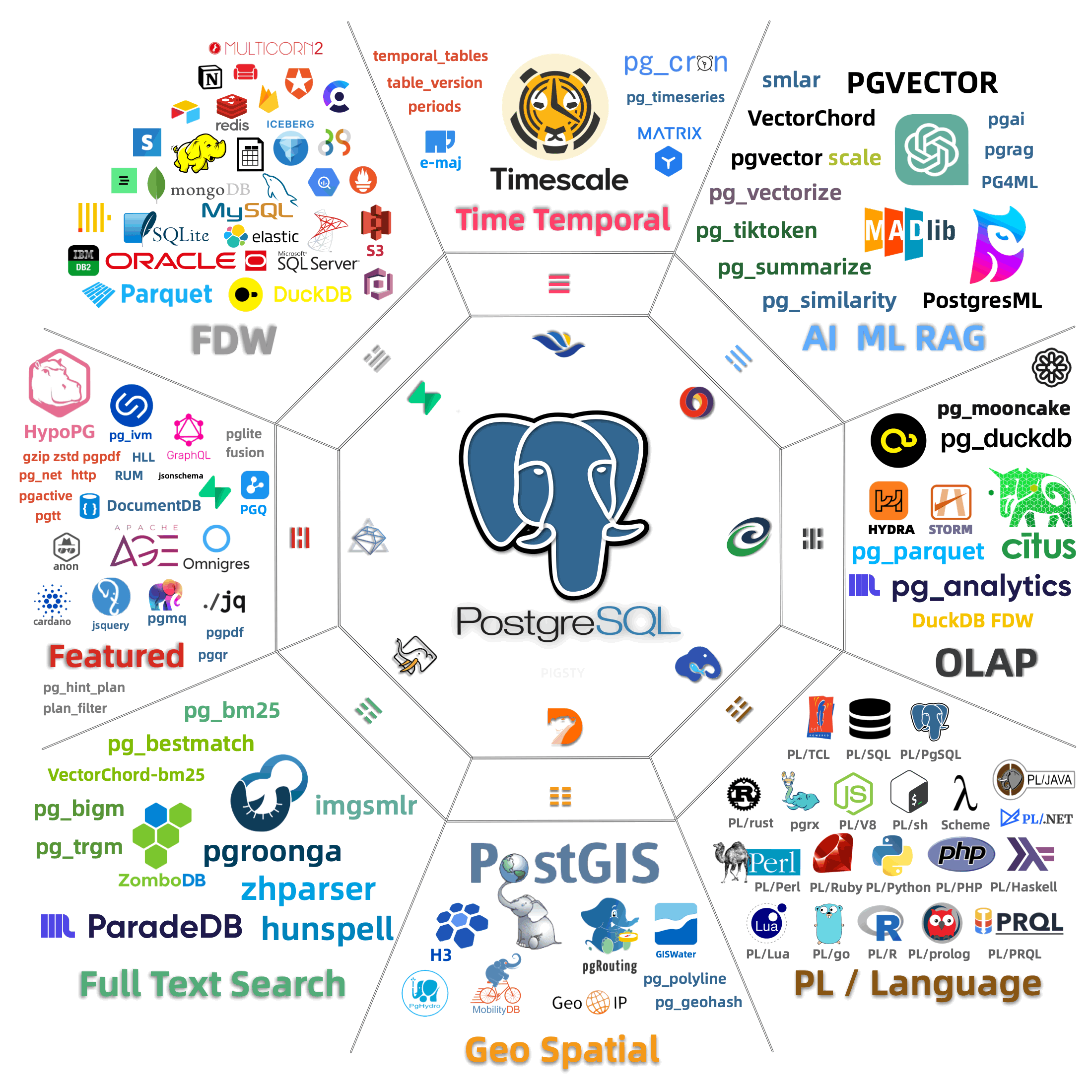
So we packed the most popular and useful extensions into pre-made RPM/DEB packages for 10 linux distributions and 5 PG Major version. Now there are unparalleled 422 extensions available out-of-the-box, and we will continue to add more extensions in the future.
What’s more, we even have support for 8 flavors of PostgreSQL kernels (ext, fork, wrapper, etc.), including:
| Kernel | Key Feature | Description |
|---|---|---|
| Citus | Horizontal Scaling | Native Distributive PostgreSQL |
| WiltonDB | SQL Server Migration | SQL Server wire-compatibility |
| IvorySQL | Oracle Migration | Oracle Grammar and PL/SQL compatible |
| OpenHalo | MySQL Migration | MySQL wire-protocol compatibility |
| FerretDB | MongoDB Migration | MongoDB wire-protocol compatibility |
| OrioleDB | OLTP Optimization | Zheap, No bloat, S3 Storage |
| PolarDB PG | Aurora flavor RAC | RAC, China domestic compliance |
| Supabase | Backend as Service | BaaS based on PostgreSQL, Firebase alternative |
| Greenplum | Analytics/DW | Massively parallel processing database warehouse |
You can get started with raw PostgreSQL kernel easily like systemctl start postgresql, but it’s far away from production grade service.
That’s the main reason why people pay 160 $ / vCPU·Month for a managed PostgreSQL service like AWS RDS.
But what if you can just build an enterprise-grade PostgreSQL service on your own, with a few commands, and no license fees? Pigsty enables you to do that. It gives you HA PostgreSQL clusters with PITR, Monitoring & Alerting, Connection Pooling, along with
You can get started with raw PostgreSQL kernel easily like systemctl start postgresql, but it’s far away from production grade service.
That’s the main reason why people pay 160 $ / vCPU·Month for a managed PostgreSQL service like AWS RDS. and even pay more for traditional “enterprise” database services.
The expertise of Building and Managing Production-Grade PostgreSQL Service is rare and expensive.
But what if you can just build an enterprise-grade PostgreSQL service on your own, with a few commands, and no license fees? Pigsty enables you to do that. It gives you HA PostgreSQL clusters with PITR, Monitoring & Alerting, Connection Pooling, along with
It’s all starts from a few commands, and you can build a production-grade PostgreSQL service on your own, without the need for expensive licenses or expertise.
Modular Architecture and Declarative Interface!
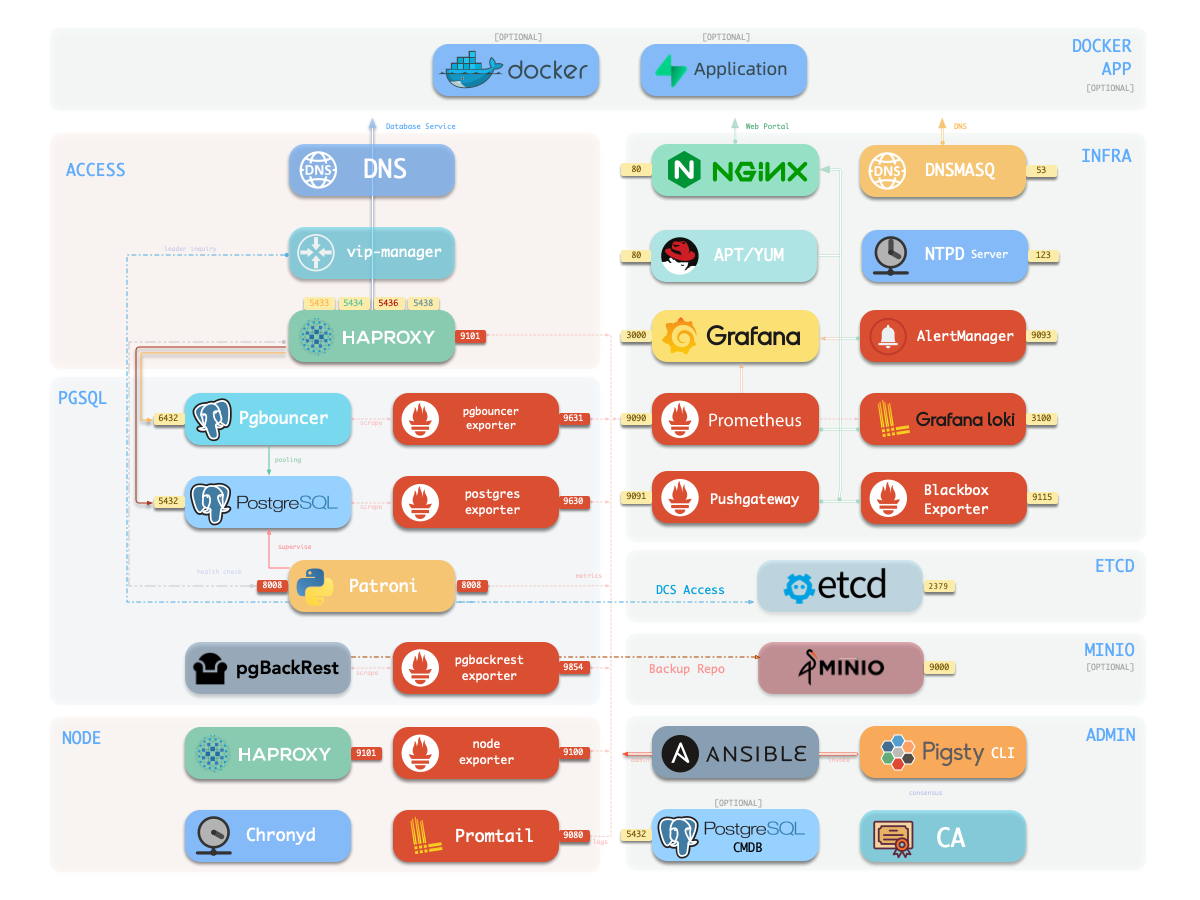
Pigsty uses a modular design, and there are six default modules: PGSQL, INFRA, NODE, ETCD, REDIS, and MINIO.
PGSQL: Autonomous HA Postgres cluster powered by Patroni, Pgbouncer, HAproxy, PgBackrest, etc…INFRA: Local yum/apt repo, Prometheus, Grafana, Loki, AlertManager, PushGateway, Blackbox Exporter…NODE: Tune node to desired state, name, timezone, NTP, ssh, sudo, haproxy, docker, promtail, keepalivedETCD: Distributed key-value store will be used as DCS for high-available Postgres clusters.REDIS: Redis servers in standalone master-replica, sentinel, cluster mode with Redis exporter.MINIO: S3 compatible simple object storage server, can be used as an optional backup center for Postgres.You can compose them freely in a declarative manner. If you want host monitoring, INFRA & NODE will suffice. Additional ETCD and PGSQL are used for HA PG Clusters. Deploying them on multiple nodes will form an HA cluster. You can reuse pigsty infra and develop your modules, considering optional REDIS and MINIO as examples.
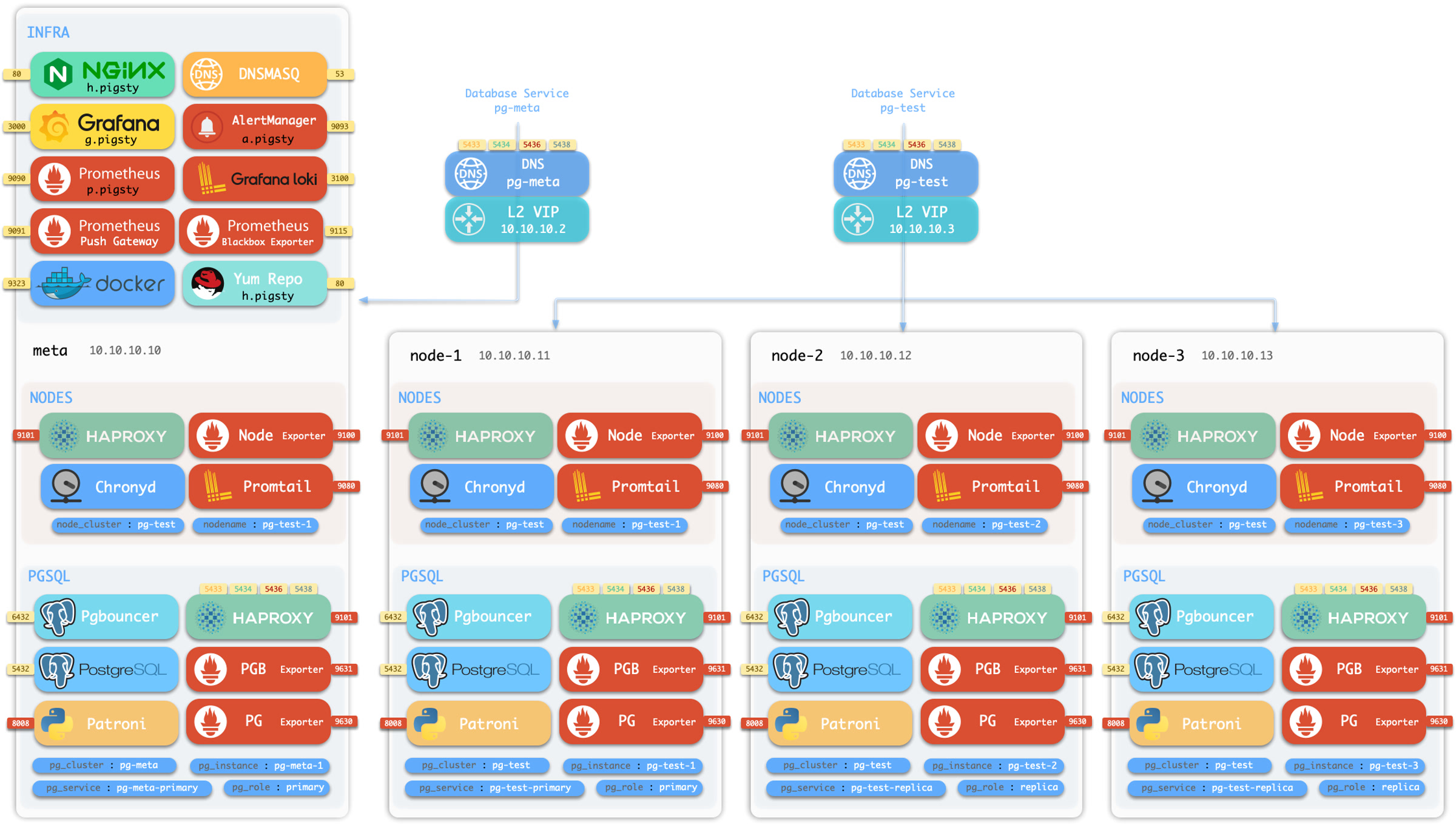
Pigsty will install on a single node (BareMetal / VirtualMachine) by default. The install.yml playbook will install INFRA, ETCD, PGSQL, and optional MINIO modules on the current node, which will give you a full-featured observability infrastructure (Prometheus, Grafana, Loki, AlertManager, PushGateway, BlackboxExporter, etc… ) and a battery-included PostgreSQL Singleton Instance (Named meta).
This node now has a self-monitoring system, visualization toolsets, and a Postgres database with autoconfigured PITR. You can use this node for devbox, testing, running demos, and doing data visualization & analysis. Or, furthermore, adding more nodes to it!
The installed Singleton Meta can be used as an admin node and monitoring center, to take more nodes & Database servers under it’s surveillance & control.
If you want to install the Prometheus / Grafana observability stack, Pigsty just deliver the best practice for you! It has fine-grained dashboards for Nodes & PostgreSQL, no matter these nodes or PostgreSQL servers are managed by Pigsty or not, you can have a production-grade monitoring & alerting immediately with simple configuration.
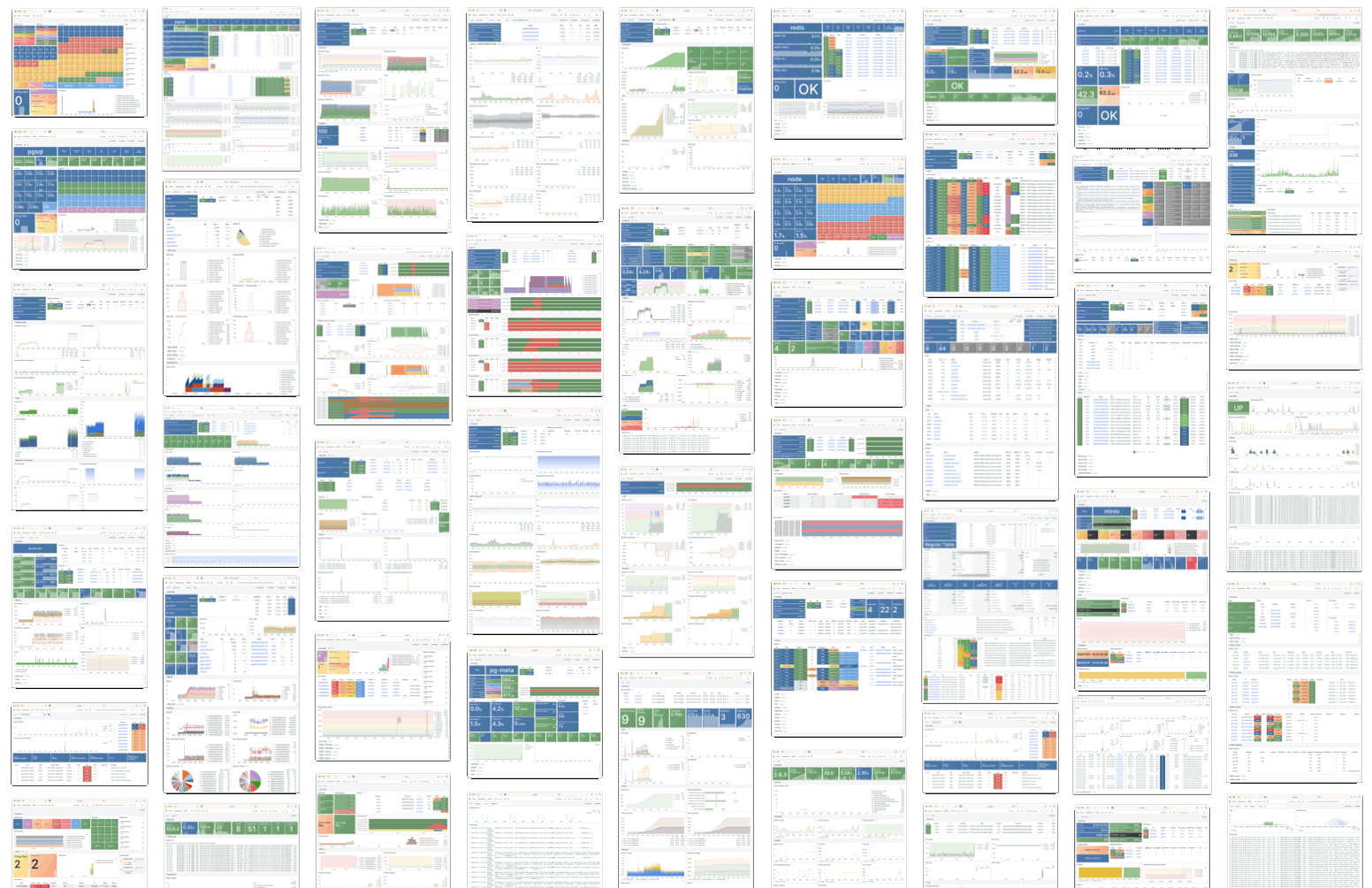
With Pigsty, you can have your own local production-grade HA PostgreSQL RDS as much as you want.
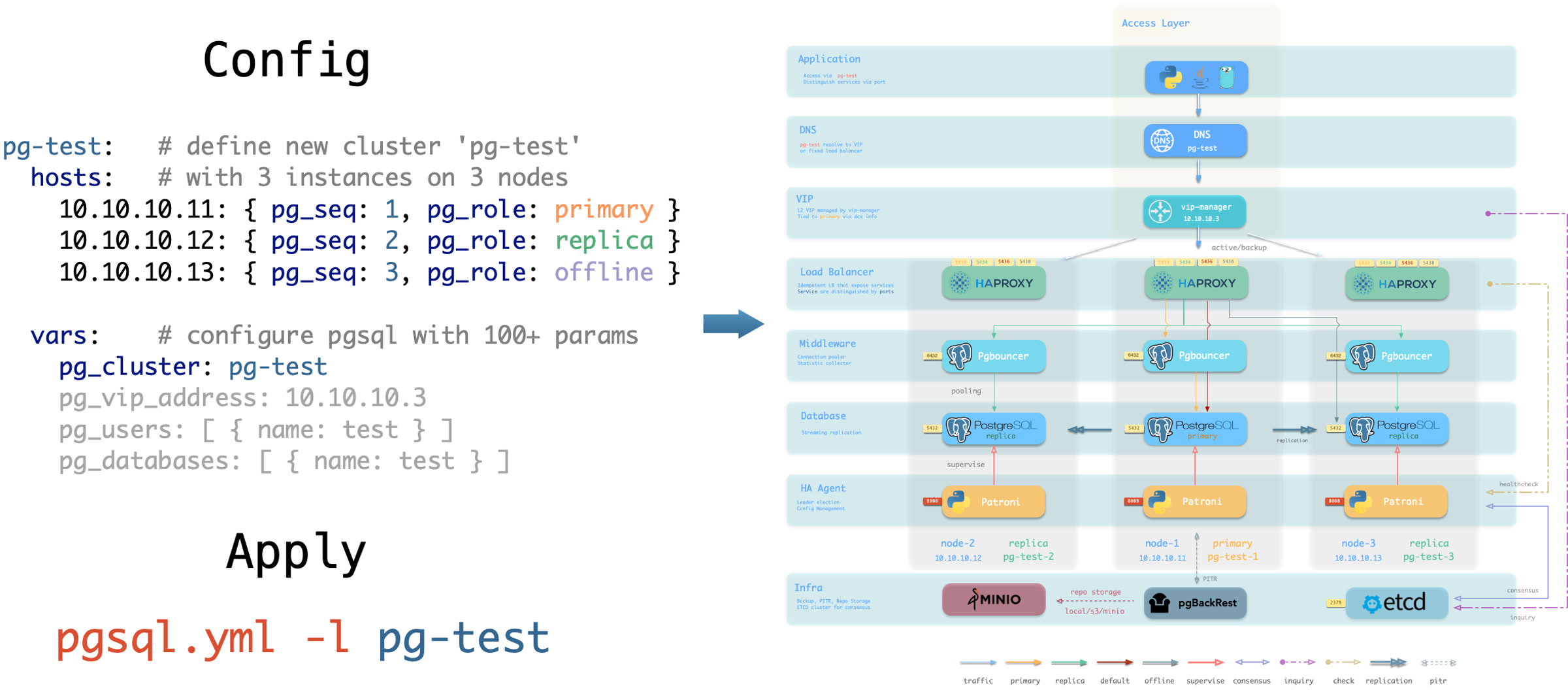
And to create such a HA PostgreSQL cluster, All you have to do is describe it & run the playbook:
Which will give you the following cluster with monitoring, replica, backup all set.
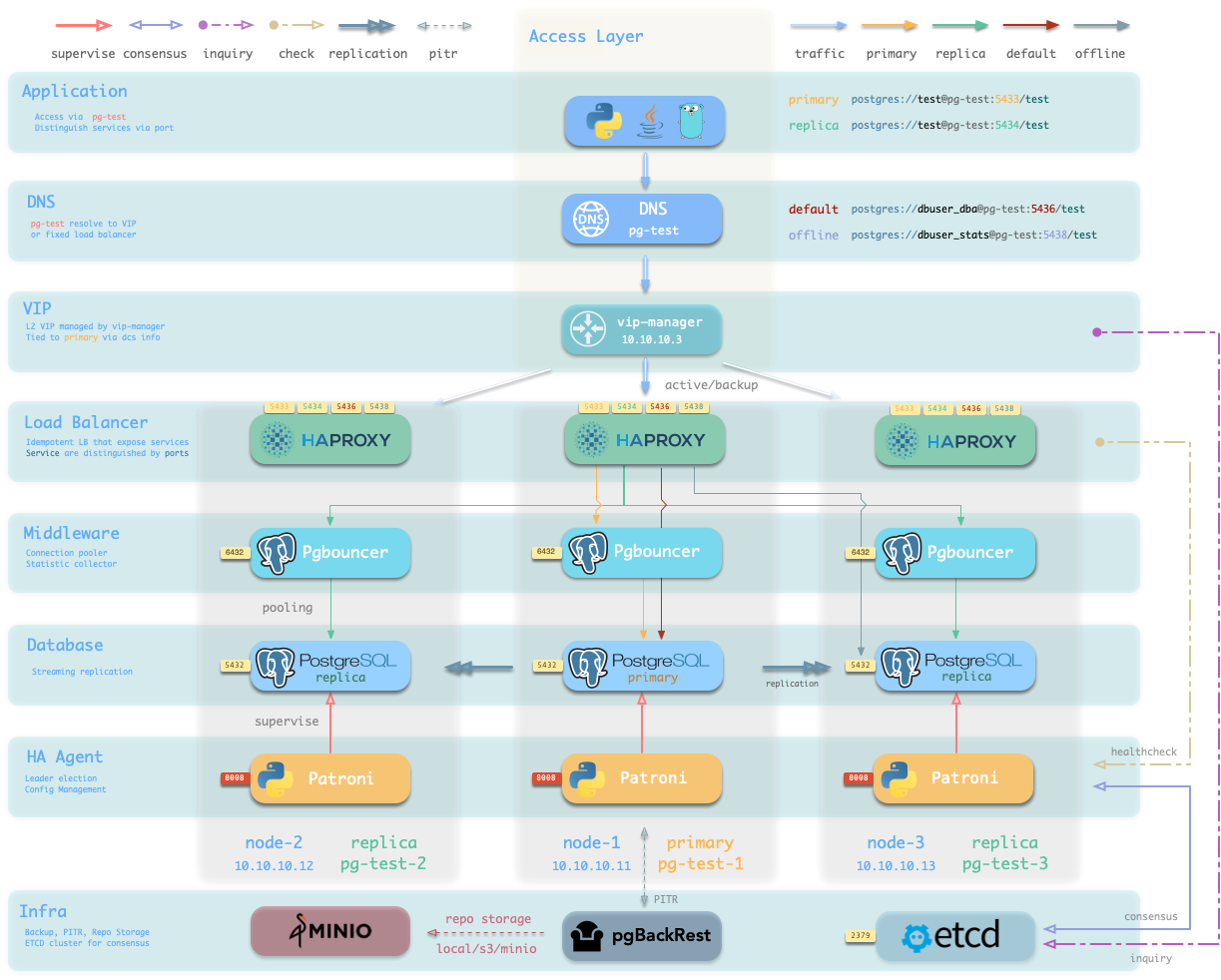
Hardware failures are covered by self-healing HA architecture powered by patroni, etcd, and haproxy, which will perform auto failover in case of leader failure under 30 seconds. With the self-healing traffic control powered by haproxy, the client may not even notice there’s a failure at all, in case of a switchover or replica failure.
Software Failures, human errors, and DC Failure are covered by pgbackrest, and optional MinIO clusters. Which gives you the ability to perform point-in-time recovery to anytime (as long as your storage is capable)
Pigsty follows IaC & GitOPS philosophy: Pigsty deployment is described by declarative Config Inventory and materialized with idempotent playbooks.
The user describes the desired status with Parameters in a declarative manner, and the playbooks tune target nodes into that status in an idempotent manner. It’s like Kubernetes CRD & Operator but works on Bare Metals & Virtual Machines.
Take the default config snippet as an example, which describes a node 10.10.10.10 with modules INFRA, NODE, ETCD, and PGSQL installed.
To materialize it, use the following playbooks:
It would be straightforward to perform regular administration tasks. For example, if you wish to add a new replica/database/user to an existing HA PostgreSQL cluster, all you need to do is add a host in config & run that playbook on it, such as:
You can even manage many PostgreSQL Entities using this approach: User/Role, Database, Service, HBA Rules, Extensions, Schemas, etc…
Check PGSQL Config for details.
Notice: this post is outdated and re-generated with claude
Pigsty positions itself as a local-first, open-source PostgreSQL platform that challenges traditional cloud database services and complex orchestration platforms. This comparison demonstrates Pigsty’s advantages across key dimensions.
| Feature | AWS RDS PostgreSQL | Pigsty |
|---|---|---|
| Deployment | Managed cloud service | Self-hosted on bare metal/VM/cloud |
| Cost | $200-1,300/core/month | $20-40/core/month hardware cost |
| Licensing | Proprietary + usage fees | AGPLv3 open source |
| Extensions | Limited, AWS-approved only | 400+ extensions freely available |
| Monitoring Metrics | 99 basic metrics | 3,000+ comprehensive metrics |
| Dashboards | CloudWatch basic views | 50+ specialized dashboards |
| Superuser Access | Restricted | Full superuser privileges |
| Data Sovereignty | AWS controlled | Complete local control |
| Offline Operation | Impossible | Full offline capability |
| Migration Flexibility | Vendor lock-in | Multi-cloud portability |
Traditional Cloud RDS Pricing:
Pigsty Total Cost of Ownership:
Pigsty Monitoring Capabilities:
Cloud Provider Limitations:
| Aspect | Kubernetes Operators | Pigsty |
|---|---|---|
| Complexity | High learning curve | Simple Ansible-based |
| Dependencies | Kubernetes cluster required | Bare Linux sufficient |
| Resource Overhead | Container orchestration overhead | Native performance |
| Monitoring | Separate monitoring stack needed | Integrated observability |
| Storage | Complex PV/PVC management | Direct storage access |
| Networking | K8s networking complexity | Standard Linux networking |
| Debugging | Multi-layer troubleshooting | Direct system access |
| Operational Burden | Kubernetes + DB operations | Database-focused operations |
Simplicity Benefits:
Operational Advantages:
| Feature | EnterpriseDB | Postgres Pro | VMware Postgres | Pigsty |
|---|---|---|---|---|
| Licensing | Commercial | Commercial | Commercial | AGPLv3 |
| Cost | High license fees | High license fees | High license fees | Free |
| Extensions | Limited selection | Curated set | VMware-specific | 400+ available |
| Monitoring | Additional purchase | Basic included | vCenter integration | 3,000+ metrics included |
| High Availability | Enterprise feature | Available | Available | Built-in |
| Support | Paid support only | Paid support | VMware support | Community + commercial |
| Solution | Focus Area | Pigsty Advantage |
|---|---|---|
| Patroni | HA clustering only | Complete platform with monitoring |
| PostgreSQL Helm Charts | K8s deployment | No K8s dependency, simpler ops |
| Postgres Operator | K8s orchestration | Native performance, easier management |
| TimescaleDB Cloud | Time-series focus | General-purpose with time-series support |
| Supabase | Backend-as-a-Service | Full infrastructure control |
Cloud Provider Lock-in Risks:
Pigsty Multi-Cloud Benefits:
graph TB
    A[Existing PostgreSQL] --> B[Pigsty Migration Tool]
    B --> C[Cloud Provider A]
    B --> D[Cloud Provider B]
    B --> E[On-Premises]
    B --> F[Hybrid Deployment]

    C --> G[Cross-Cloud Replication]
    D --> G
    E --> G
    F --> G
Migration Capabilities:
| Category | Cloud RDS | Pigsty |
|---|---|---|
| Analytics | Limited (no pg_duckdb) | Full OLAP stack |
| Vector/AI | Basic pgvector | pgvector, pgml, pg_embedding |
| Geospatial | PostGIS only | PostGIS + advanced GIS extensions |
| Time Series | Basic TimescaleDB | TimescaleDB + specialized tools |
| Graph | Not available | Apache AGE + graph extensions |
| Search | Basic text search | Advanced search + vector hybrid |
| Monitoring | None | pg_stat_monitor + custom metrics |
Pigsty Includes:
Cloud Limitations:
Pigsty Performance Advantages:
Benchmark Results:
Efficiency Gains:
| Security Aspect | Cloud RDS | Pigsty |
|---|---|---|
| Data Location | Cloud provider controlled | Fully controlled |
| Encryption | Provider-managed keys | Self-managed PKI |
| Access Control | Platform-dependent | Full administrative control |
| Audit Logging | Limited visibility | Complete audit trail |
| Compliance | Provider certifications | Direct compliance control |
| Vulnerability Management | Provider responsibility | Direct security management |
Pigsty Sovereignty Benefits:
Ideal Use Cases:
Cloud RDS Advantages:
Migration Path:
Pigsty delivers enterprise-grade PostgreSQL capabilities with significant cost savings, superior observability, and complete operational control, making it a compelling alternative to cloud database services and complex orchestration platforms.
Pigsty consists of multiple modules. The PINE stack: PGSQL / INFRA / NODE / ETCD are ESSENTIAL for self-hosting Postgres RDS service.
HA PG Cluster with PITR, IaC, ACL, Monitor, and 437 extensions
Nginx, Repo, DNS, NTP, Prometheus and Grafana stack for Observability
Enroll nodes into the desired state and monitor it, and VIP, HAProxy
Reliable distributive consensus storage (DCS), empowering PGSQL HA
Pigsty also have some OPTIONAL “Bonus” modules, which works well with PostgreSQL, and brings extra value to your data infrastructure.
S3 compatible object storage compatible, optional backup storage
High-performance in-memory cache, optional data structure server
Container runtime, optional for running stateless app and tools
MongoDB wire-protocol compatible on PostgreSQL, optional middleware
Pigsty allows using 8 exotic PostgreSQL KERNEL forks, as an optional in-place replacement:
Native Distributive Extension
SQL Server wire-compatible
Oracle grammar & PL/SQL compatible
MySQL wire-compatibility
OLTP-optimized cloud-native storage engine
Aurora-like shared storage, with china compliance
Backend as a Service, self-hosting Firebase
Massively parallel processing data warehouse