Version v3.7.0 of the documentation is no longer actively maintained. The site that you are currently viewing is an archived snapshot. For up-to-date documentation, see the latest version.
Sandbox
Pigsty has a sandbox, which is a 4-node deployment with fixed IP addresses and other identifiers.
We will use this as a standard demonstration environment for learning and testing purposes.
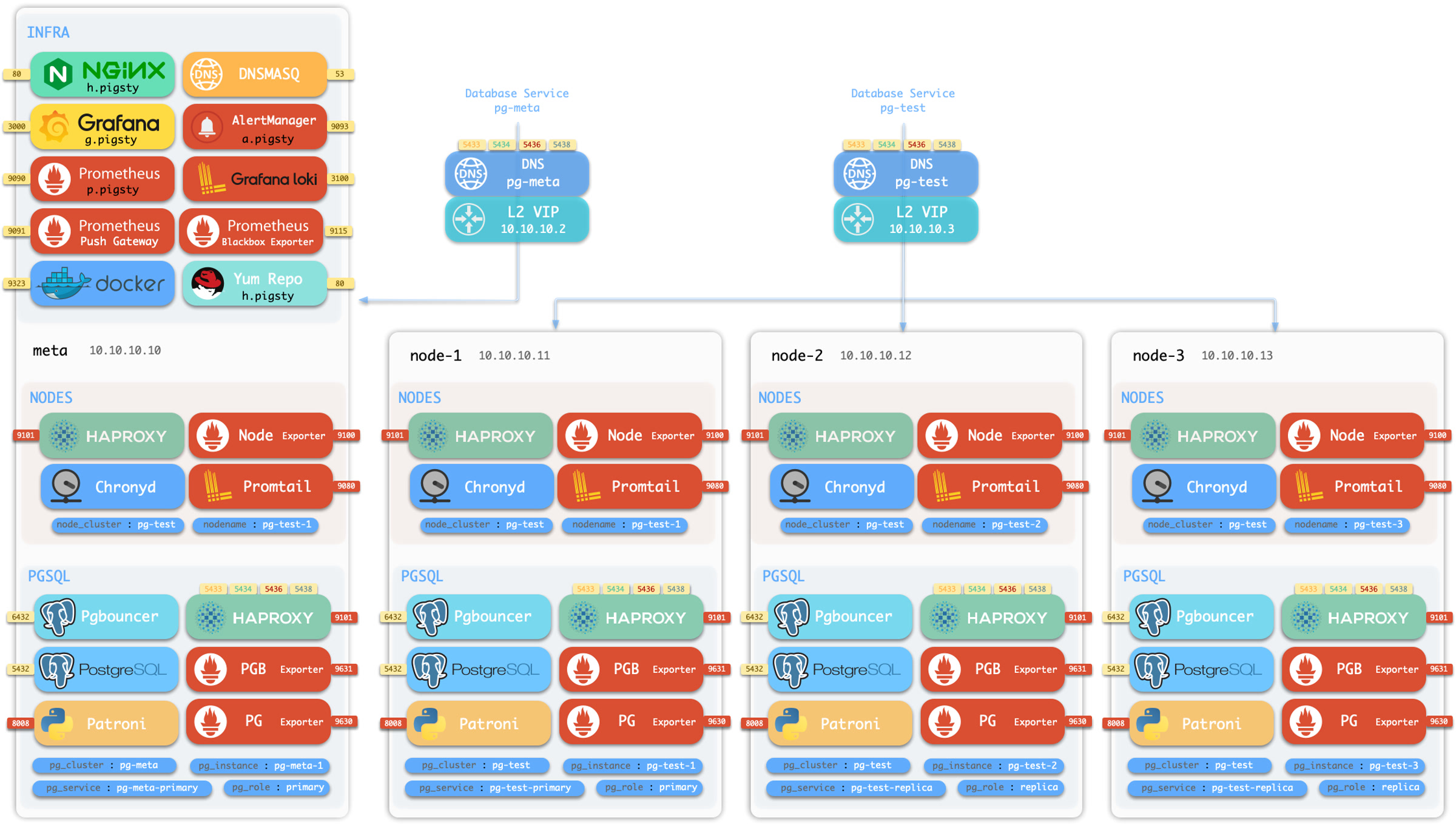
Description
The sandbox consists of 4 nodes with fixed IP addresses and identities:
| ID | IP Address | NODE | PGSQL | INFRA | ETCD | MINIO |
|---|---|---|---|---|---|---|
| 1 | 10.10.10.10 |
meta |
pg-meta-1 |
infra-1 |
etcd-1 |
minio-1 |
| 2 | 10.10.10.11 |
node-1 |
pg-test-1 |
|||
| 3 | 10.10.10.12 |
node-2 |
pg-test-1 |
|||
| 4 | 10.10.10.13 |
node-3 |
pg-test-1 |
There’s a primary singleton PostgreSQL cluster: pg-meta on the meta node,
which can be used standalone, and there’s also an optional L2 VIP 10.10.10.2 and cluster DNS pg-meta bind to it.
There are three additional nodes in the sandbox, form a 3-instance PostgreSQL HA cluster pg-test.
With an optional L2 VIP 10.10.10.3 and cluster DNS pg-test bind to the cluster leader.
There’s also a 1-node etcd cluster, and 1-node minio cluster on the meta node, too.
Implementation
You can create a local sandbox with Vagrant, or a cloud sandbox with Terraform.
To utilize local vagrant templates:
To utilize cloud terraform templates, use the spec/aliyun-full.tf as an example, Aliyun 4-node sandbox template for all distro & amd/arm.