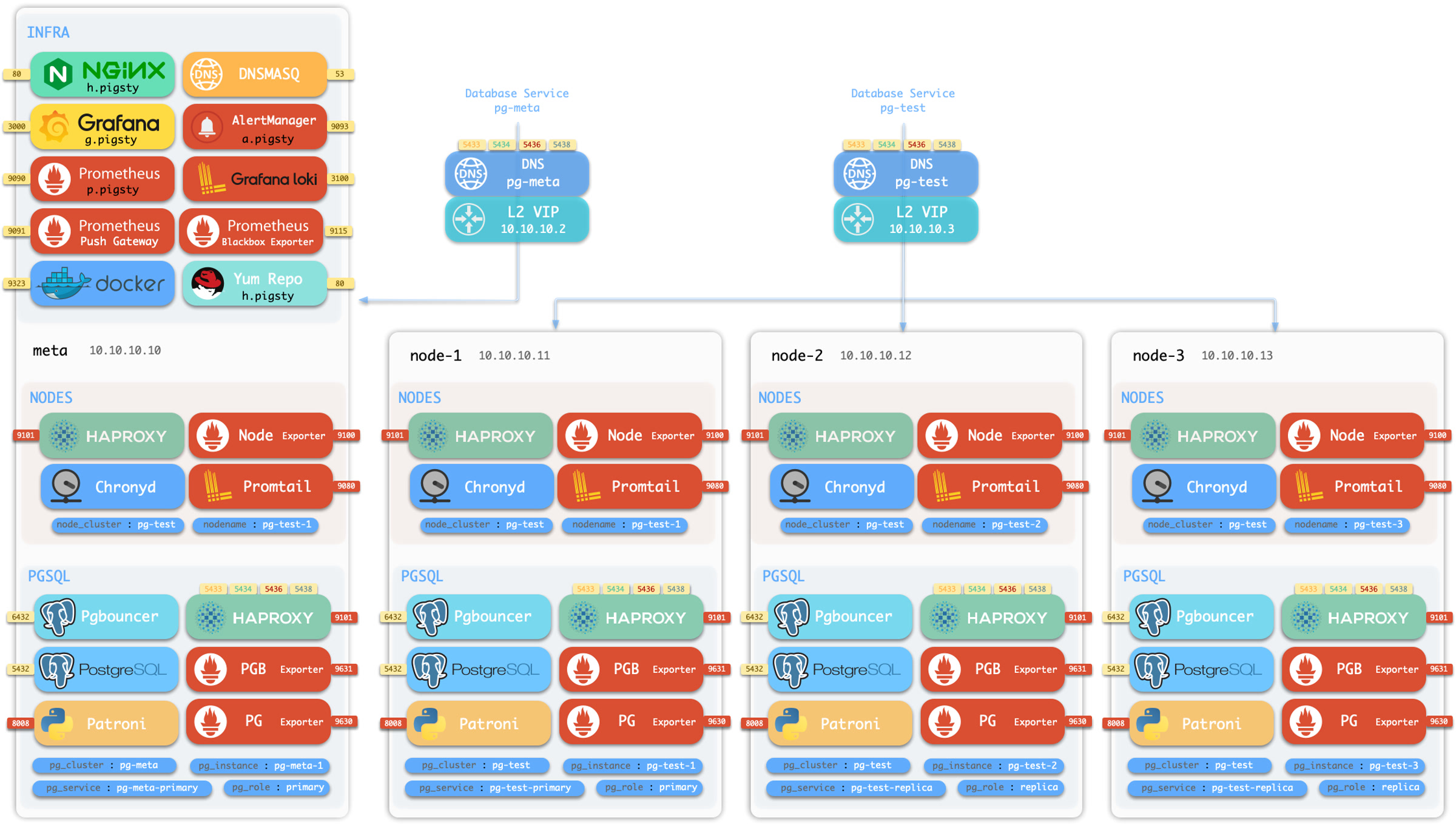
Pigsty uses pgBackRest to manage PostgreSQL backups, it may be the most powerful open-source backup tools in the ecosystem.
With incremental / parallel backup & restore, encryption, MinIO / S3 support, and many other features.
Pigsty has pre-configured it for every PGSQL cluster by default.
Policy
Backup scripts, scheduling, pgbackrest, repo and admin
Admin
Backup policy, disk planning, recovery window trade-off
Restore
Restore to specific time point with playbook
Example
Sandbox example: Perform recovery with bare hands
NO WRANTTY
Pigsty try its best to provide a reliable PITR solution, but we do not take any responsibility for the data loss caused by the PITR operation, use it at your own risk.
For professional support, consider our pro service.
Quick Start
Step 1
[Backup Policy](/docs/pgsql/backup/mechanism): Schedule Base Backups with Crontab
Step 2
[WAL Archiving](/docs/pgsql/backup/policy): Continuously record write activities
Step 3
[Restore & Recovery](/docs/pgsql/backup/restore): Recover from backup and wal archive
Backup script, schedule, repository, and infrastructure
Backups can be invoked by built-in scripts, scheduled with node crontab,
managed by pgbackrest, and stored in backup repo,
which could be local disk filesystem or MinIO / S3, with different retention policies.
Script
You can create a backup with pgbackrest command with pg_dbsu user (postgres by default):
pgbackrest --stanza=pg-meta --type=full backup # create a full backup for cluster pg-meta
The stanza here is the database cluster name: pg_cluster, which is pg-meta for the default setup.
Pigsty has an alias pb and wrapper script pg-backup that fills the current cluster name as stanza:
alias
function pb(){localstanza=$(grep -o '\[[^][]*]' /etc/pgbackrest/pgbackrest.conf | head -n1 | sed 's/.*\[\([^]]*\)].*/\1/') pgbackrest --stanza=$stanza$@}pb ... # pgbackrest --stanza=pg-meta ...pb info # pgbackrest --stanza=pg-meta infopb backup # pgbackrest --stanza=pg-meta backup
script
pg-backup full # take an full backup = pgbackrest --stanza=pg-meta --type=incr backuppg-backup incr # take an incremental backup = pgbackrest --stanza=pg-meta --type=incr backuppg-backup diff # take an differential backup = pgbackrest --stanza=pg-meta --type=incr backup
Crontab
Pigsty is leveraging Linux’s crontab to schedule backups. You can define your backup policies with it
For example, most one-node config template will have the following node_crontab for backup.
You can design more sophisticated backup policies with crontab and pg-backup script, such as:
Full backup on Monday, incremental backup during weekdays
node_crontab:# make a full backup on monday 1am, and an incremental backup during weekdays- '00 01 * * 1 postgres /pg/bin/pg-backup full'- '00 01 * * 2,3,4,5,6,7 postgres /pg/bin/pg-backup'
To apply crontab change, use the node.yml to update the crontab on all nodes.
apply crontab
./node.yml -t node_crontab -l pg-meta # apply crontab change to the pg-meta group
pgbackrest
Here’s pigsty’s setup details for pgbackrest:
The pgbackrest backup tool is enabled and configured by default (pgbackrest_enabled)
Installed in the pg_install task in the pgsql.yml playbook, defined in pg_packages
tmp: /pg/spool is used as the temp spool directory for pgbackrest
data: /pg/backup is used, if the default local filesystem backup repo is selected.
Moreover, during the PITR Recovery process,
Pigsty will create a temp /pg/conf/pitr.conf pgbackrest config file.
And write postgres recovery log to the /pg/tmp/recovery.log file.
When a postgres cluster is created, pigsty will create an initial backup automatically.
It’s a tiny backup since the new cluster is almost empty.
It will leave a marker file /etc/pgbackrest/initial.done to avoid creating the initial backup again.
Set the pgbackrest_init_backup to false if you don’t want it.
Administration
Enable Backup
If you database cluster is created with pgbackrest_enable set to true, the backup will be enabled automatically.
If it created with the false value, you can enable the pgbackrest component with:
./pgsql.yml -t pg_backup # run the pgbackrest subtask
Remove Backup
Pigsty will remove pgbackrest backup stanza when removing the primary instance (pg_role = primary).
Use the pg_backup subtask to remove the backup only, and use the pg_rm_backup arg to keep backups.
If your backup repo is locked, (e.g., S3 / MinIO has a lock option), this operation will fail.
Backup Removal
Removing backup may lead to permanent data loss, it’s a dangerous operation, do with extreme caution.
List Backup
This command will list all backups in the pgbackrest repository (shared by all clusters)
pgbackrest info
Manual Backup
Pigsty has a built-in script /pg/bin/pg-backup which wraps the pgbackrest backup command.
pg-backup # take an incremental backuppg-backup full # take an full backuppg-backup incr # take an incremental backuppg-backup diff # take an differential backup
Base Backup
Pigsty has an alternative backup script /pg/bin/pg-basebackup which does not rely on pgbackrest, and gives you a physical copy of the database cluster.
The default backup dir is /pg/backup.
NAME
pg-basebackup -- make base backup from PostgreSQL instance
SYNOPSIS
pg-basebackup -sdfeukr
pg-basebackup --src postgres:/// --dst . --file backup.tar.lz4
DESCRIPTION
-s, --src, --url Backup source URL, optional, "postgres:///" by default, if password is required, it should be given in url, ENV or .pgpass
-d, --dst, --dir Where to put backup files, "/pg/backup" by default
-f, --file Overwrite default backup filename, "backup_${tag}_${date}.tar.lz4"-r, --remove .lz4 Files mtime before n minutes ago will be removed, default is 1200(20hour)-t, --tag Backup file tag, if not set, target cluster_name or local ip address will be used. Also used as part of DEFAULT filename
-k, --key Encryption key when --encrypt is specified, default key is ${tag}-u, --upload Upload backup files to cloud storage, (need your own implementation)-e, --encryption Encrypt with RC4 using OpenSSL, if not key is specified, tag is used as key
-h, --help Print this message
postgres@pg-meta-1:~$ pg-basebackup
[2025-07-13 06:16:05][INFO]================================================================[2025-07-13 06:16:05][INFO][INIT] pg-basebackup begin, checking parameters
[2025-07-13 06:16:05][DEBUG][INIT]#====== BINARY[2025-07-13 06:16:05][DEBUG][INIT] pg_basebackup : /usr/pgsql/bin/pg_basebackup
[2025-07-13 06:16:05][DEBUG][INIT] openssl : /usr/bin/openssl
[2025-07-13 06:16:05][DEBUG][INIT]#====== PARAMETER[2025-07-13 06:16:05][DEBUG][INIT] filename (-f) : backup_pg-meta_20250713.tar.lz4
[2025-07-13 06:16:05][DEBUG][INIT] src (-s) : postgres:///
[2025-07-13 06:16:05][DEBUG][INIT] dst (-d) : /pg/backup
[2025-07-13 06:16:05][DEBUG][INIT] tag (-t) : pg-meta
[2025-07-13 06:16:05][DEBUG][INIT] key (-k) : pg-meta
[2025-07-13 06:16:05][DEBUG][INIT] encrypt (-e) : false[2025-07-13 06:16:05][DEBUG][INIT] upload (-u) : false[2025-07-13 06:16:05][DEBUG][INIT] remove (-r) : -mmin +1200
[2025-07-13 06:16:05][INFO][LOCK] acquire lock @ /tmp/backup.lock
[2025-07-13 06:16:05][INFO][LOCK] lock acquired success on /tmp/backup.lock, pid=107417[2025-07-13 06:16:05][INFO][BKUP] backup begin, from postgres:/// to /pg/backup/backup_pg-meta_20250713.tar.lz4
[2025-07-13 06:16:05][INFO][BKUP] backup in normal mode
pg_basebackup: initiating base backup, waiting for checkpoint to completepg_basebackup: checkpoint completed
pg_basebackup: write-ahead log start point: 0/7000028 on timeline 1pg_basebackup: write-ahead log end point: 0/7000FD8
pg_basebackup: syncing data to disk ...
pg_basebackup: base backup completed
[2025-07-13 06:16:06][INFO][BKUP] backup complete!
[2025-07-13 06:16:06][INFO][RMBK] remove local obsolete backup: 1200[2025-07-13 06:16:06][INFO][BKUP] find obsolete backups: find /pg/backup/ -maxdepth 1 -type f -mmin +1200 -name 'backup*.lz4'[2025-07-13 06:16:06][WARN][BKUP] remove obsolete backups:
[2025-07-13 06:16:06][INFO][RMBK] remove old backup complete[2025-07-13 06:16:06][INFO][LOCK] release lock @ /tmp/backup.lock
[2025-07-13 06:16:06][INFO][DONE] backup procedure complete!
[2025-07-13 06:16:06][INFO]================================================================
Backup are compressed with lz4, You can unzip and extract the tarball with the following command:
mkdir -p /tmp/data # extract backup to this directorycat /pg/backup/backup_pg-meta_20250713.tar.lz4 | unlz4 -d -c | tar -xC /tmp/data
Logical Backup
You can also use the pg_dump command to perform a logical backup.
Logical backups cannot be used for PITR (Point In Time Recovery),
but they are useful for migrating data between different major versions, or implement flexible data export logic.
Bootstrap from Repo
Now let’s say you have an existing cluster pg-meta, and want to FORK it as pg-meta2:
You’ll need to create the new pg-meta2 cluster fork, then run pitr on it.
2 - Repository
Backup storage repository for PostgreSQL
You can to configure WHERE to store the backups by specifying the pgbackrest_repo parameter.
You can define multiple repo there, and Pigsty will pick it according to the value of pgbackrest_method.
Default Repo
By default, Pigsty has two default backup repo definition: the local and minio backup repo.
local: The default, use the local /pg/backup dir (Softlink point to pg_fs_backup: /data/backups)
minio: Use the SNSD 1-node MinIO cluster (Supported by pigsty, but not enabled by default)
pgbackrest_method:local # choose the backup repo method, `local` or `minio` or any other user defined repopgbackrest_repo:# pgbackrest repo: https://pgbackrest.org/configuration.html#section-repositorylocal:# default pgbackrest repo with local posix fspath:/pg/backup # local backup directory, `/pg/backup` by defaultretention_full_type:count # retention full backups by countretention_full:2# keep 2, at most 3 full backups when using local fs repominio:# optional minio repo for pgbackresttype:s3 # minio is s3-compatible, so s3 is useds3_endpoint:sss.pigsty # minio endpoint domain name, `sss.pigsty` by defaults3_region:us-east-1 # minio region, us-east-1 by default, useless for minios3_bucket:pgsql # minio bucket name, `pgsql` by defaults3_key:pgbackrest # minio user access key for pgbackrests3_key_secret:S3User.Backup # minio user secret key for pgbackrests3_uri_style:path # use path style uri for minio rather than host stylepath:/pgbackrest # minio backup path, default is `/pgbackrest`storage_port:9000# minio port, 9000 by defaultstorage_ca_file:/etc/pki/ca.crt # minio ca file path, `/etc/pki/ca.crt` by defaultblock:y# Enable block incremental backupbundle:y# bundle small files into a single filebundle_limit:20MiB # Limit for file bundles, 20MiB for object storagebundle_size:128MiB # Target size for file bundles, 128MiB for object storagecipher_type:aes-256-cbc # enable AES encryption for remote backup repocipher_pass:pgBackRest # AES encryption password, default is 'pgBackRest'retention_full_type:time # retention full backup by time on minio reporetention_full:14# keep full backup for the last 14 days
Repo Retention
If you take backups every day without deleting them, the backup repo will grow larger and larger and blow your disk space.
You’ll need to define a retention policy to only keep a limited number of backups.
The default backup policy is defined in the pgbackrest_repo parameter, change them on demand.
local: keep last 2 full backups, at most 3 during backup
minio: keep all full backups in the last 14 days
Space Planning
Object storage provides virtually unlimited storage capacity, so you don’t need to worry about the disk space.
You can optimize space usage with a hybrid full & diff backup policy.
For local disk backup repo, pigsty recommends using a retention policy of keeping the last 2 full backups,
which means keep the two most-recent full backups on disk (a third copy may exist while a new backup is running).
This gives you a guaranteed recovery window of at least last 24 hours. Check backup policy for details.
Object storage service provides virtually unlimited storage capacity, and provides a remote disaster tolerance for your system.
If you don’t have one, Pigsty has built-in MinIO support.
MinIO
You can enable minio backup repo by uncommenting the following settings.
Beware that pgbackrest only takes HTTPS / domain names, so you have to run MinIO with a domain name and HTTPS endpoint.
all:vars:pgbackrest_method:minio # use minio as the default backup repochildren:# define a one-node minio SNSD clusterminio:{hosts:{10.10.10.10:{minio_seq:1 }} ,vars:{minio_cluster:minio }}
S3
If you only have one node, the meaningful backup policy could be using a cloud vendor’s object storage service such as AWS S3, Aliyun OSS, or Google Cloud, etc…
To achieve this, you can define a new repo:
pgbackrest_method:s3 # use the 'pgbackrest_repo.s3' as backup repopgbackrest_repo:# pgbackrest repo: https://pgbackrest.org/configuration.html#section-repositorys3:# aliyun oss (s3 compatible) object storage servicetype:s3 # oss is s3-compatibles3_endpoint:oss-cn-beijing-internal.aliyuncs.coms3_region:oss-cn-beijings3_bucket:<your_bucket_name>s3_key:<your_access_key>s3_key_secret:<your_secret_key>s3_uri_style:hostpath:/pgbackrestbundle:y# bundle small files into a single filebundle_limit:20MiB # Limit for file bundles, 20MiB for object storagebundle_size:128MiB # Target size for file bundles, 128MiB for object storagecipher_type:aes-256-cbc # enable AES encryption for remote backup repocipher_pass:pgBackRest # AES encryption password, default is 'pgBackRest'retention_full_type:time # retention full backup by time on minio reporetention_full:14# keep full backup for last 14 dayslocal:# default pgbackrest repo with local posix fspath:/pg/backup # local backup directory, `/pg/backup` by defaultretention_full_type:count # retention full backups by countretention_full:2# keep 2, at most 3 full backups when using local fs repo
Manage Backups
Enable Backup
If you database cluster is created with pgbackrest_enable set to true, the backup will be enabled automatically.
If it created with the false value, you can enable the pgbackrest component with:
./pgsql.yml -t pg_backup # run the pgbackrest subtask
Remove Backup
Pigsty will remove pgbackrest backup stanza when removing the primary instance (pg_role = primary).
Use the pg_backup subtask to remove the backup only, and use the pg_rm_backup arg to keep backups.
If your backup repo is locked, (e.g., S3 / MinIO has a lock option), this operation will fail.
Backup Removal
Removing backup may lead to permanent data loss, it’s a dangerous operation, do with extreme caution.
List Backup
This command will list all backups in the pgbackrest repository (shared by all clusters)
pgbackrest info
Manual Backup
Pigsty has a built-in script /pg/bin/pg-backup which wraps the pgbackrest backup command.
pg-backup # take an incremental backuppg-backup full # take an full backuppg-backup incr # take an incremental backuppg-backup diff # take an differential backup
Base Backup
Pigsty has an alternative backup script /pg/bin/pg-basebackup which does not rely on pgbackrest, and gives you a physical copy of the database cluster.
The default backup dir is /pg/backup.
NAME
pg-basebackup -- make base backup from PostgreSQL instance
SYNOPSIS
pg-basebackup -sdfeukr
pg-basebackup --src postgres:/// --dst . --file backup.tar.lz4
DESCRIPTION
-s, --src, --url Backup source URL, optional, "postgres:///" by default, if password is required, it should be given in url, ENV or .pgpass
-d, --dst, --dir Where to put backup files, "/pg/backup" by default
-f, --file Overwrite default backup filename, "backup_${tag}_${date}.tar.lz4"-r, --remove .lz4 Files mtime before n minutes ago will be removed, default is 1200(20hour)-t, --tag Backup file tag, if not set, target cluster_name or local ip address will be used. Also used as part of DEFAULT filename
-k, --key Encryption key when --encrypt is specified, default key is ${tag}-u, --upload Upload backup files to cloud storage, (need your own implementation)-e, --encryption Encrypt with RC4 using OpenSSL, if not key is specified, tag is used as key
-h, --help Print this message
postgres@pg-meta-1:~$ pg-basebackup
[2025-07-13 06:16:05][INFO]================================================================[2025-07-13 06:16:05][INFO][INIT] pg-basebackup begin, checking parameters
[2025-07-13 06:16:05][DEBUG][INIT]#====== BINARY[2025-07-13 06:16:05][DEBUG][INIT] pg_basebackup : /usr/pgsql/bin/pg_basebackup
[2025-07-13 06:16:05][DEBUG][INIT] openssl : /usr/bin/openssl
[2025-07-13 06:16:05][DEBUG][INIT]#====== PARAMETER[2025-07-13 06:16:05][DEBUG][INIT] filename (-f) : backup_pg-meta_20250713.tar.lz4
[2025-07-13 06:16:05][DEBUG][INIT] src (-s) : postgres:///
[2025-07-13 06:16:05][DEBUG][INIT] dst (-d) : /pg/backup
[2025-07-13 06:16:05][DEBUG][INIT] tag (-t) : pg-meta
[2025-07-13 06:16:05][DEBUG][INIT] key (-k) : pg-meta
[2025-07-13 06:16:05][DEBUG][INIT] encrypt (-e) : false[2025-07-13 06:16:05][DEBUG][INIT] upload (-u) : false[2025-07-13 06:16:05][DEBUG][INIT] remove (-r) : -mmin +1200
[2025-07-13 06:16:05][INFO][LOCK] acquire lock @ /tmp/backup.lock
[2025-07-13 06:16:05][INFO][LOCK] lock acquired success on /tmp/backup.lock, pid=107417[2025-07-13 06:16:05][INFO][BKUP] backup begin, from postgres:/// to /pg/backup/backup_pg-meta_20250713.tar.lz4
[2025-07-13 06:16:05][INFO][BKUP] backup in normal mode
pg_basebackup: initiating base backup, waiting for checkpoint to completepg_basebackup: checkpoint completed
pg_basebackup: write-ahead log start point: 0/7000028 on timeline 1pg_basebackup: write-ahead log end point: 0/7000FD8
pg_basebackup: syncing data to disk ...
pg_basebackup: base backup completed
[2025-07-13 06:16:06][INFO][BKUP] backup complete!
[2025-07-13 06:16:06][INFO][RMBK] remove local obsolete backup: 1200[2025-07-13 06:16:06][INFO][BKUP] find obsolete backups: find /pg/backup/ -maxdepth 1 -type f -mmin +1200 -name 'backup*.lz4'[2025-07-13 06:16:06][WARN][BKUP] remove obsolete backups:
[2025-07-13 06:16:06][INFO][RMBK] remove old backup complete[2025-07-13 06:16:06][INFO][LOCK] release lock @ /tmp/backup.lock
[2025-07-13 06:16:06][INFO][DONE] backup procedure complete!
[2025-07-13 06:16:06][INFO]================================================================
Backup are compressed with lz4, You can unzip and extract the tarball with the following command:
mkdir -p /tmp/data # extract backup to this directorycat /pg/backup/backup_pg-meta_20250713.tar.lz4 | unlz4 -d -c | tar -xC /tmp/data
Logical Backup
You can also use the pg_dump command to perform a logical backup.
Logical backups cannot be used for PITR (Point In Time Recovery),
but they are useful for migrating data between different major versions, or implement flexible data export logic.
Bootstrap from Repo
Now let’s say you have an existing cluster pg-meta, and want to FORK it as pg-meta2:
You’ll need to create the new pg-meta2 cluster fork, then run pitr on it.
3 - Policy
Design backup policy according to your needs.
WHEN: Backup Policy
WHERE: Backup Repo
HOW: Backup Method
WHEN
The first problem is WHEN to backup your database — Trade off between backup frequency and recovery time.
Since you’ll need to replay the WAL logs to your recovery target since the last previous backup,
the more frequent you backup, the less WAL logs you’ll need to replay, and the faster your recovery will be.
Everyday Full Backup
For a production database, it is recommended to start with the simplest everyday full backup policy.
Where is the default backup policy in pigsty, implemented with crontab.
Full backup everyday 1am
node_crontab:['00 01 * * * postgres /pg/bin/pg-backup full']pgbackrest_method:local # choose the backup repo method, `local` or `minio` or any other user defined repopgbackrest_repo:# pgbackrest repo: https://pgbackrest.org/configuration.html#section-repositorylocal:# default pgbackrest repo with local posix fspath:/pg/backup # local backup directory, `/pg/backup` by defaultretention_full_type:count # retention full backups by countretention_full:2# keep 2, at most 3 full backups when using local fs repo
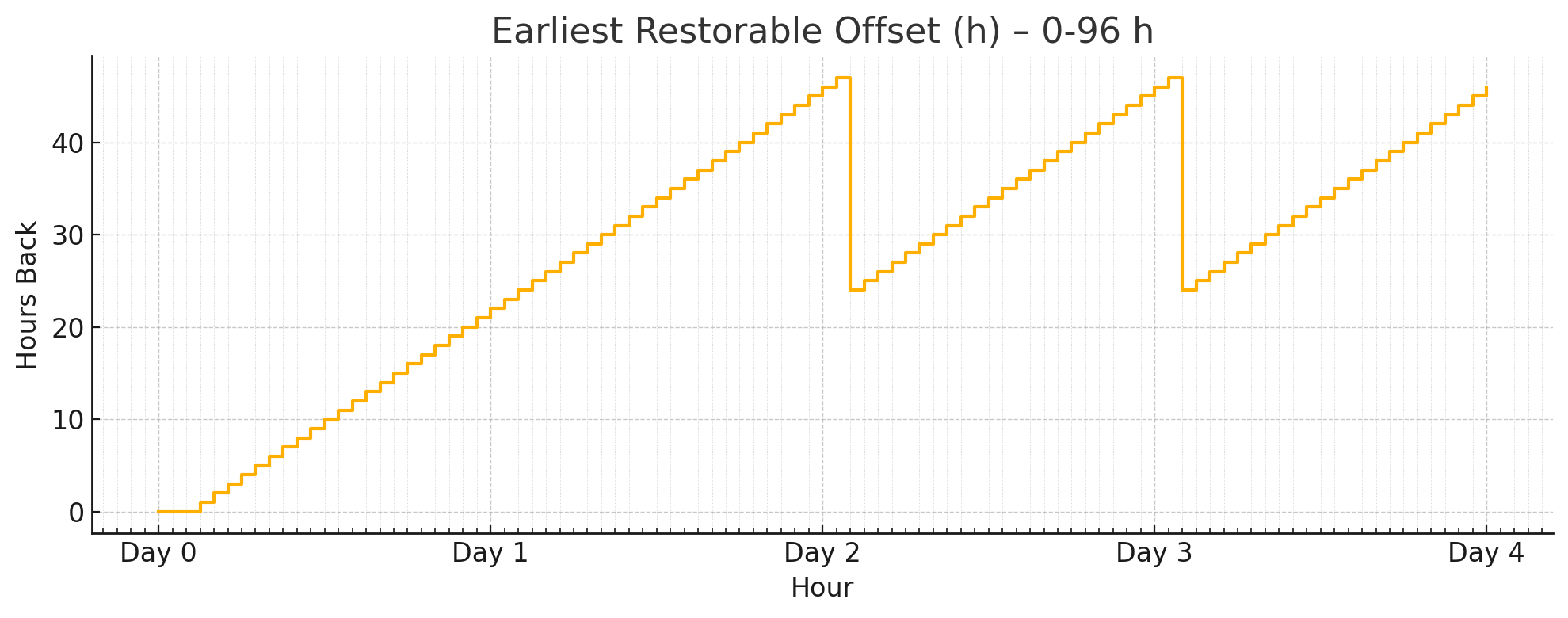
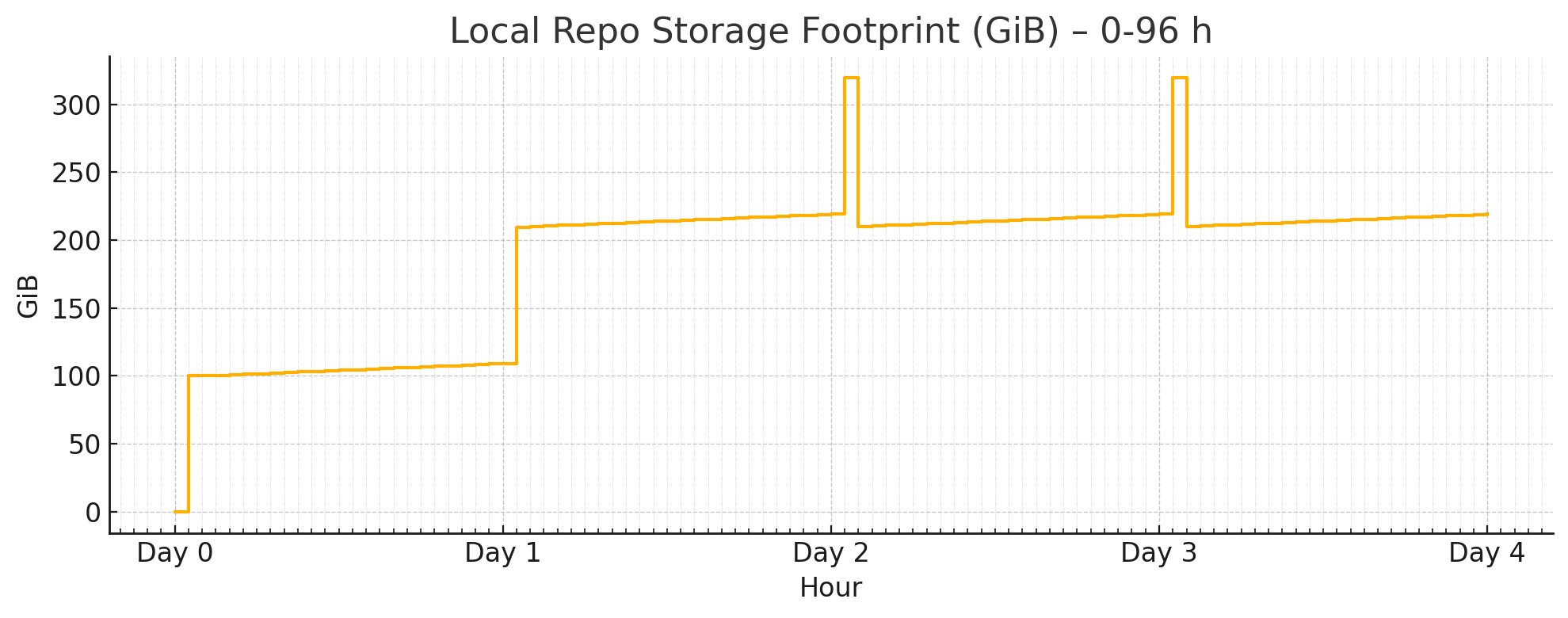
When using with the default local filesystem backup repo, it provides a 24~48h recovery window.
Let’s assume your database size is 100GB, and 10GB writes per day, and your backup size will be.
It will consume 2 ~ 3x of your database size, plus a 2 day’s WAL.
So in practice, you may have to prepare a backup disk with at least 3 ~ 5x of your database size
to use the default backup policy.
Full + Incr Backup
You can optimize backup space usage by changing these parameters.
If you are using MinIO / S3 as centralized backup repo, you can use more space than your disk limitation.
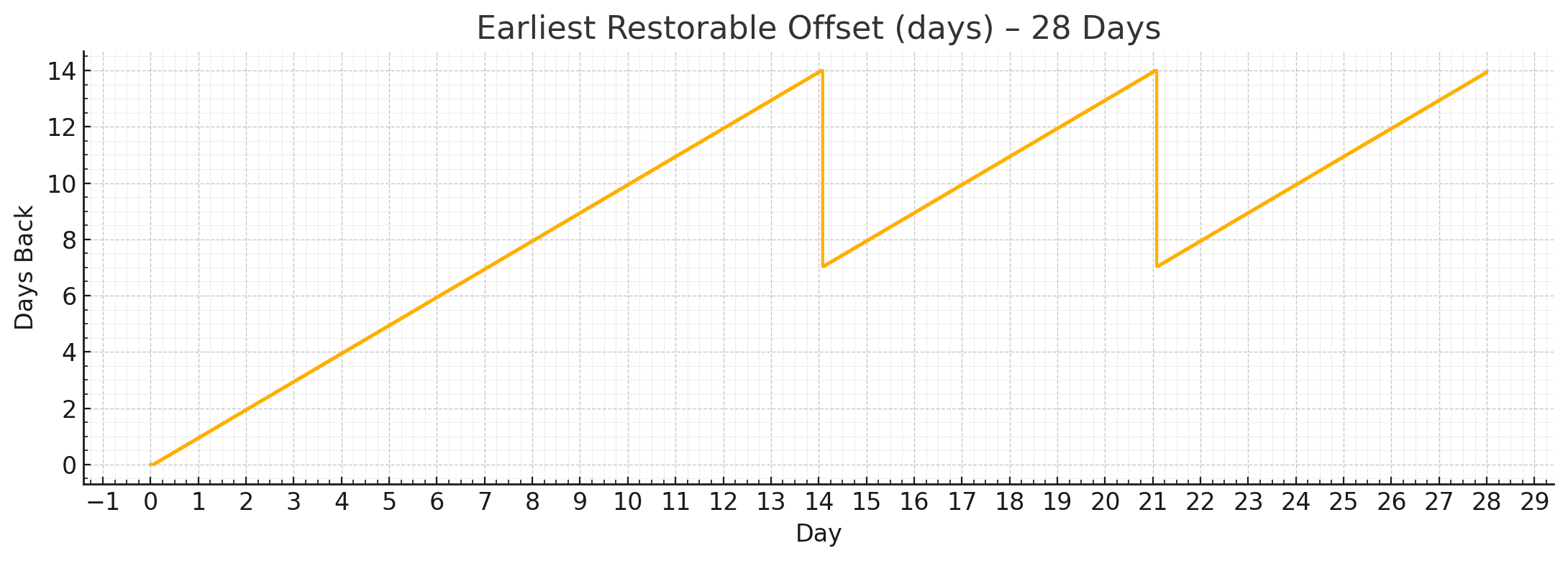
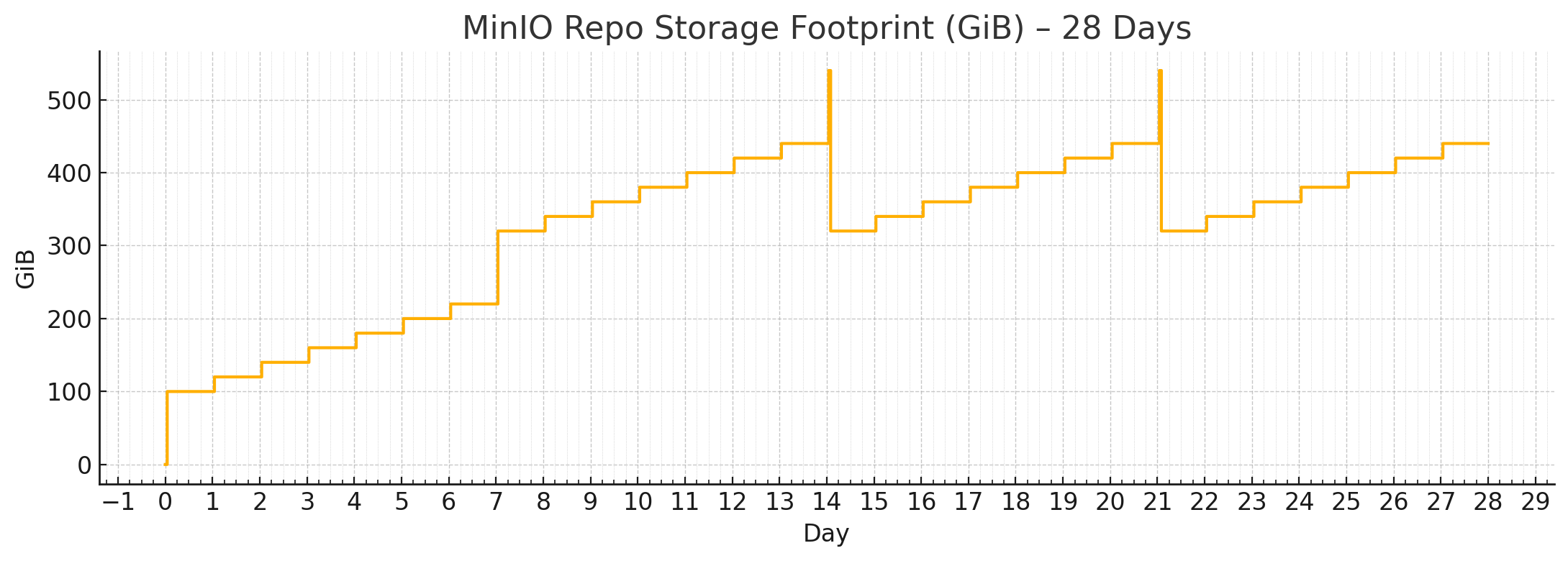
Then consider the full + incr backup with 2-week retention policy:
node_crontab:# make a full backup on monday 1am, and an incremental backup during weekdays- '00 01 * * 1 postgres /pg/bin/pg-backup full'- '00 01 * * 2,3,4,5,6,7 postgres /pg/bin/pg-backup'pgbackrest_method:miniopgbackrest_repo:# pgbackrest repo: https://pgbackrest.org/configuration.html#section-repositoryminio:# optional minio repo for pgbackresttype:s3 # minio is s3-compatible, so s3 is useds3_endpoint:sss.pigsty # minio endpoint domain name, `sss.pigsty` by defaults3_region:us-east-1 # minio region, us-east-1 by default, useless for minios3_bucket:pgsql # minio bucket name, `pgsql` by defaults3_key:pgbackrest # minio user access key for pgbackrests3_key_secret:S3User.Backup # minio user secret key for pgbackrests3_uri_style:path # use path style uri for minio rather than host stylepath:/pgbackrest # minio backup path, default is `/pgbackrest`storage_port:9000# minio port, 9000 by defaultstorage_ca_file:/etc/pki/ca.crt # minio ca file path, `/etc/pki/ca.crt` by defaultblock:y# Enable block incremental backupbundle:y# bundle small files into a single filebundle_limit:20MiB # Limit for file bundles, 20MiB for object storagebundle_size:128MiB # Target size for file bundles, 128MiB for object storagecipher_type:aes-256-cbc # enable AES encryption for remote backup repocipher_pass:pgBackRest # AES encryption password, default is 'pgBackRest'retention_full_type:time # retention full backup by time on minio reporetention_full:14# keep full backup for the last 14 days
When using with the built-in minio filesystem backup repo, it provides a guaranteed 1-week pitr window.
Let’s assume your database size is 100GB, and 10GB writes per day, and your backup size will be like:
Where
By default, Pigsty has two default backup repo definition: the local and minio backup repo.
local: The default, use the local /pg/backup dir (Softlink point to pg_fs_backup: /data/backups)
minio: Use the SNSD 1-node MinIO cluster (Supported by pigsty, but not enabled by default)
pgbackrest_method:local # choose the backup repo method, `local` or `minio` or any other user defined repopgbackrest_repo:# pgbackrest repo: https://pgbackrest.org/configuration.html#section-repositorylocal:# default pgbackrest repo with local posix fspath:/pg/backup # local backup directory, `/pg/backup` by defaultretention_full_type:count # retention full backups by countretention_full:2# keep 2, at most 3 full backups when using local fs repominio:# optional minio repo for pgbackresttype:s3 # minio is s3-compatible, so s3 is useds3_endpoint:sss.pigsty # minio endpoint domain name, `sss.pigsty` by defaults3_region:us-east-1 # minio region, us-east-1 by default, useless for minios3_bucket:pgsql # minio bucket name, `pgsql` by defaults3_key:pgbackrest # minio user access key for pgbackrests3_key_secret:S3User.Backup # minio user secret key for pgbackrests3_uri_style:path # use path style uri for minio rather than host stylepath:/pgbackrest # minio backup path, default is `/pgbackrest`storage_port:9000# minio port, 9000 by defaultstorage_ca_file:/etc/pki/ca.crt # minio ca file path, `/etc/pki/ca.crt` by defaultblock:y# Enable block incremental backupbundle:y# bundle small files into a single filebundle_limit:20MiB # Limit for file bundles, 20MiB for object storagebundle_size:128MiB # Target size for file bundles, 128MiB for object storagecipher_type:aes-256-cbc # enable AES encryption for remote backup repocipher_pass:pgBackRest # AES encryption password, default is 'pgBackRest'retention_full_type:time # retention full backup by time on minio reporetention_full:14# keep full backup for the last 14 days
4 - Admin
Manage backup repo and backups
Enable Backup
If you database cluster is created with pgbackrest_enable set to true, the backup will be enabled automatically.
If it created with the false value, you can enable the pgbackrest component with:
./pgsql.yml -t pg_backup # run the pgbackrest subtask
Remove Backup
Pigsty will remove pgbackrest backup stanza when removing the primary instance (pg_role = primary).
Use the pg_backup subtask to remove the backup only, and use the pg_rm_backup arg to keep backups.
If your backup repo is locked, (e.g., S3 / MinIO has a lock option), this operation will fail.
Backup Removal
Removing backup may lead to permanent data loss, it’s a dangerous operation, do with extreme caution.
List Backup
This command will list all backups in the pgbackrest repository (shared by all clusters)
pgbackrest info
Manual Backup
Pigsty has a built-in script /pg/bin/pg-backup which wraps the pgbackrest backup command.
pg-backup # take an incremental backuppg-backup full # take an full backuppg-backup incr # take an incremental backuppg-backup diff # take an differential backup
Base Backup
Pigsty has an alternative backup script /pg/bin/pg-basebackup which does not rely on pgbackrest, and gives you a physical copy of the database cluster.
The default backup dir is /pg/backup.
NAME
pg-basebackup -- make base backup from PostgreSQL instance
SYNOPSIS
pg-basebackup -sdfeukr
pg-basebackup --src postgres:/// --dst . --file backup.tar.lz4
DESCRIPTION
-s, --src, --url Backup source URL, optional, "postgres:///" by default, if password is required, it should be given in url, ENV or .pgpass
-d, --dst, --dir Where to put backup files, "/pg/backup" by default
-f, --file Overwrite default backup filename, "backup_${tag}_${date}.tar.lz4"-r, --remove .lz4 Files mtime before n minutes ago will be removed, default is 1200(20hour)-t, --tag Backup file tag, if not set, target cluster_name or local ip address will be used. Also used as part of DEFAULT filename
-k, --key Encryption key when --encrypt is specified, default key is ${tag}-u, --upload Upload backup files to cloud storage, (need your own implementation)-e, --encryption Encrypt with RC4 using OpenSSL, if not key is specified, tag is used as key
-h, --help Print this message
postgres@pg-meta-1:~$ pg-basebackup
[2025-07-13 06:16:05][INFO]================================================================[2025-07-13 06:16:05][INFO][INIT] pg-basebackup begin, checking parameters
[2025-07-13 06:16:05][DEBUG][INIT]#====== BINARY[2025-07-13 06:16:05][DEBUG][INIT] pg_basebackup : /usr/pgsql/bin/pg_basebackup
[2025-07-13 06:16:05][DEBUG][INIT] openssl : /usr/bin/openssl
[2025-07-13 06:16:05][DEBUG][INIT]#====== PARAMETER[2025-07-13 06:16:05][DEBUG][INIT] filename (-f) : backup_pg-meta_20250713.tar.lz4
[2025-07-13 06:16:05][DEBUG][INIT] src (-s) : postgres:///
[2025-07-13 06:16:05][DEBUG][INIT] dst (-d) : /pg/backup
[2025-07-13 06:16:05][DEBUG][INIT] tag (-t) : pg-meta
[2025-07-13 06:16:05][DEBUG][INIT] key (-k) : pg-meta
[2025-07-13 06:16:05][DEBUG][INIT] encrypt (-e) : false[2025-07-13 06:16:05][DEBUG][INIT] upload (-u) : false[2025-07-13 06:16:05][DEBUG][INIT] remove (-r) : -mmin +1200
[2025-07-13 06:16:05][INFO][LOCK] acquire lock @ /tmp/backup.lock
[2025-07-13 06:16:05][INFO][LOCK] lock acquired success on /tmp/backup.lock, pid=107417[2025-07-13 06:16:05][INFO][BKUP] backup begin, from postgres:/// to /pg/backup/backup_pg-meta_20250713.tar.lz4
[2025-07-13 06:16:05][INFO][BKUP] backup in normal mode
pg_basebackup: initiating base backup, waiting for checkpoint to completepg_basebackup: checkpoint completed
pg_basebackup: write-ahead log start point: 0/7000028 on timeline 1pg_basebackup: write-ahead log end point: 0/7000FD8
pg_basebackup: syncing data to disk ...
pg_basebackup: base backup completed
[2025-07-13 06:16:06][INFO][BKUP] backup complete!
[2025-07-13 06:16:06][INFO][RMBK] remove local obsolete backup: 1200[2025-07-13 06:16:06][INFO][BKUP] find obsolete backups: find /pg/backup/ -maxdepth 1 -type f -mmin +1200 -name 'backup*.lz4'[2025-07-13 06:16:06][WARN][BKUP] remove obsolete backups:
[2025-07-13 06:16:06][INFO][RMBK] remove old backup complete[2025-07-13 06:16:06][INFO][LOCK] release lock @ /tmp/backup.lock
[2025-07-13 06:16:06][INFO][DONE] backup procedure complete!
[2025-07-13 06:16:06][INFO]================================================================
Backup are compressed with lz4, You can unzip and extract the tarball with the following command:
mkdir -p /tmp/data # extract backup to this directorycat /pg/backup/backup_pg-meta_20250713.tar.lz4 | unlz4 -d -c | tar -xC /tmp/data
Logical Backup
You can also use the pg_dump command to perform a logical backup.
Logical backups cannot be used for PITR (Point In Time Recovery),
but they are useful for migrating data between different major versions, or implement flexible data export logic.
Bootstrap from Repo
Now let’s say you have an existing cluster pg-meta, and want to FORK it as pg-meta2:
You’ll need to create the new pg-meta2 cluster fork, then run pitr on it.
5 - Restore
Restore PostgreSQL from Backup
You can use the pre-configured pgbackrest to perform Point-in-Time Recovery (PITR) in Pigsty.
Manually: PITR with the pg-pitr hint script, do it manually, more flexible with more complexity.
Playbook: PITR with the pgsql-pitr.yml playbook, automatic, but less flexible and more error-prone.
If you are very convenient with your configuration, you can use the fully automatic playbook,
otherwise, consider do it step by step manually
Quick Start
If you want to roll back the pg-meta cluster to the previous timepoint, adding the pg_pitr:
pg-meta:hosts:{10.10.10.10:{pg_seq:1, pg_role:primary } }vars:pg_cluster:pg-meta2pg_pitr:{time:'2025-07-13 10:00:00+00'}# restore from the latest backup
Then run the pgsql-pitr.yml playbook, it will roll back the pg-meta cluster to the specified timepoint.
./pgsql-pitr.yml -l pg-meta
Restore PITR
The archive_mode will be disabled on recovered cluster to prevent unwanted WAL writes.
If the recovered database status is ok, you can enable the archive_mode and make a full backup.
postgres @ pg-meta $
psql -c 'ALTER SYSTEM RESET archive_mode; SELECT pg_reload_conf();'pg-backup full # take a new full backup
Recovery Target
You can specify different types of recovery targets in pg_pitr, but they are mutually exclusive:
name: restore to a named restore point (created by pg_create_restore_point)
xid: restore to a specific transaction ID (TXID/XID)
lsn: restore to a specific LSN (Log Sequence Number) point
The recovery type will be set accordingly if any of the above parameters is specified,
otherwise it will be set to latest (the end of the WAL archive stream).
The special immediate type can be used to instruct pgbackrest to minimize the recovery time by stop at the first consistent point.
Target Type
pg_pitr:{}# restore to the latest status (wal archive stream end)
pg_pitr:{time:"2025-07-13 10:00:00+00"}
pg_pitr:{lsn:"0/4001C80"}
pg_pitr:{xid:"250000"}
pg_pitr:{name:"some_restore_point"}
pg_pitr:{type:"immediate"}
By Time
The most frequently used target is the time point; you can specify the time point to restore to:
If you have a transaction that accidentally deleted some data, the best way to recover is to restore the database to the state before that transaction.
You can find the exact transaction id from monitoring dashboard, or find it from TXID from the CSVLOG.
Inclusive vs Exclusive
The target parameter is “inclusive” by default, which means the recovery will include the target point.
The exclusive flag will exclude that exact target, like the xid 24999 will be the last transaction being replayed
PostgreSQL uses the LSN (Log Sequence Number) to identify the position of a WAL record.
You can find it everywhere, like the PG LSN panel from Pigsty dashboards.
To restore to an exact point in the WAL stream, you may also specify the timeline parameter (default to latest)
Recovery Source
cluster: which cluster to restore? the current pg_cluster will be used by default, you can use any other cluster in the same pgbackrest repo
repo: overwrite the backup repo, use the same format in pgbackrest_repo
set: the latest backup set is used by default, but you can specify a specific pgbackrest backup by label
Pigsty will recover from the pgbackrest backup repository, if you are using a centralized backup repo (like MinIO/S3),
you can specify another “stanza” (another cluster’s backup directory) to restore from.
pg-meta2:hosts:{10.10.10.11:{pg_seq:1, pg_role:primary } }vars:pg_cluster:pg-meta2pg_pitr:{cluster:pg-meta } # restore from the pg-meta cluster backup
The above configuration will mark the PITR procedure to use the pg-meta stanza.
You can also pass the pg_pitr parameter via CLI args:
This approach is semi-automatic, you will participate in the PITR process to make key decisions.
For example, this configuration will restore the pg-meta cluster itself to the specified timepoint
pg-meta:hosts:{10.10.10.10:{pg_seq:1, pg_role:primary } }vars:pg_cluster:pg-meta2pg_pitr:{time:'2025-07-13 10:00:00+00'}# restore from the latest backup
Let’s do this one step by step:
./pgsql-pitr.yml -l pg-meta -t down # pause patroni HA./pgsql-pitr.yml -l pg-meta -t pitr # run the pitr procedure./pgsql-pitr.yml -l pg-meta -t up # generate pgbackrest config and restore script
# down : # stop ha and shutdown patroni and postgres# - pause : # pause patroni auto failover# - stop : # stop patroni and postgres service# - stop_patroni : # stop patroni service# - stop_postgres : # stop postgres service# pitr : # perform the PITR procedure# - config : # generate pgbackrest config and restore script# - restore : # run the pgbackrest restore command# - recovery : # start postgres and complete recovery# - verify : # verify the recovered cluster control data# up: : # start postgres / patroni and resume ha# - etcd : # clean up etcd metadata before launching# - start : # start patroni and postgres service# - start_postgres : # start postgres service# - start_patroni : # start patroni service# - resume : # resume patroni auto failover
PITR Definition
There are more options available in the pg_pitr parameter:
pg_pitr:# define a PITR taskcluster:"some_pg_cls_name"# Source cluster nametype:latest # Recovery target type: time, xid, name, lsn, immediate, latesttime:"2025-01-01 10:00:00+00"# Recovery target: time, exclusive with xid, name, lsnname:"some_restore_point"# Recovery target: named restore point, exclusive with time, xid, lsnxid:"100000"# Recovery target: transaction ID, exclusive with time, name, lsnlsn:"0/3000000"# Recovery target: log sequence number, exclusive with time, name, xidtimeline:latest # Target timeline, can be an integer, latest by default,exclusive:false# Exclude the target point, default false?action:pause # Post-recovery action: pause, promote, shutdownarchive:false# Preserve archive settings? false by defaultdb_exclude:[template0, template1 ]db_include:[]link_map:pg_wal:'/data/wal'pg_xact:'/data/pg_xact'process:4# Parallel restore processesrepo:{}# Repository to restore fromdata:/pg/data # where to restore the dataport:5432# listen port of the recovered instance
6 - Example
Perform PITR manually in sandbox according to hint script
You can do PITR with the pgsql-pitr playbook, while in some case, you may want to perform PITR manually.
We’ll illustrate the procedure with the 4-node sandbox cluster with minio backup repo.
Init Sandbox
Prepare the 4-node sandbox environment with vagrant or terraform, then:
Now operate as the admin user (or dbsu) on the admin node to proceed.
Check Backup
To check the backup status, you’ll need to switch to the postgres user and use the pb command:
sudo su - postgres # switch to the dbsu: postgres userpb info # print pgbackrest backup info
The pb is the alias for pgbackrest, with auto scraped stanza name from pgbackrest config.
/etc/profile.d/pg-alias.sh
function pb(){localstanza=$(grep -o '\[[^][]*]' /etc/pgbackrest/pgbackrest.conf | head -n1 | sed 's/.*\[\([^]]*\)].*/\1/') pgbackrest --stanza=$stanza$@}
You can see the initial backup info, which is a full backup created at
The backup finish at 2025-07-13 02:27:33+00, this is the earliest time you can restore to.
Since wal archive is active, you can restore to any point in time after the backup, until the WAL end (now).
Generate Heartbeat
You can generate some heartbeat to simulate the workload. the /pg-bin/pg-heartbeat is for this purpose,
It will write a heartbeat timestamp to the monitor.heartbeat table every second.
make rh # run heartbeat: ssh 10.10.10.10 'sudo -iu postgres /pg/bin/pg-heartbeat'
while true;do pgbench -nv -P1 -c4 --rate=64 -T10 postgres://dbuser_meta:[email protected]:5433/meta;donepgbench (17.5 (Homebrew), server 17.4 (Ubuntu 17.4-1.pgdg24.04+2))progress: 1.0 s, 60.9 tps, lat 7.295 ms stddev 4.219, 0 failed, lag 1.818 ms
progress: 2.0 s, 69.1 tps, lat 6.296 ms stddev 1.983, 0 failed, lag 1.397 ms
...
PITR Manual
Now let’s choose a time point to recovery, let’s say 2025-07-13 03:03:03+00, which is a timepoint after the initial backup (and heartbeat).
To perform the manual PITR, use the pg-pitr util:
$ pg-pitr -t "2025-07-13 03:03:00+00"
It will generate the instructions for you to perform the recovery, it usually takes four steps:
Perform time PITR on pg-meta
[1. Stop PostgreSQL]=========================================== 1.1 Pause Patroni (if there are any replicas) $ pg pause <cls> # pause patroni auto failover 1.2 Shutdown Patroni
$ pt-stop # sudo systemctl stop patroni 1.3 Shutdown Postgres
$ pg-stop # pg_ctl -D /pg/data stop -m fast[2. Perform PITR]=========================================== 2.1 Restore Backup
$ pgbackrest --stanza=pg-meta --type=time --target='2025-07-13 03:03:00+00' restore
2.2 Start PG to Replay WAL
$ pg-start # pg_ctl -D /pg/data start 2.3 Validate and Promote
- If database content is ok, promote it to finish recovery, otherwise goto 2.1
$ pg-promote # pg_ctl -D /pg/data promote
[3. Restore Primary]=========================================== 3.1 Enable Archive Mode (Restart Required) $ psql -c 'ALTER SYSTEM SET archive_mode = on;' 3.1 Restart Postgres to Apply Changes
$ pg-restart # pg_ctl -D /pg/data restart 3.3 Restart Patroni
$ pt-restart # sudo systemctl restart patroni[4. Restore Cluster]=========================================== 4.1 Re-Init All [**REPLICAS**](if any) - 4.1.1 option 1: restore replicas with same pgbackrest cmd (require central backup repo) $ pgbackrest --stanza=pg-meta --type=time --target='2025-07-13 03:03:00+00' restore
- 4.1.2 option 2: nuke the replica data dir and restart patroni (may take long time to restore) $ rm -rf /pg/data/*; pt-restart
- 4.1.3 option 3: reinit with patroni, which may fail if primary lsn < replica lsn
$ pg reinit pg-meta
4.2 Resume Patroni
$ pg resume pg-meta
4.3 Full Backup (optional) $ pg-backup full # IT's recommend to make a new full backup after PITR
Single-Node Example
Let’s start with the simple 1-node pg-meta cluster as an example, which is simpler.
We don’t want patroni HA to take over until we are sure the data is correct, so we start postgres manually:
pg-start
waiting for server to start....2025-07-13 03:19:33.133 UTC [39294] LOG: redirecting log output to logging collector process
2025-07-13 03:19:33.133 UTC [39294] HINT: Future log output will appear in directory "/pg/log/postgres".
doneserver started
Now you can check the data to see if the it is at the timepoint you want.
You can validate it by checking some latest timestamp from business tables, or in this case, check via the heartbeat table.
The timestamp is right before the timepoint we specified! (2025-07-13 03:03:00+00).
If this is not the timepoint you want, you can repeat the restore with a different timepoint.
It’s rapid since recovery is performed in an incremental and parallel way.
It’s ok to retry until you get the right point.
Promote Leader
The recovered postgres cluster is in recovery mode, so it will reject any write operations until you promote it to primary.
These recovery params are generated by pgBackRest in the config file.
/pg/data/postgresql.auto.conf
postgres@pg-meta-1:~$ cat /pg/data/postgresql.auto.conf# Do not edit this file or use ALTER SYSTEM manually!# It is managed by Pigsty & Ansible automatically!# Recovery settings generated by pgBackRest restore on 2025-07-13 03:17:08archive_mode='off'restore_command='pgbackrest --stanza=pg-meta archive-get %f "%p"'recovery_target_time='2025-07-13 03:03:00+00'
If data is correct, you can promote it to primary, mark it as the new leader and ready to accept writes.
pg-promote
waiting for server to promote.... doneserver promoted
psql -c 'SELECT pg_is_in_recovery()'# the 'f' means it is promoted to primary pg_is_in_recovery
-------------------
f
(1 row)
New Timeline and Split Brain
Once promoted, the database cluster will enter a new timeline (the leader epoch).
If there’s any write traffic, it will be written to the new timeline.
Restore Cluster
Finally, it’s not only the data that need recovery, but also the cluster state, such as:
patroni takeover
archive mode
backup set
replicas
Patroni Takeover
You postgres is start directly, to restore HA takeover; you’ll have to start the patroni service:
pt-start # sudo systemctl start patroni
pg resume pg-meta # resume patroni auto failover (if you have paused it before)
Archive Mode
The archive_mode is disabled by pgbackrest during recovery。
If you want the new leader’s writes to be archived in the backup repo, you also need to enable the archive_mode config.
psql -c 'show archive_mode'

 archive_mode
--------------
 off
# you can also edit the postgresql.auto.conf directly and reload with pg_ctlsed -i '/archive_mode/d' /pg/data/postgresql.auto.conf
pg_ctl -D /pg/data reload
Backup Set
It’s usually a good idea to take a new full backup after PITR, but it’s optional.
Replicas
If your postgres cluster has replicas, you’ll need to perform the PITR on each replica as well.
Or, the simple way is to nuke the replica data directory and restart patroni, which will re-initialize the replica from the primary.
We will cover this case in the next multi-node cluster example.
Multi-Node Example
Now let’s play with the 3-node pg-test cluster as an PITR example.