Version v3.7.0 of the documentation is no longer actively maintained. The site that you are currently viewing is an archived snapshot.
For up-to-date documentation, see the latest version.
The first problem is WHEN to backup your database — Trade off between backup frequency and recovery time.
Since you’ll need to replay the WAL logs to your recovery target since the last previous backup,
the more frequent you backup, the less WAL logs you’ll need to replay, and the faster your recovery will be.
Everyday Full Backup
For a production database, it is recommended to start with the simplest everyday full backup policy.
Where is the default backup policy in pigsty, implemented with crontab.
Full backup everyday 1am
node_crontab:['00 01 * * * postgres /pg/bin/pg-backup full']pgbackrest_method:local # choose the backup repo method, `local` or `minio` or any other user defined repopgbackrest_repo:# pgbackrest repo: https://pgbackrest.org/configuration.html#section-repositorylocal:# default pgbackrest repo with local posix fspath:/pg/backup # local backup directory, `/pg/backup` by defaultretention_full_type:count # retention full backups by countretention_full:2# keep 2, at most 3 full backups when using local fs repo
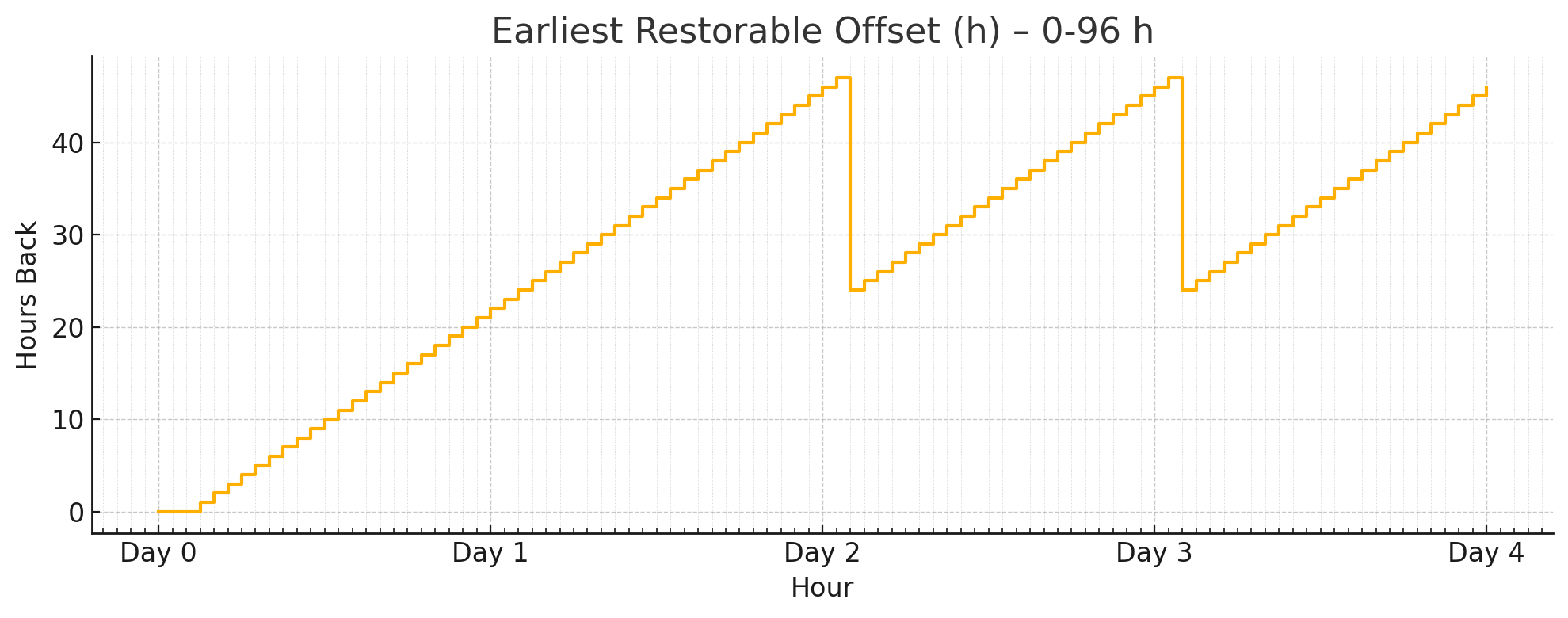
When using with the default local filesystem backup repo, it provides a 24~48h recovery window.
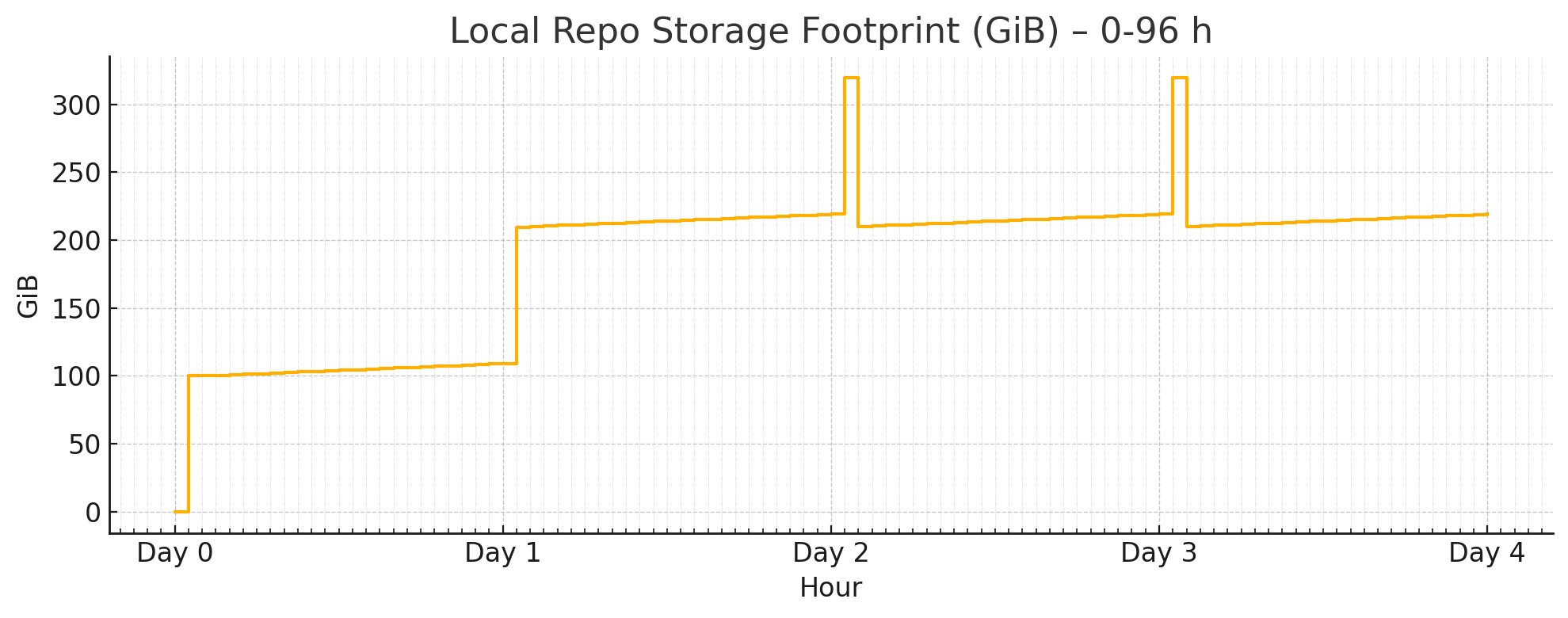
Let’s assume your database size is 100GB, and 10GB writes per day, and your backup size will be.
It will consume 2 ~ 3x of your database size, plus a 2 day’s WAL.
So in practice, you may have to prepare a backup disk with at least 3 ~ 5x of your database size
to use the default backup policy.
Full + Incr Backup
You can optimize backup space usage by changing these parameters.
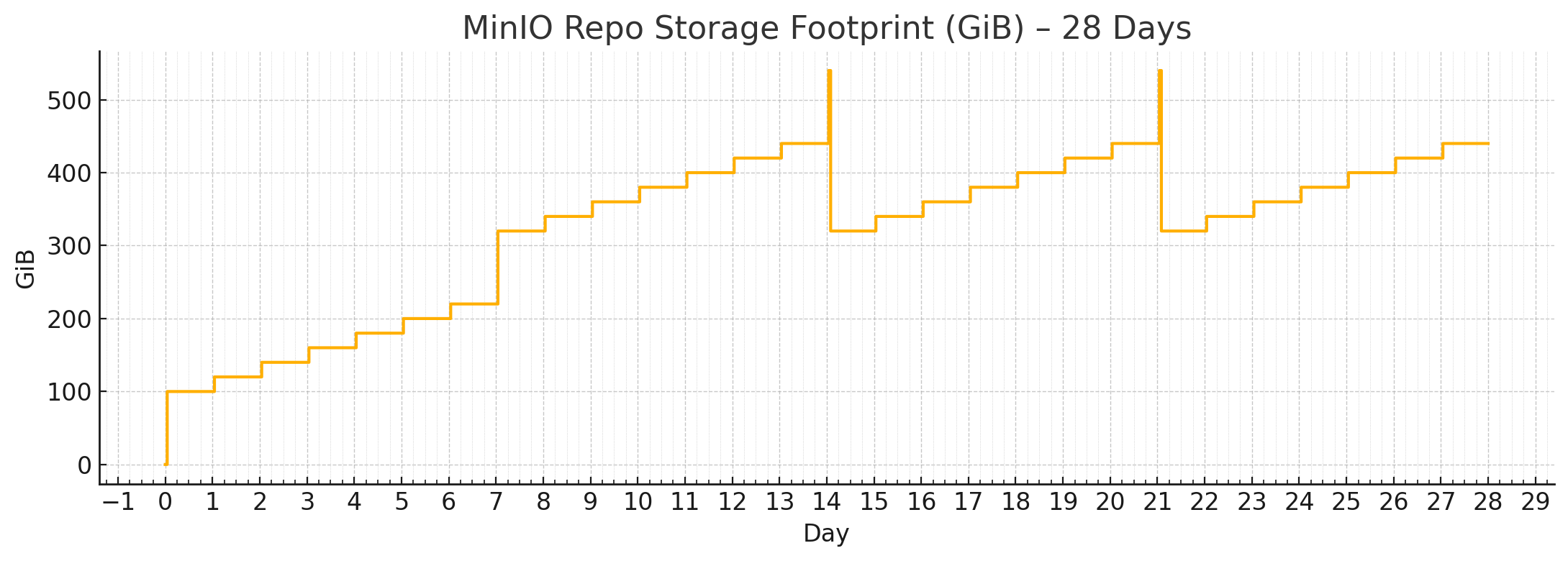
If you are using MinIO / S3 as centralized backup repo, you can use more space than your disk limitation.
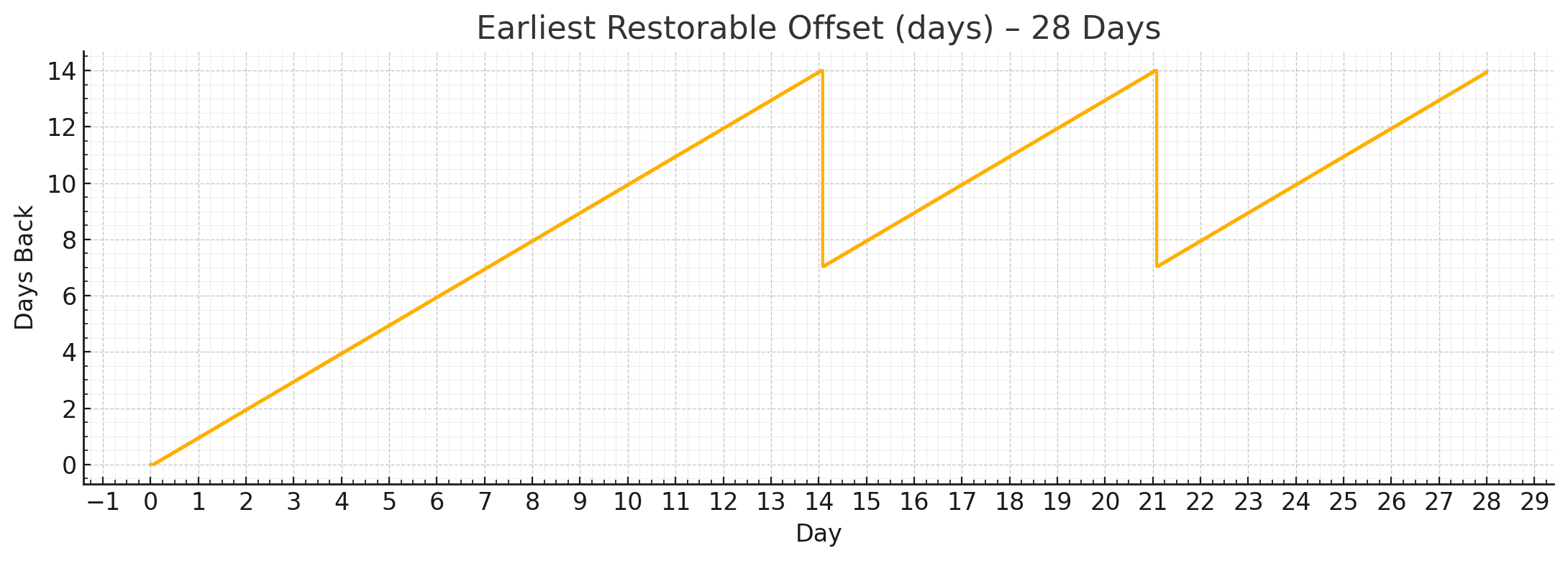
Then consider the full + incr backup with 2-week retention policy:
node_crontab:# make a full backup on monday 1am, and an incremental backup during weekdays- '00 01 * * 1 postgres /pg/bin/pg-backup full'- '00 01 * * 2,3,4,5,6,7 postgres /pg/bin/pg-backup'pgbackrest_method:miniopgbackrest_repo:# pgbackrest repo: https://pgbackrest.org/configuration.html#section-repositoryminio:# optional minio repo for pgbackresttype:s3 # minio is s3-compatible, so s3 is useds3_endpoint:sss.pigsty # minio endpoint domain name, `sss.pigsty` by defaults3_region:us-east-1 # minio region, us-east-1 by default, useless for minios3_bucket:pgsql # minio bucket name, `pgsql` by defaults3_key:pgbackrest # minio user access key for pgbackrests3_key_secret:S3User.Backup # minio user secret key for pgbackrests3_uri_style:path # use path style uri for minio rather than host stylepath:/pgbackrest # minio backup path, default is `/pgbackrest`storage_port:9000# minio port, 9000 by defaultstorage_ca_file:/etc/pki/ca.crt # minio ca file path, `/etc/pki/ca.crt` by defaultblock:y# Enable block incremental backupbundle:y# bundle small files into a single filebundle_limit:20MiB # Limit for file bundles, 20MiB for object storagebundle_size:128MiB # Target size for file bundles, 128MiB for object storagecipher_type:aes-256-cbc # enable AES encryption for remote backup repocipher_pass:pgBackRest # AES encryption password, default is 'pgBackRest'retention_full_type:time # retention full backup by time on minio reporetention_full:14# keep full backup for the last 14 days
When using with the built-in minio filesystem backup repo, it provides a guaranteed 1-week pitr window.
Let’s assume your database size is 100GB, and 10GB writes per day, and your backup size will be like:
Where
By default, Pigsty has two default backup repo definition: the local and minio backup repo.
local: The default, use the local /pg/backup dir (Softlink point to pg_fs_backup: /data/backups)
minio: Use the SNSD 1-node MinIO cluster (Supported by pigsty, but not enabled by default)
pgbackrest_method:local # choose the backup repo method, `local` or `minio` or any other user defined repopgbackrest_repo:# pgbackrest repo: https://pgbackrest.org/configuration.html#section-repositorylocal:# default pgbackrest repo with local posix fspath:/pg/backup # local backup directory, `/pg/backup` by defaultretention_full_type:count # retention full backups by countretention_full:2# keep 2, at most 3 full backups when using local fs repominio:# optional minio repo for pgbackresttype:s3 # minio is s3-compatible, so s3 is useds3_endpoint:sss.pigsty # minio endpoint domain name, `sss.pigsty` by defaults3_region:us-east-1 # minio region, us-east-1 by default, useless for minios3_bucket:pgsql # minio bucket name, `pgsql` by defaults3_key:pgbackrest # minio user access key for pgbackrests3_key_secret:S3User.Backup # minio user secret key for pgbackrests3_uri_style:path # use path style uri for minio rather than host stylepath:/pgbackrest # minio backup path, default is `/pgbackrest`storage_port:9000# minio port, 9000 by defaultstorage_ca_file:/etc/pki/ca.crt # minio ca file path, `/etc/pki/ca.crt` by defaultblock:y# Enable block incremental backupbundle:y# bundle small files into a single filebundle_limit:20MiB # Limit for file bundles, 20MiB for object storagebundle_size:128MiB # Target size for file bundles, 128MiB for object storagecipher_type:aes-256-cbc # enable AES encryption for remote backup repocipher_pass:pgBackRest # AES encryption password, default is 'pgBackRest'retention_full_type:time # retention full backup by time on minio reporetention_full:14# keep full backup for the last 14 days