Version v3.7.0 of the documentation is no longer actively maintained. The site that you are currently viewing is an archived snapshot.
For up-to-date documentation, see the latest version.
Perform PITR manually in sandbox according to hint script
You can do PITR with the pgsql-pitr playbook, while in some case, you may want to perform PITR manually.
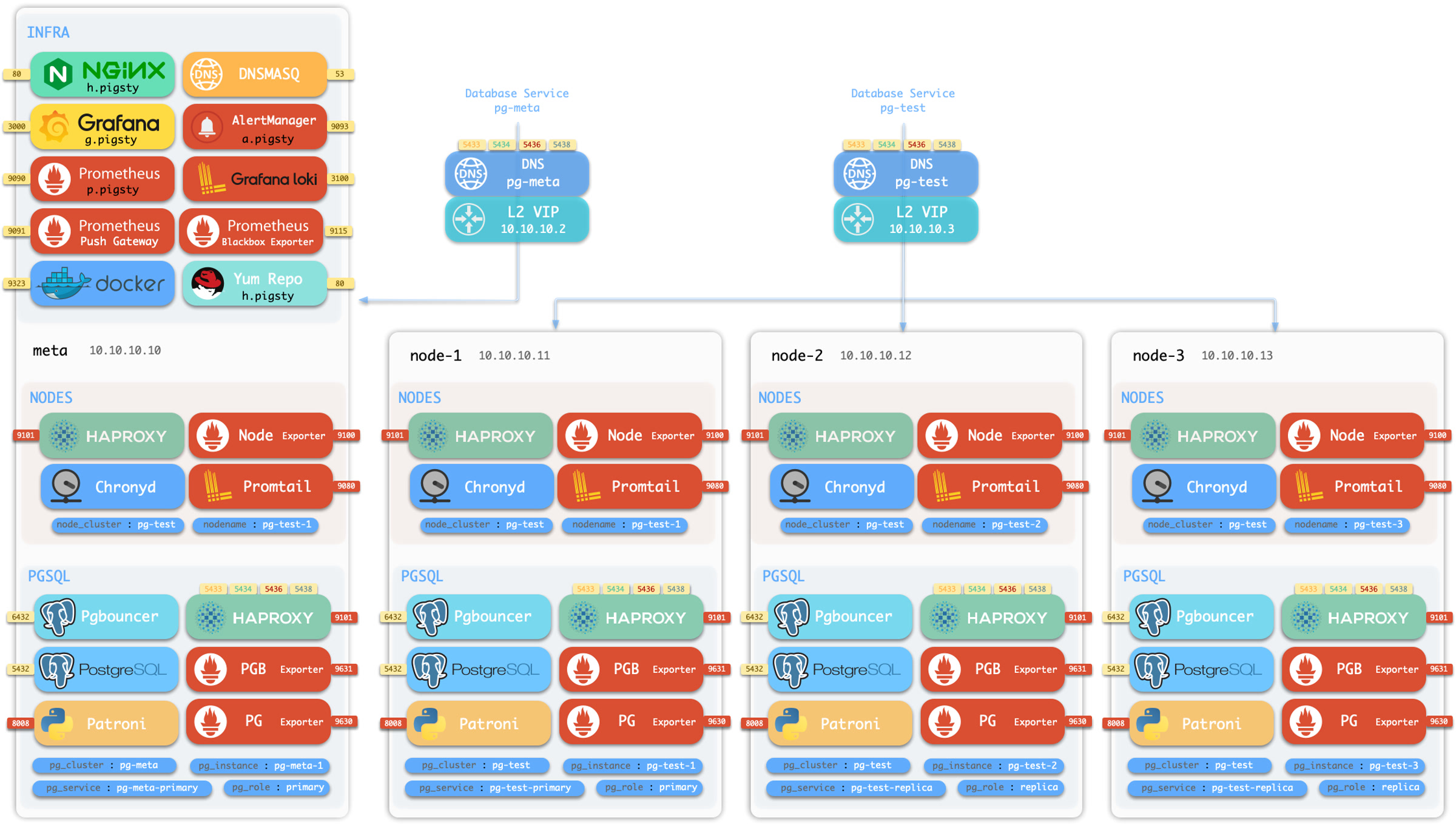
We’ll illustrate the procedure with the 4-node sandbox cluster with minio backup repo.
Init Sandbox
Prepare the 4-node sandbox environment with vagrant or terraform, then:
Now operate as the admin user (or dbsu) on the admin node to proceed.
Check Backup
To check the backup status, you’ll need to switch to the postgres user and use the pb command:
sudo su - postgres # switch to the dbsu: postgres userpb info # print pgbackrest backup info
The pb is the alias for pgbackrest, with auto scraped stanza name from pgbackrest config.
/etc/profile.d/pg-alias.sh
function pb(){localstanza=$(grep -o '\[[^][]*]' /etc/pgbackrest/pgbackrest.conf | head -n1 | sed 's/.*\[\([^]]*\)].*/\1/') pgbackrest --stanza=$stanza$@}
You can see the initial backup info, which is a full backup created at
The backup finish at 2025-07-13 02:27:33+00, this is the earliest time you can restore to.
Since wal archive is active, you can restore to any point in time after the backup, until the WAL end (now).
Generate Heartbeat
You can generate some heartbeat to simulate the workload. the /pg-bin/pg-heartbeat is for this purpose,
It will write a heartbeat timestamp to the monitor.heartbeat table every second.
make rh # run heartbeat: ssh 10.10.10.10 'sudo -iu postgres /pg/bin/pg-heartbeat'
while true;do pgbench -nv -P1 -c4 --rate=64 -T10 postgres://dbuser_meta:[email protected]:5433/meta;donepgbench (17.5 (Homebrew), server 17.4 (Ubuntu 17.4-1.pgdg24.04+2))progress: 1.0 s, 60.9 tps, lat 7.295 ms stddev 4.219, 0 failed, lag 1.818 ms
progress: 2.0 s, 69.1 tps, lat 6.296 ms stddev 1.983, 0 failed, lag 1.397 ms
...
PITR Manual
Now let’s choose a time point to recovery, let’s say 2025-07-13 03:03:03+00, which is a timepoint after the initial backup (and heartbeat).
To perform the manual PITR, use the pg-pitr util:
$ pg-pitr -t "2025-07-13 03:03:00+00"
It will generate the instructions for you to perform the recovery, it usually takes four steps:
Perform time PITR on pg-meta
[1. Stop PostgreSQL]=========================================== 1.1 Pause Patroni (if there are any replicas) $ pg pause <cls> # pause patroni auto failover 1.2 Shutdown Patroni
$ pt-stop # sudo systemctl stop patroni 1.3 Shutdown Postgres
$ pg-stop # pg_ctl -D /pg/data stop -m fast[2. Perform PITR]=========================================== 2.1 Restore Backup
$ pgbackrest --stanza=pg-meta --type=time --target='2025-07-13 03:03:00+00' restore
2.2 Start PG to Replay WAL
$ pg-start # pg_ctl -D /pg/data start 2.3 Validate and Promote
- If database content is ok, promote it to finish recovery, otherwise goto 2.1
$ pg-promote # pg_ctl -D /pg/data promote
[3. Restore Primary]=========================================== 3.1 Enable Archive Mode (Restart Required) $ psql -c 'ALTER SYSTEM SET archive_mode = on;' 3.1 Restart Postgres to Apply Changes
$ pg-restart # pg_ctl -D /pg/data restart 3.3 Restart Patroni
$ pt-restart # sudo systemctl restart patroni[4. Restore Cluster]=========================================== 4.1 Re-Init All [**REPLICAS**](if any) - 4.1.1 option 1: restore replicas with same pgbackrest cmd (require central backup repo) $ pgbackrest --stanza=pg-meta --type=time --target='2025-07-13 03:03:00+00' restore
- 4.1.2 option 2: nuke the replica data dir and restart patroni (may take long time to restore) $ rm -rf /pg/data/*; pt-restart
- 4.1.3 option 3: reinit with patroni, which may fail if primary lsn < replica lsn
$ pg reinit pg-meta
4.2 Resume Patroni
$ pg resume pg-meta
4.3 Full Backup (optional) $ pg-backup full # IT's recommend to make a new full backup after PITR
Single-Node Example
Let’s start with the simple 1-node pg-meta cluster as an example, which is simpler.
We don’t want patroni HA to take over until we are sure the data is correct, so we start postgres manually:
pg-start
waiting for server to start....2025-07-13 03:19:33.133 UTC [39294] LOG: redirecting log output to logging collector process
2025-07-13 03:19:33.133 UTC [39294] HINT: Future log output will appear in directory "/pg/log/postgres".
doneserver started
Now you can check the data to see if the it is at the timepoint you want.
You can validate it by checking some latest timestamp from business tables, or in this case, check via the heartbeat table.
The timestamp is right before the timepoint we specified! (2025-07-13 03:03:00+00).
If this is not the timepoint you want, you can repeat the restore with a different timepoint.
It’s rapid since recovery is performed in an incremental and parallel way.
It’s ok to retry until you get the right point.
Promote Leader
The recovered postgres cluster is in recovery mode, so it will reject any write operations until you promote it to primary.
These recovery params are generated by pgBackRest in the config file.
/pg/data/postgresql.auto.conf
postgres@pg-meta-1:~$ cat /pg/data/postgresql.auto.conf# Do not edit this file or use ALTER SYSTEM manually!# It is managed by Pigsty & Ansible automatically!# Recovery settings generated by pgBackRest restore on 2025-07-13 03:17:08archive_mode='off'restore_command='pgbackrest --stanza=pg-meta archive-get %f "%p"'recovery_target_time='2025-07-13 03:03:00+00'
If data is correct, you can promote it to primary, mark it as the new leader and ready to accept writes.
pg-promote
waiting for server to promote.... doneserver promoted
psql -c 'SELECT pg_is_in_recovery()'# the 'f' means it is promoted to primary pg_is_in_recovery
-------------------
f
(1 row)
New Timeline and Split Brain
Once promoted, the database cluster will enter a new timeline (the leader epoch).
If there’s any write traffic, it will be written to the new timeline.
Restore Cluster
Finally, it’s not only the data that need recovery, but also the cluster state, such as:
patroni takeover
archive mode
backup set
replicas
Patroni Takeover
You postgres is start directly, to restore HA takeover; you’ll have to start the patroni service:
pt-start # sudo systemctl start patroni
pg resume pg-meta # resume patroni auto failover (if you have paused it before)
Archive Mode
The archive_mode is disabled by pgbackrest during recovery。
If you want the new leader’s writes to be archived in the backup repo, you also need to enable the archive_mode config.
psql -c 'show archive_mode'

 archive_mode
--------------
 off
# you can also edit the postgresql.auto.conf directly and reload with pg_ctlsed -i '/archive_mode/d' /pg/data/postgresql.auto.conf
pg_ctl -D /pg/data reload
Backup Set
It’s usually a good idea to take a new full backup after PITR, but it’s optional.
Replicas
If your postgres cluster has replicas, you’ll need to perform the PITR on each replica as well.
Or, the simple way is to nuke the replica data directory and restart patroni, which will re-initialize the replica from the primary.
We will cover this case in the next multi-node cluster example.
Multi-Node Example
Now let’s play with the 3-node pg-test cluster as an PITR example.